Lesson 4: Core SAP Security Terminology: A Practical Guide
Understand key SAP security concepts, including authentication, authorization, access control, least privilege, SoD, audit logs, SAP Fiori, and cloud identity.
When I started my journey in SAP Security, one of the first challenges I faced was to get a grip on the terminology used by the different stakeholders—consultants, support, auditors, or business users.
Many discussions and business meetings include terms such as authentication, authorization, access control, privilege, transaction code, and Segregation of Duties (SoD). They are related, but each term has a meaning that is helpful to know when you are working as an SAP security consultant. It is quite important to know the key terminology & concepts before getting into the technical modules.
In this lesson, we will concentrate on the terminology and concepts of traditional ABAP-based SAP systems. It briefly touches the newer concepts such as SAP identity and application landscapes, discussed in more depth in the next modules/lessons. At the end of this lesson you will be comfortable with:
- Authentication, authorization, identity, access, and privileges.
- Differences between transaction codes, Fiori apps, and business transactions.
- How least privilege, security controls, and Segregation of Duties help reduce risk.
- How traditional SAP security relates to the broader SAP identity and application landscape.
The objective is to build a common vocabulary that will help you understand technical discussions, interpret access requirements, and prepare for the technical engagements. Let’s move on with the key concept – Authentication, Authorization, and Identity.
Prefer listening? Listen to this lesson as a podcast.
Authentication, Authorization, and Identity
Two fundamental information-security concepts are authentication and authorization. While they are related, they answer different questions.
- Authentication answers: Who are you?
- Authorization answers: What are you allowed to do?
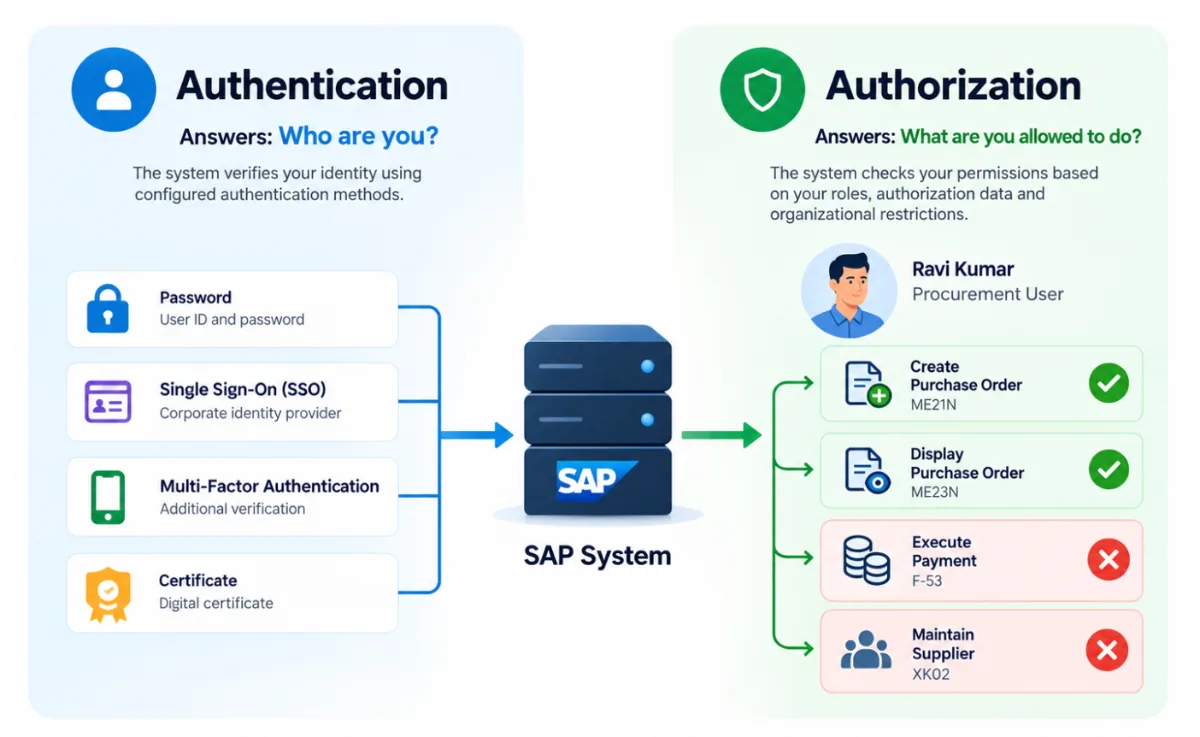
Consider an employee working with an SAP system. When an employee logs in to the system, it verifies the identity of the employee by an appropriate authentication mechanism. Once the employee is authenticated, the applicable authorization controls determine the employee’s access to applications and business activities.
Did you know?
Identity is no longer just about verifying who can log in. It’s also about limiting what an identity can access and what an attacker can do if that identity is compromised.
According to Palo Alto Networks' 2026 Unit 42 Global Incident Response Report, identity was an affected attack surface in 89% of the incidents investigated by Unit 42 in 2025. The report also found that 87% of intrusions involved activity across multiple attack surfaces.
|
89%
Of incidents investigated by Unit 42 in 2025 involved identity as an affected attack surface.
|
87%
Of intrusions involved activity across multiple attack surfaces.
|
Read the 2026 Unit 42 Global Incident Response Report
In traditional SAP environments, username and password authentication has been widely used to access a specific SAP system and client. Once a user is authenticated, the activities they can perform depend on the authorizations assigned to them and the checks enforced by the application.
From an audit perspective, both areas matter. We need to make sure that the person logging on to the system is who they say they are and that they have the appropriate access rights for their business responsibilities.
But the security landscape has changed dramatically. Cyberattacks are getting more sophisticated, so a single password may no longer cut it. Organizations are adding more authentication controls, including multi-factor authentication (MFA), to bolster identity verification. This may include integrating SAP with an identity or authentication solution that supports these controls, depending on the SAP environment.
It is equally important to remember that stronger authentication does not take the place of authorization controls. Even if an attacker does manage to compromise a legitimate account, good authorizations can help to limit what that account is allowed to do.
Note that successfully logging in does not automatically mean that a user can access every application or otherwise perform all the business transactions.
Authentication mechanisms may include passwords, single sign-on (SSO), multifactor authentication (MFA), certificates, or other configured methods, depending on the environment.
Authorization determines whether the authenticated identity has the permissions required for a particular action.
Identity – A key term to understand
An identity is an individual or entity that must be recognized by a system. A user account is the account by which that identity interacts with a particular application or system. Access is the ability to make use of a resource or do an activity in that application.
In a classic SAP NetWeaver-based ABAP system, the user master record is critical for managing a user’s account and related access assignments. SAP authorization checks are used to determine whether the user is authorized to perform a particular activity.
This becomes broader in modern SAP landscapes.
SAP Business Technology Platform (SAP BTP) provides a platform for developing, integrating, and running applications and services. The security model may include platform-specific identity and authorization concepts such as role collections and role assignments, depending on the service. SAP Cloud Identity Services (CIS) includes Identity Authentication (IAS), Identity Provisioning (IPS) and others.
- IAS supports authentication and identity federation scenarios.
- IPS supports identity provisioning and synchronization between systems.
For example, authenticating a user through IAS does not, by itself, grant the business authorizations required inside an ABAP-based SAP system. Those authorizations must still be configured appropriately in the target application.
This distinction matters because SAP Security professionals may work across landscapes containing traditional SAP systems, cloud applications, identity services, and integrations.
If you want to explore SAP BTP and SAP Cloud Identity Services in more detail, refer to the following sections. These could be a good starting point:
https://sapsecurityexpert.com/sap-btp-security
https://sapsecurityexpert.com/sap-cis
As mentioned, for this lesson, the primary focus remains on terminology associated with traditional NetWeaver (ABAP-based) SAP Security.
Additional ReadingExplore these resources for more information on modern SAP identity and authorization services. SAP Cloud Identity Services — IAS and IPSSAP Discovery Center — Cloud Identity Services SAP Help Portal — Identity and Security Guidance SAP Cloud Identity Services for Beginners SAP BTP Authorization and Role CollectionsSAP Help Portal — Roles and Role Collections |
Audit Trails and Security Logs
Controlling access is only one part of SAP Security. As a security consultant, you should understand how to identify activities that occur in a system, recognize suspicious activity, and investigate security incidents. Audit trails and security logs help provide this evidence.
An audit trail is a record of relevant activities or changes that can help to establish what happened and support investigations and audits.
Security logs include security-relevant events. The events that are logged depend on the SAP component, the logging mechanism used, and its configuration.
NOTE: The process of analyzing these logs and the relevant transaction codes will be covered in the upcoming lessons.
Security teams might review relevant records when looking into failed login attempts, checking security-related events, or looking into suspicious activity. The information available depends on the type of log and the events being logged. Not all activity is logged automatically. These records need to be properly configured, protected, retained, and reviewed regularly to be useful. Audit trails and security logs supplement preventive controls. Preventive controls help to limit potentially inappropriate activity, and logging and monitoring help organizations to detect, investigate, and respond to security events.
Change Logs
Change logs are helpful for tracking changes made to specific data or objects, depending on the object and the logging mechanism. For example, a security team may investigate an unexpected change to a user account or system setting by searching the available change records to determine what was changed and when.
Change logs and security logs are not the same. Change logs are concerned with changes recorded for specific objects or data. Security logs capture specific security-related events.
Access Control, Privileges, and Least Privilege
Access control is the process of determining and enforcing who can access which resources and perform which actions.
A privilege is a permission or capability that an identity has to perform an action or access a resource. For example, display a purchase order, generate a sales order, change supplier information, or view a financial report.
Please be aware that privileges should always be consistent with business responsibilities. Suppose we have two procurement staff.
One person creates purchase orders and the other reviews them. As their roles are different, it might not be necessary to give both employees the same access. This leads us to the Principle of Least Privilege: give a user or technical identity just enough access to do its job, no more, no less. The access granted should be appropriate to the purpose of the identity. The more privileges you have, the greater the possibility of compromised accounts, accidental changes, unauthorized transactions, and misuse of business data.
A good security design therefore looks not only at whether access is needed, but also at how much access is really needed.
Understanding Transaction Codes, SAP Fiori Apps, and Business Transactions
This may not be a new topic, as we discussed it in previous lessons. To quickly recap, a transaction code is a shortcut for starting a specific function or activity in SAP GUI. For example, ME21N is used to create purchase orders, while ME23N is used to display them. A business transaction is the business activity being performed in SAP, such as creating or displaying a purchase order.
Remember, a user may be able to start a transaction but still lack authorization for a particular activity or organizational area. Lesson 3 explored this concept in more detail.
SAP Fiori Applications
Modern SAP environments also use SAP Fiori applications to provide browser-based experiences for business users. Fiori offers a consistent user experience across supported applications.
Making a Fiori app visible to a user does not automatically mean that every operation within the app is authorized.
Depending on the application's architecture, access may also involve services such as OData and other technical components. The relevant security checks depend on the application and its deployment.
In my experience, this is an important distinction as SAP landscapes evolve. The way users enter an application has changed with web-based and Fiori experiences, but controlling what they can actually do remains essential.
SAP Security, therefore, needs to consider both the application entry point and the authorizations required to perform the underlying business activity. Transaction codes remain relevant in many environments, but they are no longer the only way users interact with SAP.
Did you know?
SAP has published thousands of Fiori apps. The SAP Fiori Apps Reference Library is my go-to resource when I need to identify Fiori apps and find their technical details, business context, catalogs, spaces, and pages for role design.
The library provides app-specific information, including implementation and configuration requirements, helping security consultants understand how an app can be incorporated into the SAP Fiori launchpad.
You can explore the library using either of the links below:
My recommendation: Start with the new library. SAP is transitioning from the classic version to the new experience.
Security Risk and Segregation of Duties
Access control is not only about ensuring that users can perform their work. It is also about reducing the risk of inappropriate or conflicting access.
There is a security risk when access, system configuration, or user behaviour could lead to unauthorized activity, data exposure, financial loss, or other adverse outcomes. The idea behind Segregation of Duties (SoD) is to split incompatible duties so that no one individual has too much control over a business process. Allowing the same person to create supplier records and process payments to those suppliers independently could create a conflict of interest if adequate controls are not in place. The risk is not in either permission considered alone, but in the combination of capabilities.
Identifying a conflict does not necessarily mean that fraud has taken place or that a control has failed. The business process, actual access, mitigating controls, and operating context should all be considered.
Preventive and Detective Controls
A security control is a mechanism to prevent, detect, or mitigate the effect of an undesirable event. Preventive controls aim to stop an undesirable action from happening. For example, a preventive access control can restrict a user to creating purchase orders only within their authorized organizational scope. Detective controls identify occurrences or patterns that need to be investigated.
For example: Analyzing security logs, reviewing recorded changes, monitoring sensitive transactions and investigating unusual activity.
Preventive controls do not eliminate all risks and detective controls help organizations discover activity that needs to be examined and provide evidence for investigations, monitoring and audits.
SAP Tools That Support Preventive and Detective Controls
| Control Type | SAP Tools / Capabilities | What They Do |
|---|---|---|
| Preventive | SAP authorization checks, PFCG roles, and SU24 proposals | Restrict transactions and business activities based on assigned authorizations. |
| Preventive | SAP GRC Access Control | Supports segregation-of-duties (SoD) risk analysis during access requests and role maintenance, along with approval and risk-mitigation workflows. |
| Detective | SAP Security Audit Log (SM20; configuration through SM19 or applicable RSAU* tools) | Helps review configured security-relevant events and investigate suspicious activity. |
| Detective | Change documents and user/role change reports | Help track relevant changes, including who made a change and when, where logging is supported and configured. |
| Detective | SAP GRC Access Control reports | Help identify access-risk violations and review role changes, access usage, and emergency-access activity, depending on the configured components. |
| Detective | SAP Process Control | Supports documenting, assessing, and monitoring business controls and compliance activities. |
Note: These tools do not automatically eliminate risk or capture every activity. Their effectiveness depends on appropriate configuration, logging coverage, retention settings, regular monitoring, and follow-up.
Organizations often combine preventive access restrictions with detective monitoring and periodic reviews.
A Practitioner’s Perspective
In SAP Security, access problems often become harder to understand when teams use the same terms to describe different things.
A request for a transaction code may actually represent a need to perform a business activity. Similarly, a request for access may provide more capability than the requester needs.
Making a Fiori app visible does not necessarily mean that the user has the required backend authorization. Likewise, authenticating through an identity service does not automatically establish every permission required in the target application.
Whenever access is requested or reviewed, I recommend starting with three questions:
- What business activity does the user need to do?
- Within what organizational and operational limits should that activity be permitted?
- Does the requested access, combined with existing access, result in unnecessary privileges or conflicting responsibilities?
These questions help connect technical security decisions to business requirements and risk.
Knowledge Check
- What is the primary difference between authentication and authorization?
- A user can see a Fiori app but cannot complete a business operation within it. What is the best conclusion?
- What is the primary purpose of the Principle of Least Privilege?
- What is the purpose of an audit trail or security log during an investigation?
- What is the primary purpose of SAP Cloud Identity Services components such as IAS and IPS?
- Why should Segregation of Duties be considered when reviewing access?
- How do preventive and detective controls differ?
Conclusion
SAP Security becomes easier to understand when its terminology is connected to real business activities rather than learned as isolated definitions.
Authentication, authorization, identity, application entry points, privileges, logging, and governance concepts each describe a different part of the security picture.
The SAP landscape continues to evolve, from traditional ABAP-based systems to Fiori experiences, SAP BTP, and cloud identity services. Although the technical components differ, understanding what each component does and where its responsibilities begin and end is fundamental to sound security design.
With this vocabulary established, you are ready to explore the more detailed technical and operational practices covered in the next courses.