What SAP is and how it's organized
Learn SAP fundamentals, including ERP, SAP systems, clients, landscapes, architecture, functional areas, roles, and how SAP Security protects access and business processes.
Objective: This sub-module will help you learn about the basics of SAP, its architecture, important terms, environments, and the importance of SAP security in the SAP system. This module will enable you to:
- Know what SAP is and why organizations use it.
- Understand the difference between the SAP system, client, instance, and landscape.
- Identify the major functional areas found in SAP.
- Identify the difference between SAP applications and SAP’s technology platform.
- A high-level overview of how SAP Security fits into the SAP landscape.
- Familiarize yourself with key terminology used by SAP Security professionals.
Let’s begin!
First, let’s understand what SAP is and how it is structured.
If you are new to SAP, it is recommended that you understand that SAP is not just another accounting software. It’s more than a software application. It’s an enterprise-wide application that helps organizations to manage all their business processes, such as finance, procurement, sales, manufacturing, supply chain, human resources, and many more in one single application.
Let me share an example to make it easier for you to understand. You might have noticed many companies manage accounts/finance functions in applications like Tally, QuickBooks, and Zoho; their procurement in another application; their HR operations in another; and their production planning in a homegrown application, and sales & distribution using a CRM solution such as Zoho CRM, Salesforce, etc. These applications individually might give greater results but are not tightly integrated. Business functions will have a lot of redundant data, such as employees, vendors, customers, etc., and consume lot of time and energy to consolidate that data. This situation is where enterprises need better software that can integrate all these functions into one application. Additionally, it should understand the business processes, which is only possible with ERP software.
What is ERP? To keep it simple, ERP is an enterprise resource planning solution. SAP details more about ERP, the evolution, etc. in their quick resources. Check this link: https://www.sap.com/resources/what-is-erp
SAP is an ERP that is widely used by enterprises. As per SAP’s publication in July 2026, SAP holds roughly 22% of the global ERP market share, making it the largest individual enterprise resource planning vendor in the world. I strongly recommend reviewing all the links shared in this article for a deeper understanding of the topic, ERP, and SAP.
Let’s understand more about SAP. SAP was originally an acronym for the German company "Systemanalyse Programmentwicklung". This means Systems, Applications and Products in Data Processing.
Today, when people say “SAP,” they might be referring to any of several things:
- SAP AG - the company.
- SAP as an ERP software
- SAP application, e.g., SAP S/4HANA, SAP ECC
- SAP Technology Ecosystem in general
This differentiation is important, as experts who are working in SAP may be working across different products, systems, and technologies.
Many beginners who start their careers in SAP think that SAP is mostly a group of screens, transactions, tables, or technical components. If you are one of those beginners, understand that SAP is just not just about transaction codes, Fiori apps, or screens. It is a process-oriented application. The below example outlines a simple procurement process:
Business requirement → Purchase Requisition → Purchase Order → Goods Receipt → Invoice → Payment
This process can involve various SAP capabilities. A sales process can also connect customer orders, delivery, goods issue, billing, and accounting. This means that learning some of the transaction codes, Fiori Apps, and understanding screens itself doesn’t make you an expert. SAP professionals often need to speak about end-to-end processes.
To be an SAP security expert, you need to know many business processes. For example, providing access to create purchase orders is just assigning a role and is considered as technical decision. A security team member must understand what additional actions a user can perform, what data they can access, and whether their access combinations create segregation-of-duties or other business risks.
SAP Application and Functional Areas:
SAP environments are often described in terms of functional areas or modules. While there are many functional areas, few of the important and key functions are highlighted below:
| Area | Functional Areas It Supports |
|---|---|
| FI | Financial Accounting |
| CO | Controlling |
| MM | Materials Management |
| SD | Sales and Distribution |
| PP | Production Planning |
| HCM | Human Capital Management |
| EWM | Extended Warehouse Management |
| QM | Quality Management |
| PM | Plant Maintenance |
Are you wondering why a security professional should care about access control? As mentioned earlier, access is often related to business functions. You may require financial functionality for the finance personnel, purchasing capabilities for those in procurement, and technical access for system administrators.
A security professional can better understand why a user needs access and the associated risks by grasping the business areas.
Let’s start with understanding the key terminology.
What is SAP system?
An SAP system is a technical environment where you install and execute SAP software. An organization can have, for example:
- Development system
- Quality / test system
- Manufacturing system
These are often referred to as DEV, QAS, PRD, TEST, SBX
Each of these systems has its unique need. For example: A change or customization must be created in the development system, tested in quality, and finally moved to production. Not just from a functional perspective, but even from a security perspective, this separation is key. We will discuss more in-detail in the subsequent modules.
What is SAP Landscape?
An SAP landscape is the collection of SAP systems and environments that a company runs. These are logically arranged. As mentioned earlier, a development system is used to carry out developments, and a quality system to test the developments with near-to-real-time data. Upon successful testing only, the developments are moved to the production system made available to business users.
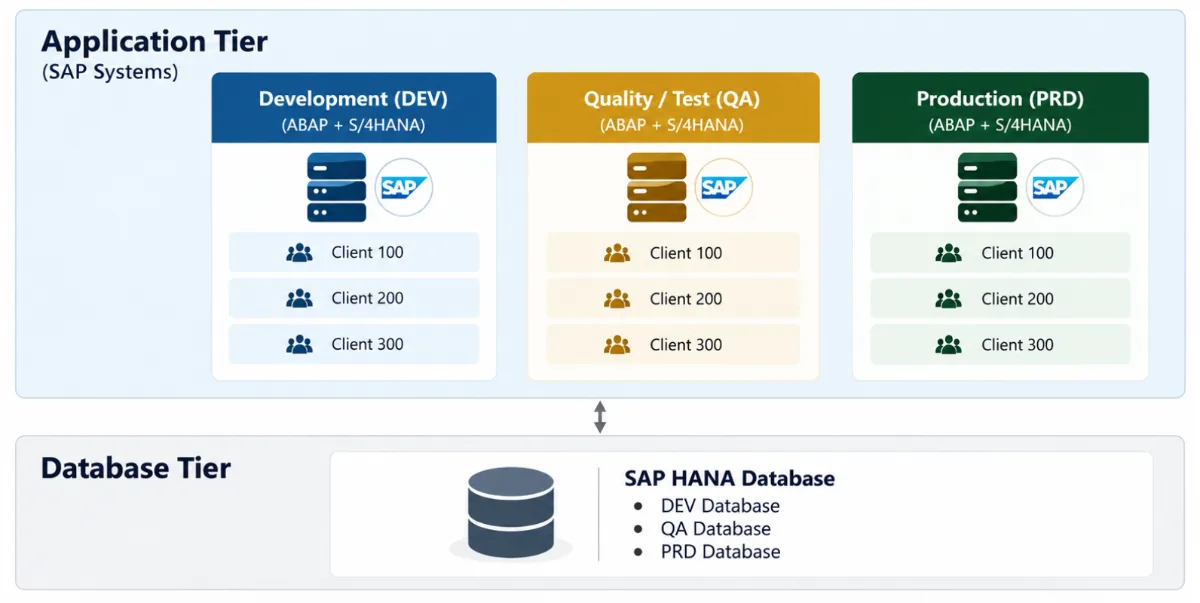
The landscape for larger enterprises can be far more complex. They might have several other systems, such as Sandbox, Training, Pre-production, etc., depending on the needs and complexity of the landscape.
Additionally, there will be separate landscapes for each of the systems. For example, the SAP S/4HANA system will have a separate landscape, and the SAP BI/BW system might have another. Similar landscaping is carried out for the new generation systems such as SAP BTP, SAP SuccessFactors, SAP Ariba, SAP Concur, integration platforms, and third-party applications.
Note that SAP Security goes beyond user creation and authorization management in the SAP ecosystem. It is protecting individuals, identities, applications, interfaces, data, platforms, and business operations. If your understanding is that SAP Security is just an administrative activity that involves the creation of users, resetting passwords, or assigning roles, it’s time for you to realize. It is beyond!
Let’s understand what an SAP client is.
The client is one of the most important concepts for anyone entering SAP Security. It is a logically independent environment in an SAP system. Refer to the image below:
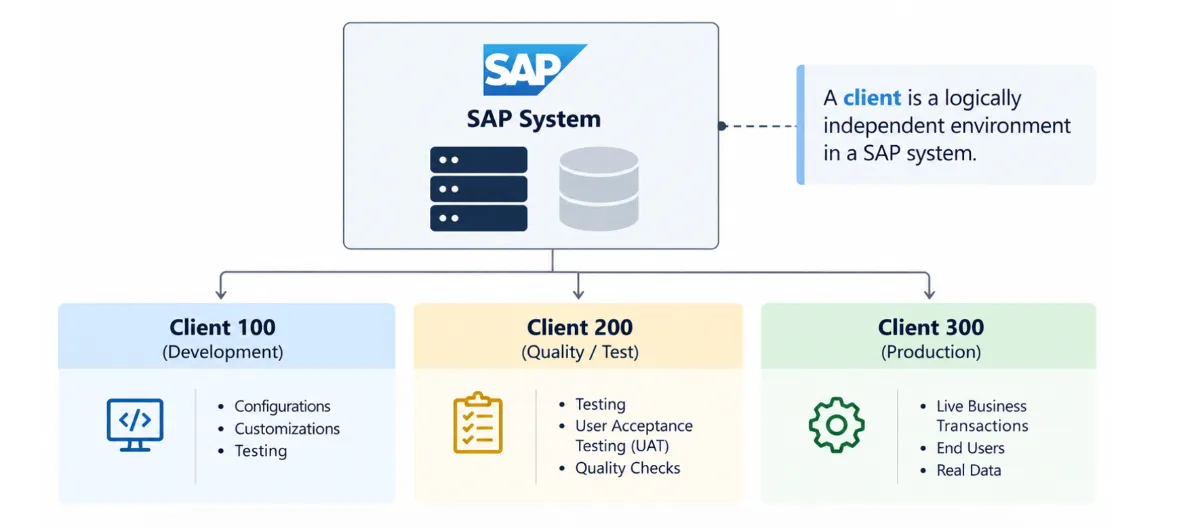
Each client can have distinct users, configuration, and business data. A client is identified by a three-digit number, for example, 000, 100, 200, or 300, and ranges between 000 and 999. Organizations can create any number of clients, and it depends on the way the organization is set up.
Clients 000, 001, and 066 are SAP standard and system-generated clients that are essential for the system's core operations, maintenance, and upgrades.
Here is the specific purpose of each default client:
| Client | Referred to | Description |
|---|---|---|
| 000 | The Master Client |
Always keep this client intact.
|
| 001 | The Reference/Sample Client |
|
| 066 | The Early Watch Client |
|
Why does the SAP Security team care about the client? Security is concerned about the client because many SAP security objects are dependent on it. For example, when you create or maintain a user in one client, that user is restricted to that SAP client. You must create users individually in each of the clients.
SAP Architecture?
Now that you know what SAP and the other terminology are, it is also important to understand the SAP architecture. The SAP architecture has three layers, as outlined below:
- Presentation Layer – This layer is the layer where technical/business users’ login in to. SAP GUI, browser etc.
- Application Layer – The SAP application where all the core processes run. The application layer is where you have all the clients and user login to perform various business functions/activities.
- Database Layer – The layer that runs the database, such as SAP HANA, MaxDB, SQL Server etc.
The below image outlines the key layers:
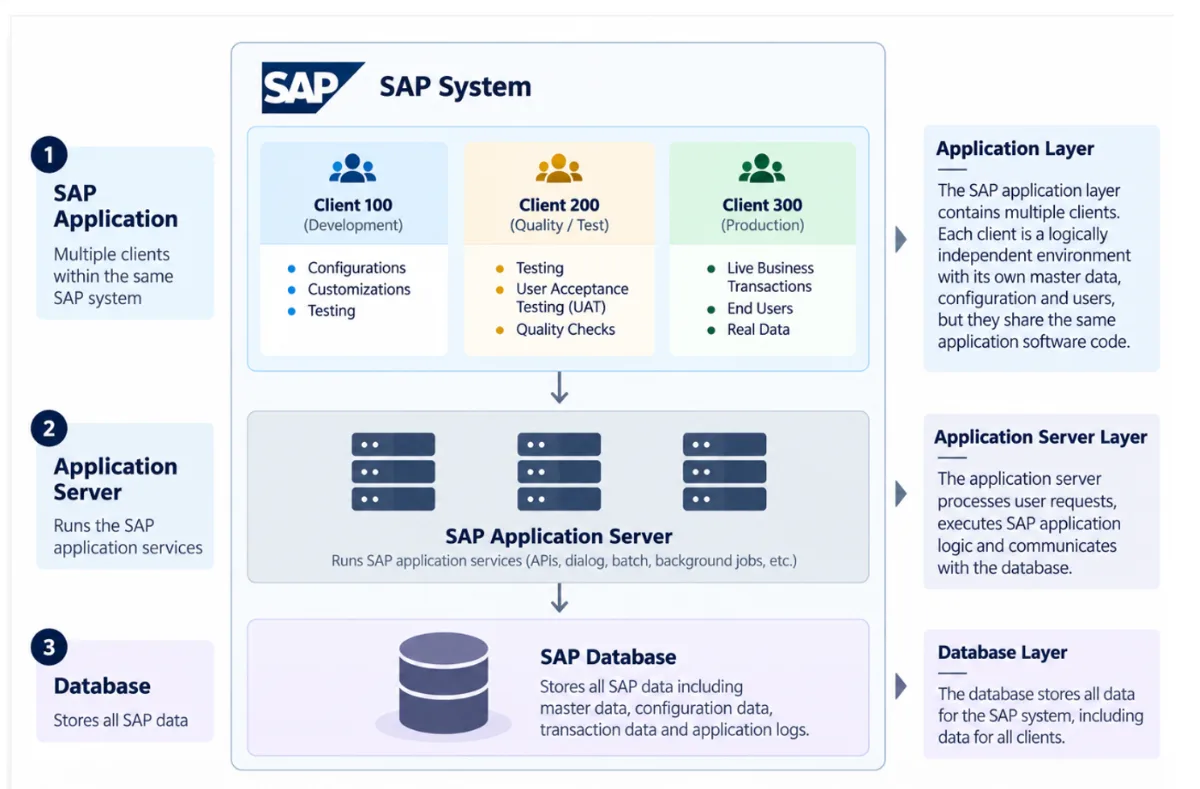
There is security in all these layers. You might need to protect user identities, authentication, authorizations, applications, APIs, databases, interfaces, business data, privileged access, cloud services, and audit information. The next module explains how security can be applied in each of these areas.
What Is SAP Security?
SAP Security is the key technical module and deals with protecting SAP systems, applications, identities, data, and business processes from unapproved access, misuse, and security threats.
Let’s take an employee, Alex, who is a member of Procurement. As a part of his job function, Alex must:
- Generate purchase requisitions
- Prepare purchase orders
- View vendor information She probably doesn’t need to:
- Change employee pay
- Financial postings without constraints
- Manage SAP users
- Alter security settings
Creating Alex’s ID in a specific client alone doesn’t provide him the required authorization. The security team must also provide authorization to the respective activities (either transaction codes or Fiori apps) that are available in the form of roles. Additionally, Alex’s authorization must be restricted to specific organization elements, business groups, etc., to ensure he doesn’t have org-wide access.
The security administrator may require strong technical and functional expertise/understanding for better management of security in SAP.
Roles: How Access Is Usually Structured
In SAP, users are usually provided access through roles. Transaction codes, or Fiori Apps, can’t be assigned directly. This concept is called RBAC (Role-based Access Control). A role holds the authorizations needed to perform specific activities.
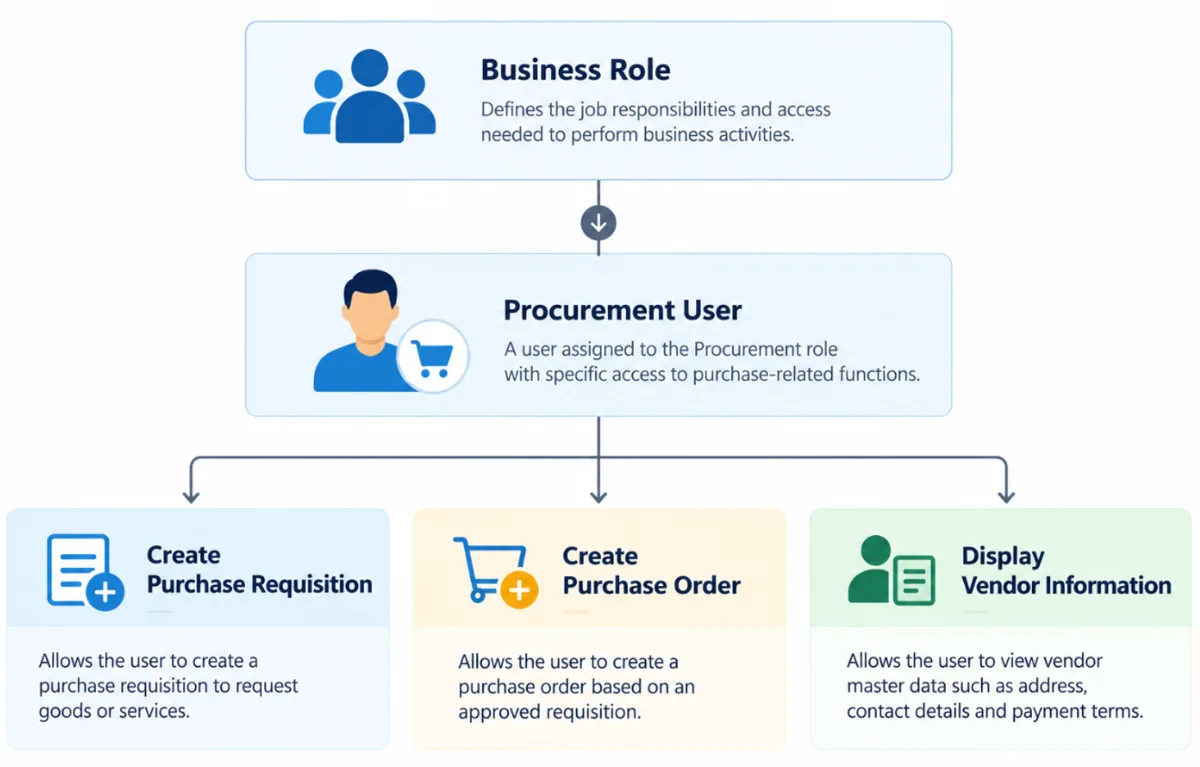
The user is assigned a group of roles accordingly. The process of structuring and implementing roles may differ depending on the SAP product and architecture.
Keep this in mind.
- SAP is an enterprise ecosystem that supports business processes in finance, procurement, sales, manufacturing, HR, and supply chain.
- SAP is not a single system. Organizations may have multiple SAP systems across development, testing, production, and business functions.
- A client is not equal to a system. An SAP system may have several clients, and many security objects are kept in a specific client.
- The user should have the access they need to do their job, not every single permission they could possibly have.
- SAP Security is about risk, not just access. Ask not just what access the user has, but what it allows them to do and the risks it poses.
What’s Next?
Having understood what SAP is and how an SAP environment is organized, the next step is to understand one of the most important concepts in SAP Security:
Security concepts in ERP context - Users, Roles, Authorizations, and Profiles
You will learn how SAP maps a person's job responsibilities to technical access and why assigning a role is not the same thing as managing access risk.