Lesson 2: Security Concepts in ERP: Users, Roles, Authorizations, and Profiles
Learn SAP Security fundamentals, including users, roles, authorizations, and profiles, with practical examples of access control in SAP ABAP systems.
ERP systems support essential business processes such as finance, procurement, sales, inventory, and manufacturing. Since these systems are used by many employees for different responsibilities, organizations need to control what each user can see and what activities they can perform.
For example, a purchasing officer may need to create purchase orders but may not be automatically given the authority to approve them or to modify vendor bank account information.
SAP Security allows organizations to manage these permissions through users, roles, authorizations, and profiles. In this lesson we will learn these concepts and how they fit together in SAP systems.
In this lesson, you will learn the four basic concepts: users, roles, authorizations, and profiles.
By the end of this lesson, you will be able to:
- Explain the purpose of SAP user accounts.
- Distinguish between roles, authorizations, and authorization profiles.
- Describe how these components work together to control access in SAP.
Prefer listening? Listen to this lesson as a podcast.
Let’s start with each of these concepts. Since our focus is on SAP, the next sections will align the content with the SAP context.
Before I explain each of the fundamentals, it is relevant to understand the authorization design/architecture. Refer to the diagram below that outlines the authorization flow:
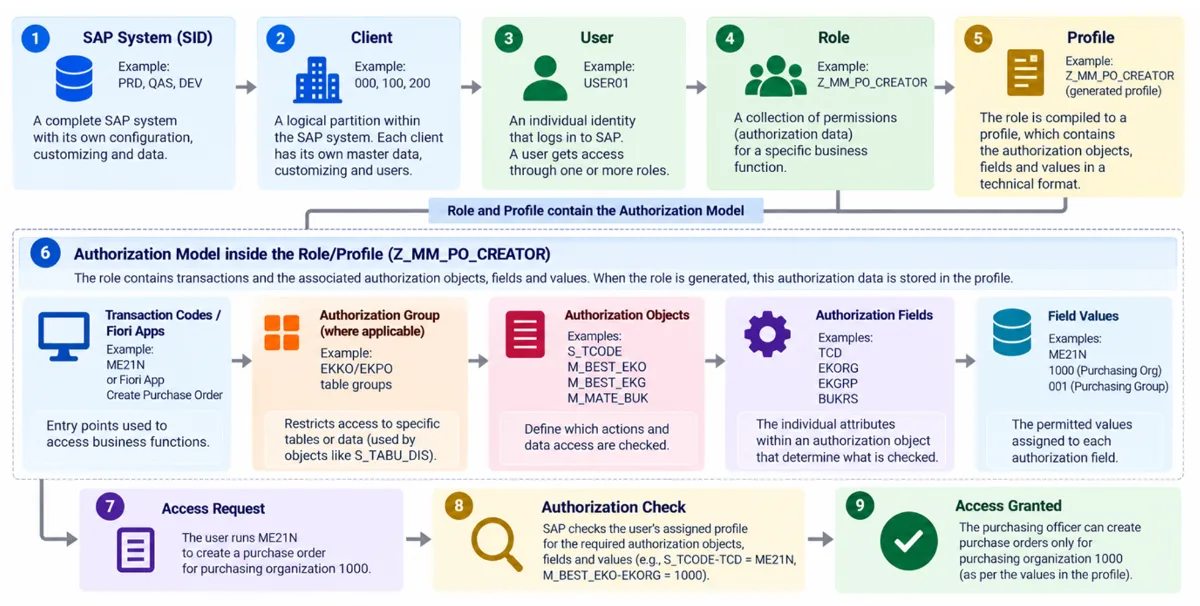
Every SAP system is identified with a three-character alphanumeric identifier called SID. For example: PRD, QAS, P01, SBX, Q11, etc. The first character must be an alphabet, and the next two can be alphabets or numbers.
Further, every system will have clients. We discussed this topic in the previous lesson. If you are directly reading this, I suggest you read the previous one, especially if you are new to SAP and authorizations.
Users are client-specific in SAP ABAP systems. You may encounter business users, administrators, and technical or system accounts (special SAP users include SAP* and DDIC, TMSADM.)
Each of the users will be assigned with roles, which are a collection of transaction codes/Fiori apps that are further restricted at the authorization level. We will cover this topic in detail in the subsequent modules/lessons.
Let’s understand the key concepts in this lesson.
What Is a User?
A user is an identity that directly/in-directly accesses the SAP system. This can be either a business user, a system administrator, a contractor, an integration account, a reference, or a system ID.
For example, consider an organization that has many business functions:
- Priya works as a finance director.
- Ali is the technical team member who monitors the system from time to time.
- Adam works in the warehouse.
Each business user will have a separate user account in the SAP system. When Priya logs in, the system identifies her through her user account and allows her to perform various activities as per the permissions given. Similarly, organizations utilize various solutions such as sales CRM, tax compliance, HRMS, and so on. Integrating these applications into SAP systems is easy, and eliminates the need for manual validations & reduces the data redundancy and manual activities.
Why is a separate user ID necessary?
User accounts enhance accountability by linking business activities to individual users. Relevant activities and changes may be logged in application change documents, security audit logs, or other logging mechanisms, depending on the application and its logging configuration. These records can be used to support audits, investigations, and security monitoring.
What Is a Role?
An SAP role represents the set of transactions, applications, and authorizations required to perform a given set of duties. The roles menu offers navigation options, and the authorization data for the roles is used to determine what the assigned user can do.
NOTE: There are various types of roles. However, to ensure clarity for our experts, I will not cover the various types of roles in detail. Let’s stick to what you are learning.
Think about the different responsibilities within a finance department. For example, an accounts payable employee may need to see vendor invoices and process payments, while a finance manager may need additional permissions to approve financial transactions.
Instead of assigning every permission individually to each employee, administrators can organize these authorizations into roles. For example:
| Role | Typical Business Responsibilities |
|---|---|
| Accounts Payable Processor | Process vendor invoices. |
| Purchasing Officer | Create and manage purchase orders. |
| Purchasing Manager | Review and approve purchase orders. |
| Finance Display User | View financial reports and documents. |
The job roles, transactions required, and level of authorizations differ from one position to the other. Thus, it is required to create individual task-based roles and assign them to the respective users.
Why Roles?
SAP ABAP role administration follows a role-based access management (RBAC) approach. Administrators assign roles to users, and these roles contain authorization data that helps control the activities that users can perform. SAP also checks authorization fields, organizational values, and application-specific checks to determine if an activity is allowed.
What Is Role-Based Access Control (RBAC)?
Role-Based Access Control (RBAC) is a security model in which permissions are assigned to roles based on job functions or responsibilities, rather than directly to individual users.
Let’s understand this concept with an example. Suppose an organization hires 20 new purchasing officers. Without role-based access management, administrators might need to assign numerous permissions to each employee individually.
With properly designed roles, security admins can assign the appropriate role to each business user. Further, roles also make it easier to manage organizational changes. When an employee moves from one division to the other or one position to another, roles can be easily replaced so that the user gets the required access.
What is an authorization?
An authorization defines what a user is permitted to do within a system, including the scope within which that activity is allowed.
In simple terms,
- User account answers who ?
- Role answers which job responsibilities, and
- An authorization helps answer what exactly the user can do in the SAP system.
Understanding authorization objects in SAP
In SAP ABAP NetWeaver systems, authorization checks typically use authorization objects. An authorization object groups related security fields that the system checks when a user attempts to perform an activity.
For example, an authorization object can have fields such as:
- Activity like display or change.
- Organizational scope like company code or purchasing organization
The exact fields depend on the authorization object.
An authorization object alone does not grant access. The corresponding field values must be stored in the authorization data. The application must perform the corresponding authorization check.
Let me illustrate this process with another example. A purchasing officer needs to create purchase orders for the purchasing organization 1000.
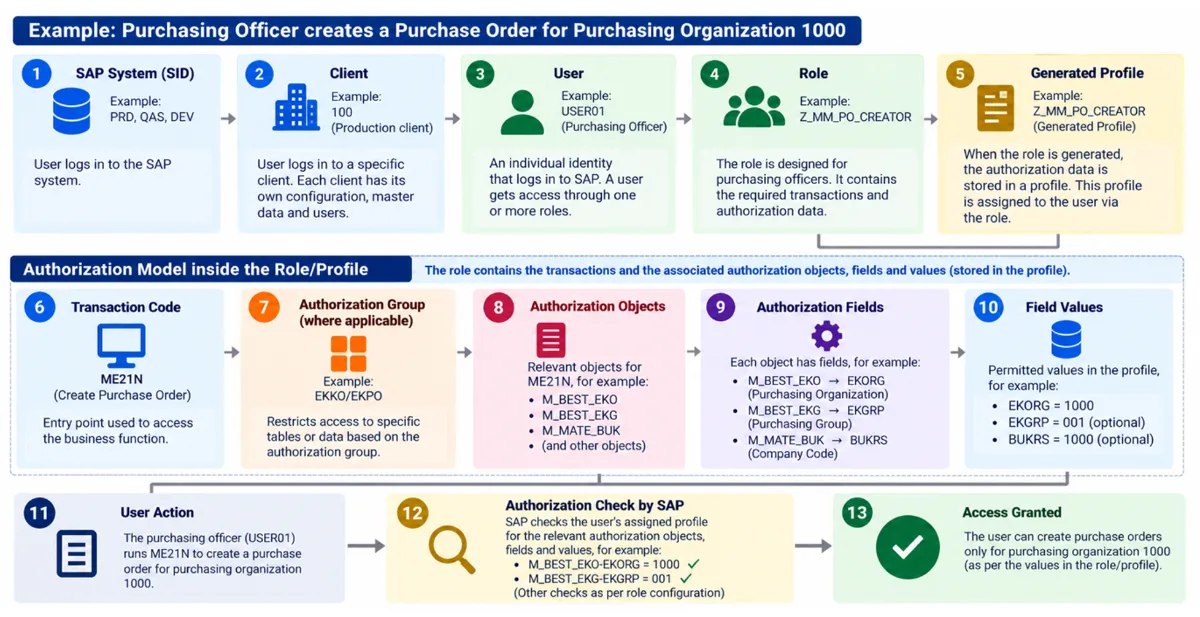
First, the purchasing officer must log in to the right SAP system and the client. Once he logs in, he may perform the activity using the tcode ME21N, which is assigned through a role Z_MM_PO_CREATOR and further restricted with specific authorizations for purchasing organization 1000.
If the user attempts the same activity for purchasing organization 2000, the system denies the activity and throws an authorization error.
This illustrates an important principle: access can be restricted not only by the activity a user performs but also by the organizational data within which that activity is permitted.
NOTE: Assuming the required authorization checks are performed and the user has no other authorization permitting access to purchasing organization 2000, the system will deny the operation.
What is a Profile?
When an SAP ABAP single role is maintained and generated in PFCG, SAP generates the corresponding authorization profile based on its authorization data. The role can then be assigned to users, and the applicable user comparison process updates their user master records with the relevant authorizations.
For beginners, think of an authorization profile as a technical container for the generated authorization data that SAP uses when evaluating a user's access.
For example, a purchasing role may contain authorization data that permits specific purchasing activities within defined organizational boundaries. After the role is generated, assigned to the user, and the required user comparison is completed, the applicable authorizations are available, subject to the relevant authorization checks.
Are roles and profiles the same?
No. Although they are closely related, their purpose is different.
A role is the administrative structure used to organize business access, including its authorization data and, where applicable, its menu.
A generated profile is the technical representation of authorization data used by SAP.
This distinction matters during troubleshooting. A role may have been assigned to a user, but if the role's authorization data has not been generated correctly or the user comparison has not been completed, the expected access may not yet be available.
Profiles are particularly relevant when learning SAP ABAP authorization architecture. Other ERP platforms may use different technical mechanisms, so the term should not be assumed to mean exactly the same thing in every system.
Remember…
It might be convenient to provide all employees wide access, but it can increase the risk of fraud, errors, and unauthorized changes.
If one employee can create a vendor, change the vendor's bank details, enter an invoice, and independently execute the payment, the organization may have an insufficient separation of duties.
This is why ERP security is more than creating user accounts and assigning roles. It means understanding business processes, assessing risks, and putting the right controls in place.
A Practitioner’s Perspective
In SAP Security projects, one of the most common mistakes is treating role assignment as the complete access management process.
Assigning a role is only one part of the picture. Security professionals must understand the business lifecycle, how authorizations work, what each role allows, which organizational values are included, how authorization data is generated, and whether the resulting access is appropriate for the user's responsibilities.
A role may appear reasonable by name but still provide excessive permissions. Similarly, two roles that appear harmless individually may create a risk when assigned to the same user.
In my experience, I’ve seen roles labelled “Display Only” that still contain create or change authorizations. Don’t rely on the role name alone - it is user-defined. Always inspect the authorization data.
The objective is not simply to ensure that users can access the system. It is to ensure that they have the right access, for the right purpose, within the right boundaries.
Key Takeaways
- User : Identifies who is accessing the ERP system.
- Role : Groups access according to business responsibilities.
- Authorization : Defines the activities and scope a user is permitted to access.
- Profile : In SAP NetWeaver-based systems, it represents generated authorization data used for user access.
- Authorization checks : Determine whether the required permissions are available when an activity is performed.
- Access governance : Ensures that access remains appropriate, controlled, and aligned with business requirements.
What’s Next?
Having learned about Users, Roles, Authorizations and Profiles, we will now see how these components work together in an ERP system.
In the next lesson we will see the Authorization Model – how access permissions are structured, how the authorization checks are done, and how the system decides if a user is allowed to carry out a certain business activity.