Review, Benchmark, and Improve Your SAP Security Configuration in Minutes
Every SAP system relies on hundreds of profile parameters that govern authentication, password policies, RFC communication, audit logging, gateway security, encryption, session management, and numerous other security controls. While organizations invest heavily in SAP Security, GRC, SIEM, and monitoring solutions, one of the most overlooked areas remains the configuration of SAP system parameters.
The SAP Security Analyzer from SAP Security Expert helps SAP Security Consultants, SAP Basis Administrators, GRC professionals, auditors, and compliance teams quickly assess their SAP security configuration against industry best practices. It identifies configuration gaps, prioritizes risks, and generates executive-ready reports - all without requiring software installation or complex implementation.
Whether you're conducting an SAP security health check, preparing for an audit, or validating a newly implemented SAP landscape, this free assessment tool helps you understand your current security posture in minutes.
What Is an SAP Security Analyzer?
An SAP Security Analyzer is a security assessment tool that evaluates SAP system configurations to identify insecure parameter settings, compliance gaps, and configuration weaknesses that could expose SAP systems to cyber threats or audit findings.
Rather than simply listing configuration values, a modern SAP Security Analyzer should:
- Compare current values against recommended security baselines
- Highlight high-risk parameters
- Explain business impact
- Provide remediation guidance
- Prioritize findings
- Generate management-friendly reports
The objective is to help organizations improve their SAP security posture before vulnerabilities become security incidents.
Why SAP System Parameters Matter
SAP profile parameters control many of the platform's most critical security settings. Incorrect values can weaken password policies, reduce audit visibility, expose RFC interfaces, permit insecure communications, or create unnecessary attack surfaces.
Examples include:
- Password complexity
- Minimum password length
- Failed login thresholds
- Automatic SAP* user login
- Gateway access controls
- Security Audit Log configuration
- SNC encryption
- Session timeout settings
- RFC security
- HTTPS communication
Although these parameters are fundamental to SAP security, they are often reviewed only during audits or after a security incident.
A proactive review significantly reduces operational and compliance risks.
Why Use This SAP Security Analyzer?
Many organizations assume they need a large enterprise platform or expensive software to perform an SAP security assessment. In reality, for reviewing SAP system parameters and identifying configuration weaknesses, a focused assessment tool is often sufficient.
The SAP Security Analyzer is designed to provide practical insights without requiring additional infrastructure, servers, or lengthy implementation projects.
Key benefits include:
- Analyze over 150 SAP security parameters
- Automatic risk classification
- Executive dashboards
- Recommended SAP security values
- Business impact analysis
- Remediation guidance
- Printable assessment reports
- No installation required
The focus is on helping organizations spend more time improving security and less time deploying tools.
Key Features
Comprehensive Security Parameter Library
The analyzer evaluates more than 150 SAP profile parameters across multiple security domains.
Coverage includes:
- Password Security
- Gateway Security
- RFC Security
- SNC Security
- Audit Logging
- Session Management
- User Authentication
- Communication Security
- Trace Configuration
- Authorization Controls
Automated Risk Assessment
Each parameter is automatically evaluated and assigned a risk level:
- Critical
- High
- Medium
- Low
This enables security teams to prioritize remediation efforts based on business impact rather than reviewing hundreds of parameters manually.
Executive Dashboard
Security teams and management receive visual dashboards showing:
- Overall Security Score
- Risk Distribution
- Critical Findings
- Compliance Summary
- Parameter Coverage
- Improvement Opportunities
Recommended Security Values
Each parameter includes:
- Current Value
- Recommended Value
- Risk Rating
- Security Recommendation
This reduces the research effort normally required during security reviews.
Executive Reports
Reports suitable for:
- Internal Audits
- External Audits
- ISO 27001 Assessments
- Compliance Meetings
- SOX Reviews
- SAP Security Governance Reviews
How to Use the SAP Security Analyzer
Step 1 – Export SAP Profile Parameters
Export the current profile parameters from your SAP system using transactions such as RZ11 or RSPFPAR.
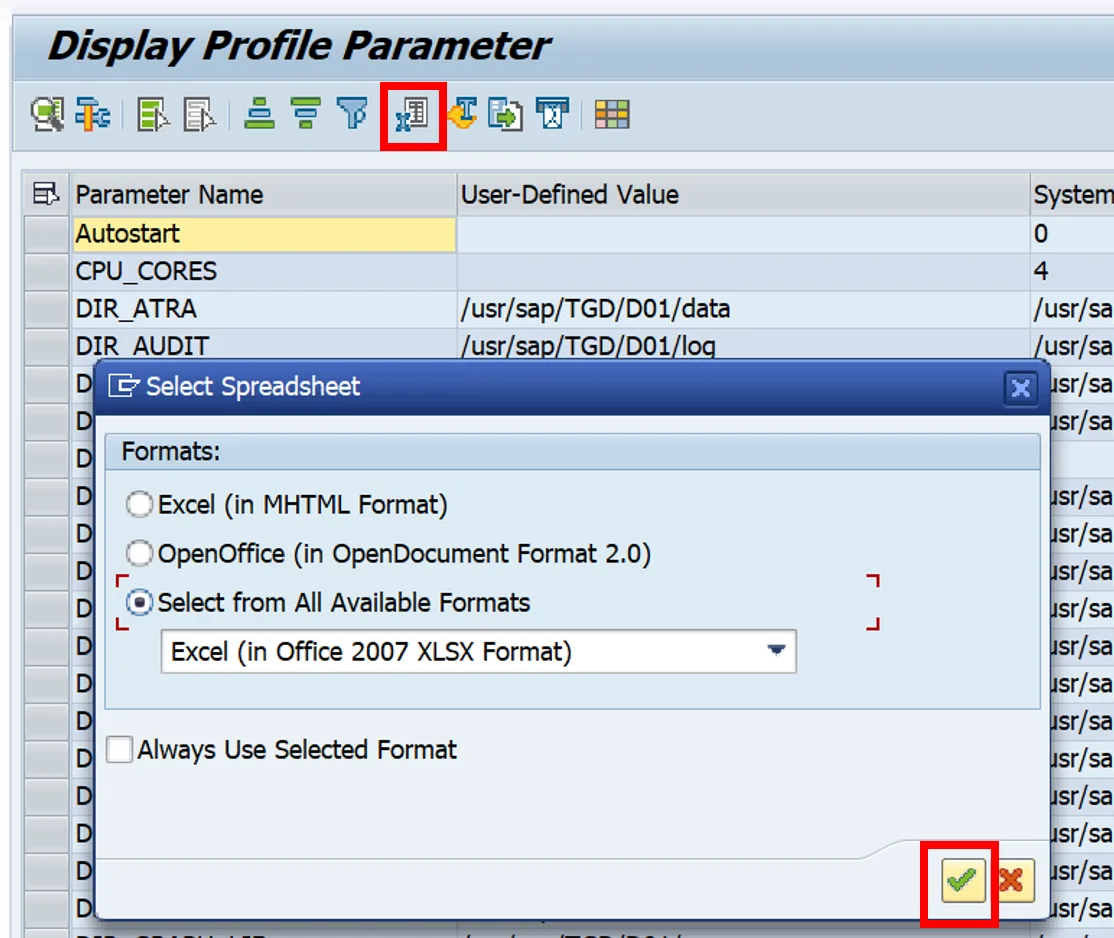
Screenshot: Export SAP Profile Parameters
Step 2 – Open the SAP Security Analyzer
Open the Excel-based assessment workbook. No installation or additional software is required.
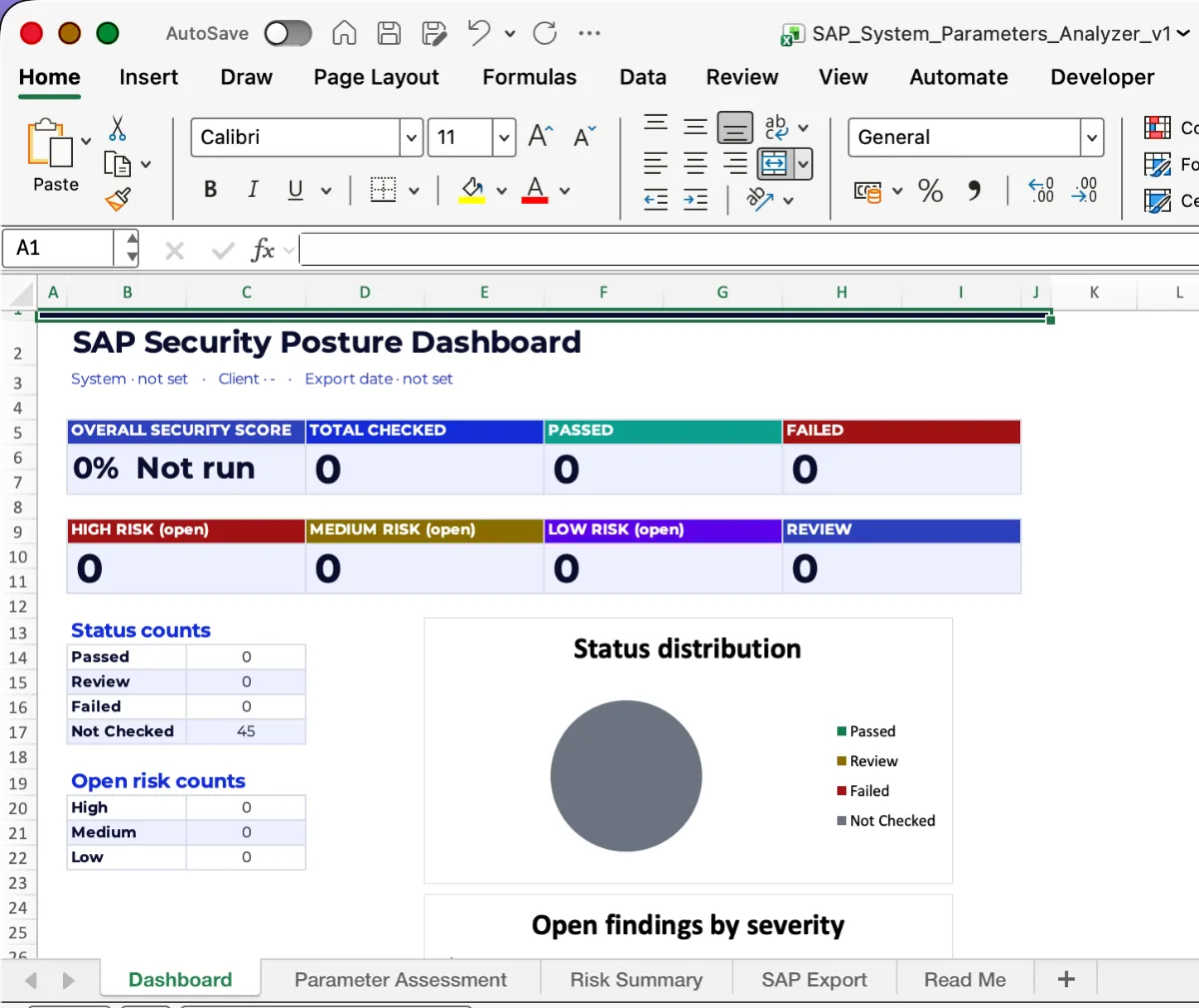
Screenshot: SAP Security Analyzer Home Screen
Step 3 – Enter Current Parameter Values
Paste your exported SAP profile parameter values into the assessment worksheet.
The analyzer immediately compares your values against recommended security settings.
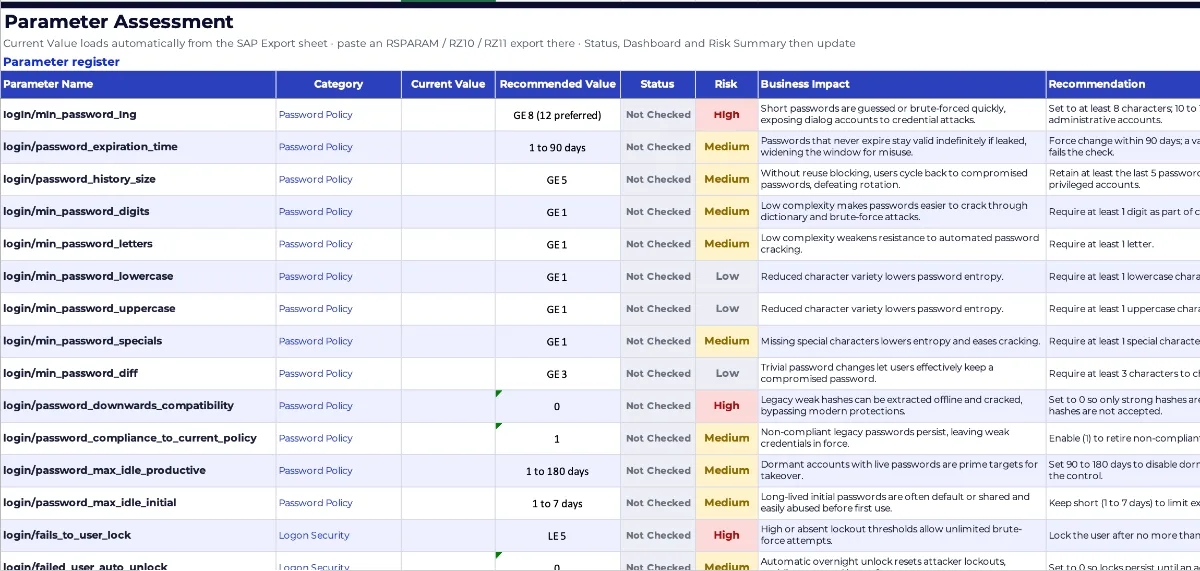
Screenshot: Parameter Assessment Sheet
Step 4 – Review Risk Ratings
Every parameter is automatically categorized based on security risk.
Review:
- Current Configuration
- Recommended Value
- Risk Rating
- Business Impact
- Suggested Action
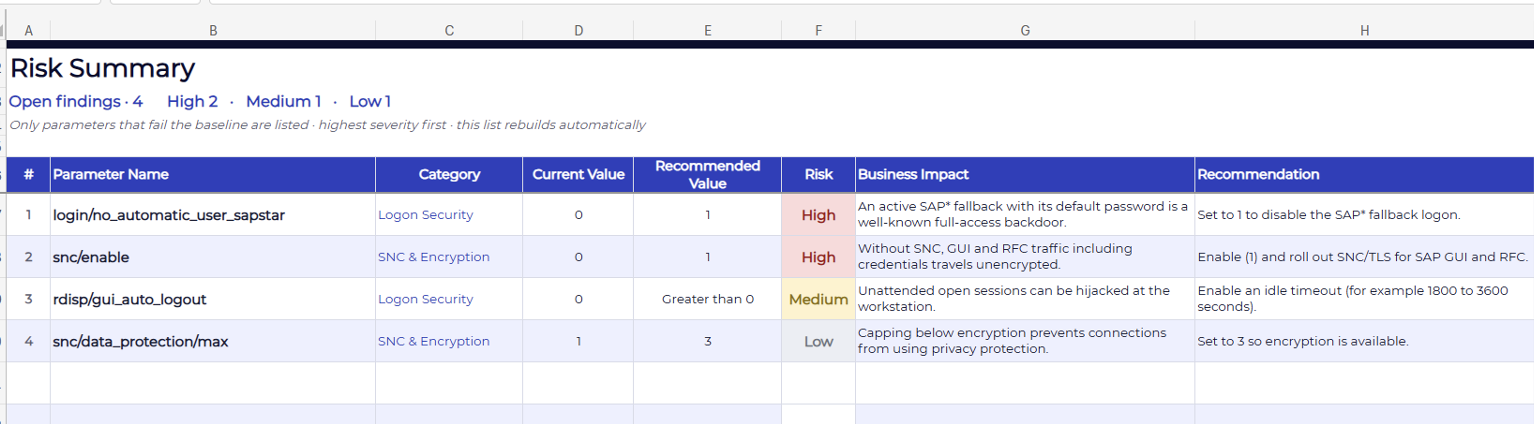
Screenshot: Risk Assessment Dashboard
Step 5 – Analyze Executive Dashboard
Review the visual dashboard to understand your organization's overall SAP security posture.
The dashboard summarizes:
- Overall Security Score
- High-Risk Parameters
- Compliance Status
- Risk Trends
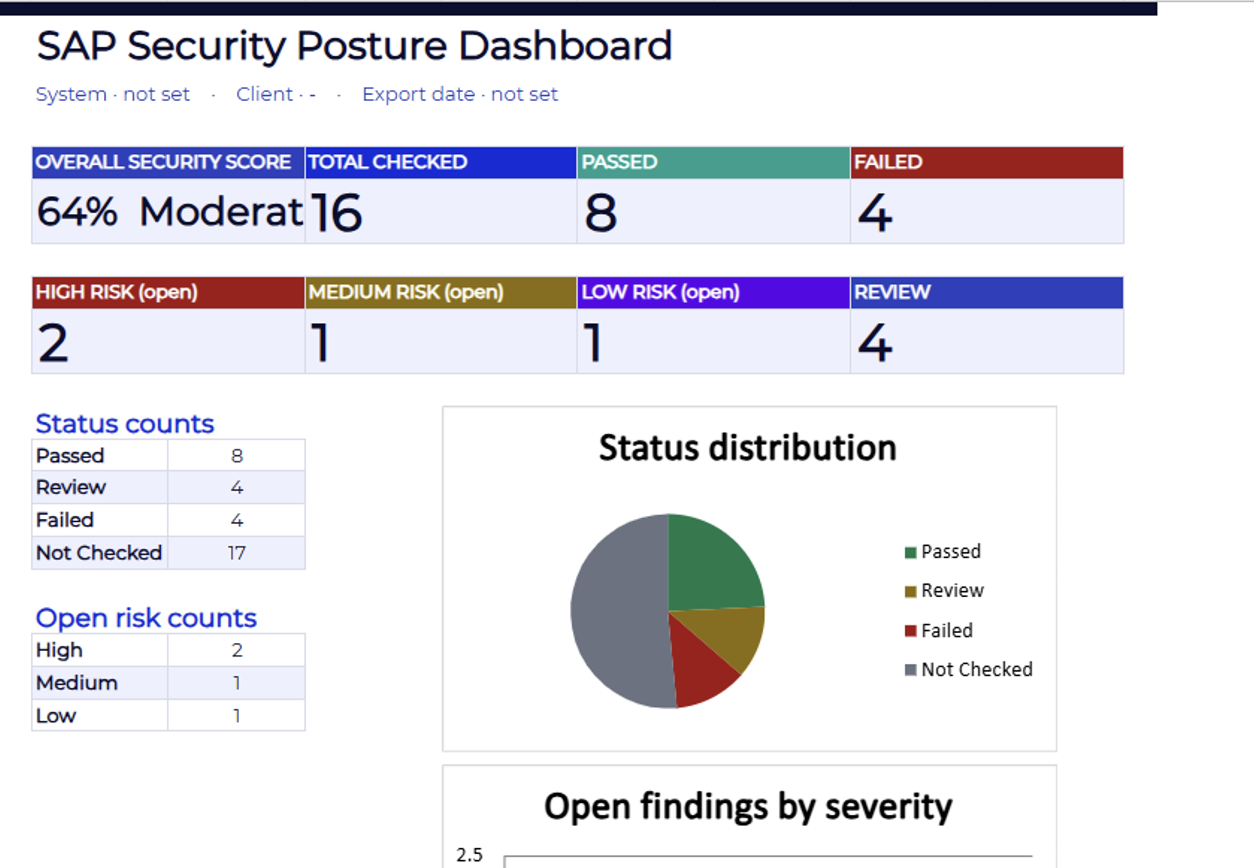
Screenshot: Executive Dashboard
Step 6 – Generate Assessment Reports
Export professional reports for management, auditors, or project teams.
Who Should Use This SAP Security Analyzer?
This assessment tool is valuable for:
- SAP Security Consultants
- SAP Basis Administrators
- SAP GRC Consultants
- Internal Auditors
- External Auditors
- Cyber Security Teams
- Compliance Managers
- SAP Project Managers
- SAP Centers of Excellence (CoE)
Business Benefits
Organizations using this SAP Security Analyzer can:
- Improve SAP security posture
- Reduce audit findings
- Identify configuration weaknesses
- Standardize security reviews
- Support regulatory compliance
- Prioritize remediation
- Improve cyber resilience
- Reduce manual assessment effort
This tool is provided "AS IS" and "AS AVAILABLE", without warranties of any kind, whether express, implied, or statutory, including, without limitation, warranties of accuracy, completeness, reliability, merchantability, fitness for a particular purpose, or non-infringement. It is intended solely as a general reference to assist SAP security, governance, risk, compliance, and audit activities and should not be considered legal, audit, accounting, regulatory, or professional advice. While reasonable efforts have been made to ensure the accuracy of the information, the author and SAP Security Expert make no representations or warranties regarding the completeness, accuracy, suitability, or currency of the content. Users are solely responsible for reviewing, validating, testing, and determining the suitability of this tool for their specific environment, business requirements, and applicable legal or regulatory obligations. To the maximum extent permitted by applicable law, the author and SAP Security Expert shall not be liable for any direct, indirect, incidental, consequential, special, exemplary, or punitive damages, including but not limited to business interruption, loss of profits, loss of data, security incidents, compliance failures, or any other loss arising out of or relating to the use of, reliance on, or inability to use this tool, even if advised of the possibility of such damages. SAP®, SAP S/4HANA®, SAP Business Technology Platform (SAP BTP)®, SAP HANA®, SAP Fiori®, and related product names are trademarks or registered trademarks of SAP SE (or an SAP affiliate company) in Germany and other countries. This tool is independent of SAP SE and is not affiliated with, endorsed by, or sponsored by SAP SE.