SAP Security professionals have been analyzing user activity and system performance for decades using the ST03N transaction code. It provides detailed information about individual transactions and dialog steps, aggregated workload analysis across users, transactions, applications and other dimensions. STAD can be utilized quickly to know the transaction code executions. For many SAP BASIS and Security teams, these tools are already familiar and remain useful.
With Real User Monitoring (RUM) app as part of SAP Cloud ALM , an obvious question comes up: what problem is RUM solving that STAD and ST03N do not already solve?
RUM becomes relevant when the question changes from what happened inside the SAP system to what happened during the user’s interaction with the application.
That distinction is becoming increasingly important as SAP environments move away from being dominated by traditional SAP GUI transactions and toward Fiori, SAPUI5, web applications, cloud services and hybrid architectures. The technology stack through which a user interacts with SAP has become considerably more complex, and the backend transaction is no longer necessarily a complete representation of the user’s experience.
STAD and ST03N already solve an important problem
Before looking at RUM, it is worth understanding the capabilities that SAP already provides.
STAD, or Business Transaction Analysis, is intended for detailed analysis of individual transactions and dialog steps in ABAP systems. SAP documentation describes statistical records containing information such as response time components, database accesses, memory usage and RFC calls. The tool can also be used to select records based on criteria such as user, transaction, program, task type, date and time.
ST03N operates at a more aggregated level. SAP describes the Workload Monitor as a tool for analyzing statistical data collected by the SAP kernel, including workload by users, transaction steps, transactions, applications and other dimensions. It can be used to analyze response-time distribution and identify transactions or workload areas contributing significantly to system activity.
These are not outdated capabilities. They remain highly relevant.
For example, a SAP Security team performing an access review may want to understand whether a user has been executing certain transactions. A Basis team investigating workload may want to know which transactions are generating significant database or response time. An administrator investigating a particular incident may need detailed information about an individual transaction execution.
STAD and ST03N are designed for these kinds of questions.
That is why RUM should not be presented as a replacement for either tool.
The difference starts with the user’s screen
The easiest way to understand the difference is to follow what happens when a user interacts with a modern SAP application.
Suppose an employee opens a Fiori application and clicks a button to approve an invoice. From the employee’s perspective, this is a single action. Technically, however, that interaction can involve frontend processing, browser activity, network communication, one or more HTTP requests, backend processing and potentially additional calls to other components.
If the user waits eight seconds before receiving a response, knowing the backend transaction took four seconds does not necessarily explain the entire experience.
Where did the other four seconds go?
Was the delay caused by network communication? Was time spent processing the request in the browser? Did another component contribute to the response time? Was there a sequence of related requests rather than one simple backend operation?
This is the type of problem that SAP Cloud ALM Real User Monitoring is designed to investigate.
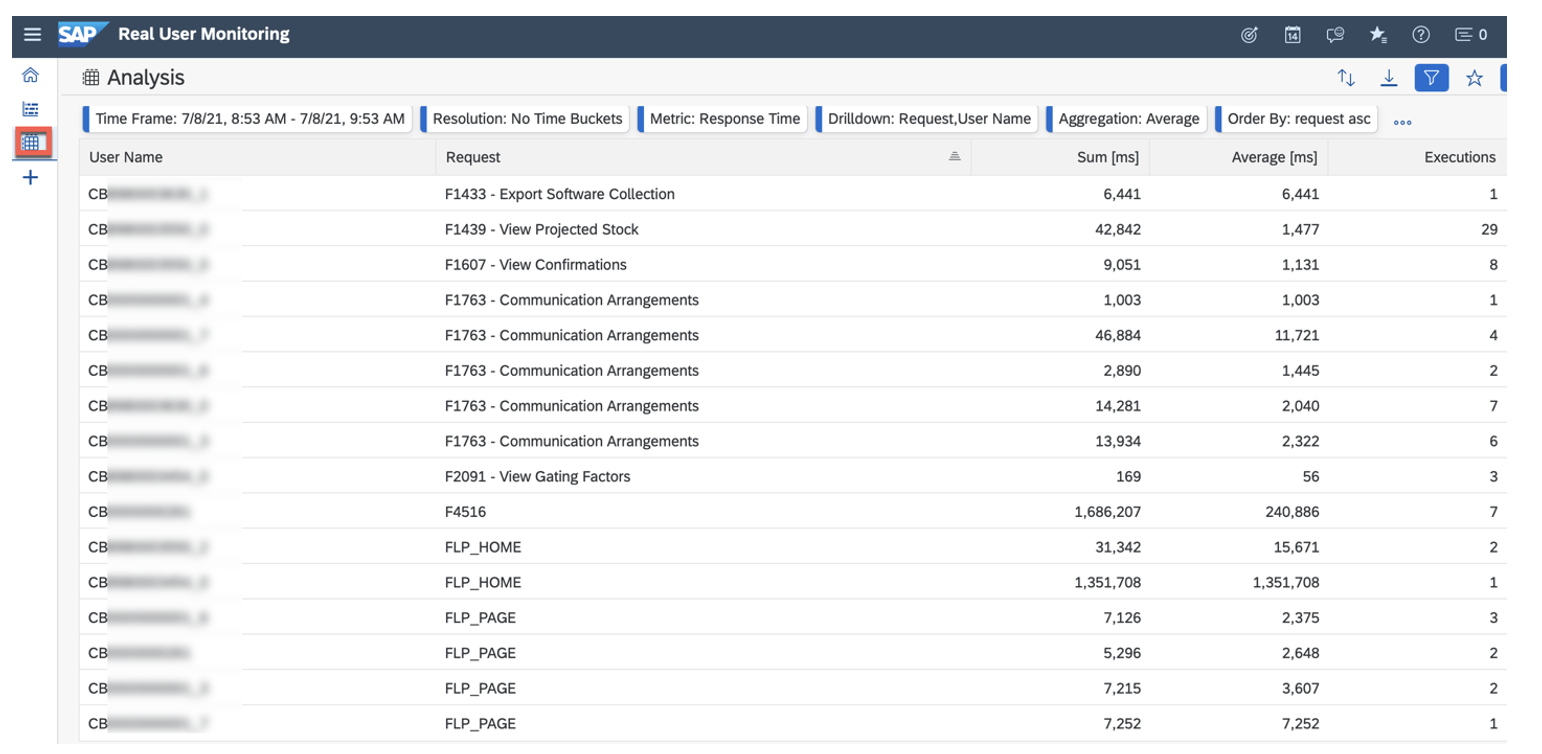
Figure - SAP Cloud ALM - Real User Monitoring (source - www.sap.com)
SAP describes RUM as providing transparency into the usage and performance of real user interactions. It correlates user interactions with relevant server requests and provides capabilities to move from aggregated information into individual executions and their details.
The starting point is therefore different.
STAD and ST03N are primarily concerned with what is happening within SAP’s workload and transaction environment. RUM starts with the application interaction and follows the request through the supported components involved in delivering that experience.
What does RUM actually measure?
SAP Cloud ALM Real User Monitoring supports measurements for frontend technologies including SAPUI5/Fiori, Web Dynpro and Web GUI. Depending on the monitored solution and scenario, backend measurements can include HTTP(S), RFC/RFCS, Dialog and Web Services.
For frontend requests, SAP Cloud ALM can expose metrics such as end-user time, network time and backend time. This distinction is important because a slow user experience does not necessarily mean that the SAP backend itself is slow.
Consider a Fiori application that takes ten seconds to respond. If the backend processing accounts for only two seconds, investigating database performance alone is unlikely to solve the problem. Conversely, if most of the response time is attributable to backend processing, the investigation can move toward the server-side components involved.
RUM therefore provides a way of looking at the composition of the user experience, rather than treating the total response time as one number.
That is the fundamental difference from simply asking how long an SAP transaction took and is more useful in the new systems such as SAP S/4HANA Cloud, Public Edition and SAP S/4HANA Cloud, Private Edition.
STAD versus ST03N versus RUM
The three capabilities overlap in some areas, but their primary purposes are different.
The important point is that there is no universal winner in this comparison. The appropriate tool depends on the question being asked.
If the question is about ABAP workload, STAD and ST03N remain extremely relevant. If the question concerns the experience of a user interacting with a Fiori application, RUM provides information that those traditional tools were not designed to provide.
Why Fiori changes the monitoring problem
The shift toward Fiori is one of the strongest reasons for the emergence of user-centric monitoring.
A traditional SAP GUI transaction provides a relatively direct relationship between the user action and the backend transaction. Modern web applications can introduce additional layers between the user and the backend.
A single screen may trigger multiple requests. Some processing may happen in the browser. Requests may travel across networks and services before reaching the backend. The response may then have to travel back through the same architecture before the user sees the result.
The user does not experience these individual technical components.
They experience the application as a whole.
This creates a monitoring gap. A backend team can correctly conclude that its component processed a request in two seconds while the user can equally correctly report that the application took ten seconds to respond.
Neither observation is necessarily wrong. They are simply measuring different parts of the same experience. RUM is intended to bring those pieces together.
Looking beyond the average response time
Another useful feature of RUM is that it does not rely solely on a fixed definition of what constitutes a slow request.
SAP explains that RUM uses historical values when rating request executions. The performance status considers the historical behavior of the corresponding request rather than applying a single threshold to every application and request.
That distinction matters because different applications naturally have different performance characteristics.
A request that normally completes in 300 milliseconds but suddenly takes three seconds may represent a meaningful degradation. Another request that consistently takes seven seconds may have a completely different performance profile.
Historical context can therefore be more informative than a generic rule such as “anything above five seconds is slow.”
For application operations teams, this can help distinguish normal variation from a genuine deterioration in user experience.
The security connection is real, but it should not be exaggerated
This is where RUM becomes relevant to an SAP Security audience, although it is important to keep the boundaries clear.
RUM is not an SAP Security monitoring product. It does not replace SAP Security Audit Log, STAD, ST03N, SAP GRC Access Control, SoD analysis, User Access Review or a SIEM platform.
Its security relevance comes from the additional context that actual application usage can provide.
Consider an access review in which a user has access to 30 Fiori applications. The role and authorization analysis can tell the reviewer what the user is technically permitted to access. The UAR process can ask whether that access should remain. A usage data source can then provide evidence about which applications or functions the user has actually been using.
That does not automatically make RUM the right source for every access review. STAD and other SAP usage statistics may be more appropriate when the requirement is specifically transaction-level usage analysis.
But RUM can become useful when the organization wants to understand the behaviuor of users within modern frontend applications.
Access analysis describes entitlement. Usage analysis describes activity. RUM adds visibility into the application interaction and its performance.
These are complementary perspectives rather than competing ones.
Do not make “no usage” an automatic reason to remove access
There is also a governance risk in taking usage information too literally.
A user may not have executed an application during the review period because the function is needed only at month-end. A backup employee may have access for business continuity but rarely use it. An administrator may have emergency access that should deliberately remain unused under normal circumstances.
Therefore, the absence of observed usage should not become an automatic access-removal rule.
It should instead become a question for the reviewer.
Why is this access assigned? Is it required for an occasional business process? Is it retained for contingency purposes? Has the user’s role changed? Is the access simply inherited from an overly broad role?
Usage information can strengthen the conversation, but it cannot replace business ownership and authorization analysis.
RUM can reveal the environment in which SAP is being used
Another area where RUM adds information is the user’s frontend environment.
SAP’s documentation describes frontend information that can include operating system, browser and device details. SAP also notes that this information can help identify environments that may require upgrades because of security or compliance considerations.
This is different from traditional transaction monitoring.
Suppose an organization discovers that a large number of users are accessing a critical Fiori application through an outdated browser configuration. That may initially appear to be an endpoint-management problem rather than an SAP problem.
But from a security perspective, it can become relevant.
The application may be perfectly secure on the backend while the endpoint environment introduces additional exposure.
RUM therefore provides another view of the environment in which SAP applications are being consumed.
User-level monitoring introduces another governance question
Real user data can also be sensitive.
An organization should not assume that because RUM can provide user-level information, every administrator should automatically have access to it.
SAP’s documentation specifically addresses sensitive user information in RUM. For example, SAP identifies a sensitive role for filtering by user name and describes hashing of user names when the relevant sensitive access is not available.
This is an important point for security teams.
If RUM data is subsequently exported into a reporting platform, data lake or security analytics environment, the organization needs to consider who should have access to that information and whether user-level data is actually required for the intended use case.
The fact that data can be collected does not mean that unrestricted visibility is appropriate.
RUM and SAP Security monitoring answer different questions
It is useful to keep the boundaries clear.
This is perhaps the most useful way to position the technology.
RUM does not need to replace existing SAP monitoring or security capabilities to be valuable.
It needs to answer a question that those capabilities were not designed to answer in the same way.
Where RUM becomes particularly valuable in modern SAP landscapes
The case for RUM becomes stronger as the SAP landscape becomes more distributed.
An organization running a largely traditional ECC environment may have relatively little need for a frontend-centric monitoring model. A company running S/4HANA with extensive Fiori adoption, SAP BTP services, cloud applications and hybrid integrations has a different problem.
The user experience may span several technical boundaries.
When an application is slow, the responsible team may not immediately know whether the problem is in the frontend, network, backend or another component involved in the request.
SAP Cloud ALM provides RUM capabilities specifically intended to correlate user interactions with server requests and allow analysis of those executions. SAP’s Execution Flow capability, for example, presents user actions and corresponding system responses in chronological order.
This makes RUM particularly useful as an observability layer.
It does not eliminate the need for detailed backend analysis. It gives the investigation a better starting point: the experience that triggered the problem in the first place.
The question is not whether RUM is better than STAD
The more you compare these technologies, the clearer it becomes that asking whether RUM is “better” than STAD or ST03N is the wrong question.
STAD is still valuable when detailed transaction and dialog-step information is required.
ST03N remains valuable for workload analysis and aggregated SAP performance information.
RUM becomes valuable when the organization needs visibility into the interaction between the user, frontend application, network and backend services.
The tools overlap at the edges, but their centers of gravity are different.
That is why an organization can reasonably use all three.
For example, RUM may identify a Fiori request that is consistently slow for users. The operations team can then use the correlated backend information to identify where the delay is occurring. If the problem ultimately leads to a specific ABAP transaction or workload pattern, STAD or ST03N can provide deeper backend analysis.
In that scenario, the tools are not competing.
They are being used sequentially.
RUM helps identify the user-facing problem. Traditional SAP monitoring helps investigate the underlying workload.
What SAP Security professionals should take from this
For SAP Security teams, the most useful lesson is not that RUM provides a new way to perform access reviews.
It is that user activity, authorization and user experience are different dimensions of the same SAP environment.
STAD and ST03N already provide valuable information about SAP workload and transaction activity. They should remain part of the toolkit where those questions are relevant.
RUM adds another dimension, particularly for Fiori and other supported frontend applications. It can show how users interact with applications, how requests perform, what portion of the response time is attributable to different stages of the request and, where supported, information about the user’s frontend environment.
For security and governance teams, that information can provide context around access usage and application criticality. For operations teams, it provides a more direct view of the user experience. For application teams, it can help narrow down where a performance problem originates.
That is a more realistic and useful role for RUM than trying to position it as another SAP Security tool.
Watch SAP’s Real User Monitoring walkthrough
SAP has published an official video demonstrating Real User Monitoring in SAP Cloud ALM. It is useful to watch alongside the documentation because the distinction between traditional workload monitoring and RUM becomes much clearer when the request and execution views are seen in the product.
The official SAP documentation provides further details about Real User Monitoring, supported frontend and backend measurements, request analysis and execution flows.So, do you need SAP Cloud ALM RUM?
If the only requirement is to determine which users executed which traditional SAP transactions, probably not. SAP already has mature capabilities for this, including STAD and ST03N.
If the requirement is to understand why a Fiori application is slow for users, how much time is spent in the frontend and network compared with the backend, which requests are involved in an execution, or how the user’s application experience changes across supported frontend environments, the answer is different.
That is the space RUM occupies.
The distinction is ultimately about perspective.
STAD and ST03N look deeply into SAP workload and transaction processing. RUM starts with the user’s interaction and follows the application request through the supported landscape.
Neither perspective is sufficient for every problem.
In a modern SAP environment, both can be useful.
For SAP Security professionals, there is an additional lesson. Authorization analysis tells you what a user is allowed to do. Usage information can tell you what the user actually does. RUM adds context around how that interaction occurs at the application level.
The objective should not be to replace one source with another.
It should be to use the right source for the question being asked.
And as SAP becomes increasingly dependent on Fiori, web applications and cloud-based services, understanding the user’s experience is becoming just as important as understanding the transaction running behind it.