SAP GRC 12.0 introduced numerous enhancements through Support Packages and SAP Notes. While most organizations focus on visible changes such as Fiori applications, workflow improvements, or UI enhancements, some of the most valuable capabilities are delivered through configuration parameters that remain disabled or unnoticed after an upgrade.
In my experience working with SAP Security and GRC implementations over the past two decades, one common observation stands out: organizations invest significant effort upgrading to the latest SAP GRC release but continue operating with configuration settings that belong to earlier versions. As a result, they miss performance improvements, governance enhancements, and usability features that SAP has already delivered.
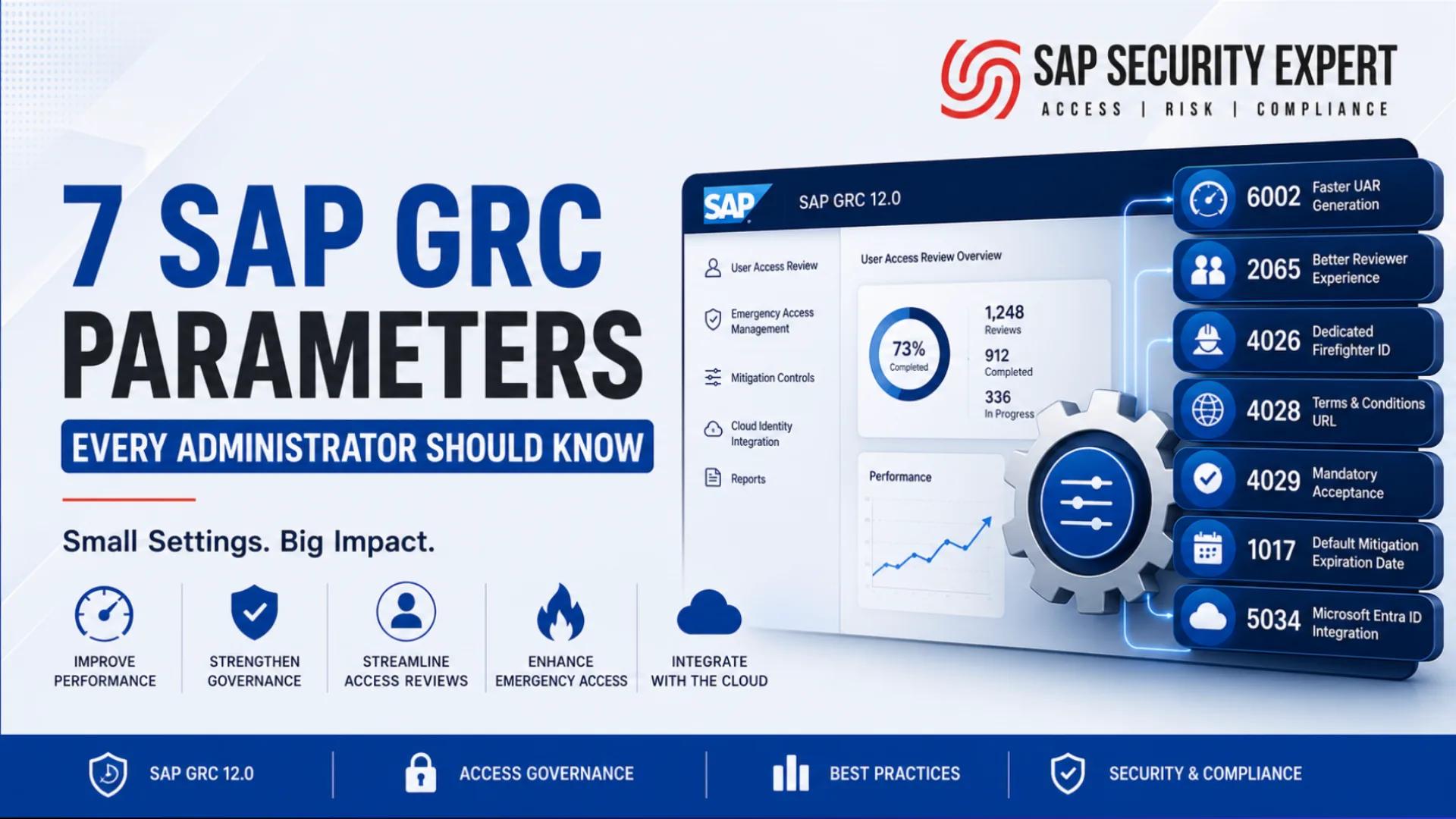
This article highlights seven SAP GRC 12.0 parameters worth reviewing as part of every post-upgrade optimization exercise, along with the SAP Notes behind them, the business case for each, and a practical framework for finding the next batch before your next audit cycle does it for you.
At a Glance
| Parameter | Functional Area | Business Benefit |
|---|---|---|
| 6002 | User Access Review | Faster User Access Review (UAR) generation using SAP HANA CDS views. |
| 2065 | User Access Review | Improved reviewer actions and enhanced workflow efficiency. |
| 4026 | Emergency Access Management | Dedicated Firefighter ID per user per system. |
| 4028 | Emergency Access Management | Configures the absolute URL for the Terms and Conditions page in the EAM Logon Pad. |
| 4029 | Emergency Access Management | Makes acceptance of the Terms and Conditions mandatory before starting a Firefighter session. |
| 1017 | Mitigation Controls | Automatically assigns a default expiration date to mitigation control assignments. |
| 5034 | Cloud Identity Integration | Retrieves user details directly from Microsoft Entra ID (formerly Azure Active Directory). |
Why SAP GRC Parameters Deserve More Attention
Unlike major product features, configuration parameters rarely receive much attention during an upgrade project. They are often introduced through SAP Notes or Support Packages and require administrators to review documentation and decide whether they should be enabled.
Many customers perform technical upgrades successfully but never revisit these parameters. Months later, they continue experiencing slow processes, manual governance activities, or workflow limitations that SAP has already addressed.
A simple review of newly introduced parameters after every Support Package can unlock meaningful improvements without any custom development.
SAP GRC Parameter 6002 – Enable CDS-Based User Access Review Generation
SAP Note: 2957411
As organizations grow, User Access Review (UAR) campaigns become increasingly resource-intensive. Large user populations, multiple connected systems, and complex authorization structures can significantly increase the time required to generate certification requests.
Parameter 6002 enables SAP GRC to generate User Access Review (UAR) requests using the Core Data Services (CDS) framework instead of the traditional generation logic.
By leveraging SAP HANA's Core Data Services (CDS), SAP GRC retrieves certification data more efficiently, improving performance and scalability while taking advantage of the in-memory capabilities of the SAP HANA platform.

Benefits
- Accelerates User Access Review generation, particularly during quarterly, semi-annual, and annual certification campaigns.
- Improves scalability for large SAP landscapes with multiple connectors, high user volumes, and complex role assignments.
- Reduces background job execution time, lowering the risk of long-running jobs, resource contention, and processing timeouts.
- Optimizes the use of SAP HANA by leveraging CDS views for more efficient data retrieval and processing.
- Helps administrator’s complete certification preparation more quickly, allowing reviewers to begin access reviews sooner.
In many large SAP environments, generating User Access Review requests is one of the most time-consuming activities during certification cycles. Organizations with tens of thousands of users and extensive role assignments often experience background jobs that run for several hours, or even overnight, using the traditional generation approach.
After enabling Parameter 6002, many organizations observe a noticeable reduction in request generation time by utilizing the CDS-based framework. While the actual performance improvement depends on factors such as system sizing, database optimization, and data volume, leveraging SAP HANA's native capabilities can significantly improve processing efficiency.
SAP GRC Parameter 2065 – Improve User Access Review Approver Actions
SAP Note: 2955240
User Access Reviews (UARs) are a critical component of an organization's access governance strategy. Their primary objective is to help managers make informed access decisions while minimizing unnecessary administrative effort and workflow complexity.
Parameter 2065, which enhances the set of actions available to User Access Review approvers. By providing more comprehensive and intuitive decision options, this enhancement streamlines the certification process and reduces unnecessary workflow routing.

Benefits
- Improves the reviewer experience by offering clearer and more complete decision options during access certifications.
- Accelerates review completion by reducing the need for manual follow-up or processing outside the standard workflow.
- Minimizes approval bottlenecks caused by limited or ambiguous action choices, enabling more efficient certification cycles.
- Enhances governance by ensuring review decisions are captured directly within the certification process, creating more complete and auditable records.
- Reduces administrative overhead for SAP Security and GRC teams by limiting off-cycle activities and exception handling.
Organizations conducting periodic access certifications across thousands of users often face significant administrative effort during each review cycle. Even small workflow improvements can deliver substantial operational benefits when multiplied across large user populations, numerous business roles, and recurring certification campaigns.
By enabling richer approval actions within the review process, Parameter 2065 helps organizations improve reviewer productivity, shorten certification cycles, and strengthen audit readiness. The result is a more efficient and user-friendly access review process that supports both governance objectives and compliance requirements without increasing administrative burden.
SAP GRC Parameter 4026 – Dedicated Firefighter ID per user per system
SAP Note - 3036192
Emergency Access Management (EAM) is one of the most closely examined areas during internal and external audits because it provides temporary privileged access that can bypass standard authorization controls. As a result, organizations must ensure that every Firefighter access request is transparent, well-justified, and fully traceable.
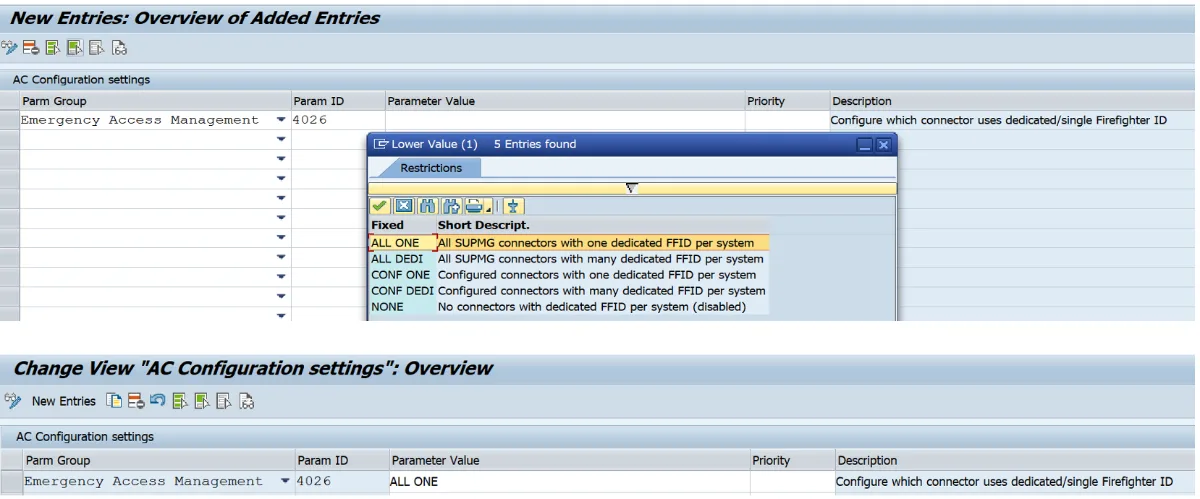
SAP Note 3036192 introduces Parameter 4026, which enables dedicated (single) Firefighter ID requests. This enhancement allows organizations to establish a clear one-to-one relationship between a Firefighter request and the corresponding Firefighter ID for a specific user and system, improving both governance and operational efficiency.
Benefits
- Simplifies the Firefighter request process by establishing a clear one-to-one relationship between the request, Firefighter ID, user, and target system.
- Streamlines approval workflows, enabling approvers to review a single, well-defined request with greater clarity and confidence.
- Strengthens governance by improving traceability between the business justification, approved access, and activities performed during the Firefighter session.
- Reduces administrative effort for SAP Security and GRC teams by simplifying the management of Firefighter ID assignments.
- Enhances audit readiness by providing clearer evidence of how privileged access was requested, approved, and utilized.
Emergency access is designed to address exceptional business situations, not to serve as a routine method of granting privileged access. By enforcing dedicated Firefighter ID requests, organizations gain greater control over how emergency access is requested, approved, and monitored throughout its lifecycle.
For organizations with stringent privileged access policies or regulatory requirements, Parameter 4026 helps improve accountability, reduce operational complexity, and strengthen compliance. The resulting level of traceability and governance is precisely the type of control that internal and external auditors expect when evaluating privileged access management processes.
SAP GRC Parameters 4028 and 4029 – Emergency Access Management Enhancements
SAP Note: 3318926
Parameter 4028 – Specifies the absolute URL for the Terms and Conditions page displayed in the EAM Logon Pad.

Parameter 4029 – Makes acceptance of the Terms and Conditions mandatory before users can initiate a Firefighter session.

In addition to these parameters, the SAP Note delivers functional enhancements to Firefighter Session Management, making it more than a simple configuration update. These changes can impact the overall user experience, compliance controls, and operational processes.
Rather than treating these as simple on/off switches, SAP administrators should understand the underlying business process changes introduced by the SAP Note and evaluate their impact before deployment.
Implementation Best Practices
Before enabling either parameter:
- Review the complete SAP Note 3318926 to understand all functional changes.
- Verify that your system meets the required Support Package prerequisites.
- Validate the end-to-end behavior in the Quality (QA) environment before moving to Production.
- Update operational procedures, user documentation, and training materials if the business process is affected.
- Communicate the change to Firefighter users and controllers, especially if mandatory acceptance of Terms and Conditions is introduced.
From experience across multiple SAP GRC implementations, even a seemingly minor configuration parameter can significantly influence request processing, approval workflows, compliance enforcement, or the end-user experience. Treat parameter changes with the same governance, testing, and change management discipline as any functional enhancement to ensure a smooth and compliant implementation.
SAP GRC Parameter 1017 - Automatically Set Mitigation Control Expiration Dates
SAP Note: 3310987
One of the most common audit observations in SAP GRC environments is the presence of mitigation controls that remain active indefinitely because no expiration date was specified when the mitigation assignment was created.
What begins as a temporary business exception can gradually become a permanent accepted risk without any formal review or reassessment.
Parameter 1017 addresses this challenge by allowing administrators to configure a default expiration date whenever a mitigation control is assigned. This encourages periodic review of mitigation assignments and reinforces a stronger governance framework.

Business Benefits
- Prevents mitigation controls from remaining active indefinitely due to missing expiration dates.
- Promotes stronger governance by embedding periodic review and reassessment into the mitigation assignment process.
- Supports regular risk reassessment aligned with internal audit, compliance, and risk management cycles.
- Enhances audit readiness by providing clear evidence that mitigation controls are actively reviewed rather than passively accepted.
- Reduces the likelihood of outdated or unnecessary mitigation assignments remaining in the system, improving the overall quality of risk management.
Organizations often invest significant effort in identifying Segregation of Duties (SoD) risks but overlook the ongoing governance of mitigation controls. Implementing a default expiration date ensures that mitigation assignments remain intentional, time-bound, and subject to periodic validation.
In practice, this small configuration change can significantly improve governance maturity, strengthen compliance posture, and demonstrate to auditors that mitigation controls are actively managed throughout their lifecycle rather than treated as permanent exceptions.
SAP GRC Parameter 5034 - Retrieve User Details from Microsoft Entra ID
SAP Note: 3621020
As enterprise identity management continues to evolve, organizations are moving beyond traditional on-premise Active Directory deployments toward hybrid and cloud-based identity architectures. To support this transition, SAP Note 3621020 introduces Parameter 5034, enabling SAP GRC to retrieve user information directly from Microsoft Entra ID (formerly Azure Active Directory).
By leveraging Microsoft Entra ID as a trusted identity source, SAP GRC can maintain more accurate user information throughout the access governance lifecycle, ensuring that identity data remains consistent across cloud and on-premise environments.
Benefits
- Improves identity synchronization between SAP GRC and Microsoft Entra ID, ensuring consistent user information across enterprise systems.
- Enhances the accuracy of user attributes used for access requests, workflow notifications, reporting, and compliance activities.
- Strengthens integration with cloud identity services, supporting modern enterprise identity and access management (IAM) strategies.
- Supports hybrid identity governance initiatives by enabling SAP GRC to leverage cloud-based identity information alongside on-premise environments.
- Provides a stronger foundation for organizations adopting Microsoft Entra ID capabilities such as Conditional Access, lifecycle management, and centralized identity governance.
As organizations modernize their identity platforms, maintaining a single, reliable source of identity data becomes essential for effective access governance. Parameter 5034 helps ensure that SAP GRC consumes accurate and up-to-date user information from Microsoft Entra ID, reducing data inconsistencies and improving the efficiency of access request, provisioning, and compliance processes.
For enterprises adopting a cloud-first or hybrid IAM strategy, this enhancement helps SAP GRC remain aligned with modern identity management practices while supporting secure and compliant access governance across the enterprise.
Which Parameters Should You Prioritize?
Not every organization will require every parameter immediately. Based on implementation experience, the following priority order provides the greatest value for most SAP GRC customers.
| Priority | Parameter | Why It Matters |
|---|---|---|
| ⭐⭐⭐⭐⭐ | 6002 | Significant User Access Review (UAR) performance improvement. |
| ⭐⭐⭐⭐⭐ | 1017 | Stronger governance and improved audit compliance. |
| ⭐⭐⭐⭐☆ | 2065 | Better User Access Review experience and reviewer productivity. |
| ⭐⭐⭐⭐☆ | 5034 | Improved cloud identity integration with Microsoft Entra ID. |
| ⭐⭐⭐☆☆ | 4026 | Enhanced Emergency Access Management governance. |
| ⭐⭐⭐☆☆ | 4028 | Review and enable based on business and compliance requirements. |
| ⭐⭐⭐☆☆ | 4029 | Review and enable based on business and compliance requirements. |
How to Identify Newly Introduced SAP GRC Parameters After Every Support Package
One of the simplest ways to maximize the value of an SAP GRC upgrade is to review newly introduced configuration parameters after each Support Package implementation. Many enhancements are delivered through SAP Notes and remain inactive until administrators evaluate and enable the corresponding parameter.
1. Review Support Package Release Information
Study the release documentation for Access Control, Process Control, Risk Management, and Emergency Access Management. New parameters are often documented alongside functional enhancements.
2. Read the Associated SAP Note
Never enable a parameter based solely on its description. Review the complete SAP Note to understand:
- Business purpose
- Prerequisites
- Dependencies
- Default behavior
- Implementation instructions
- Known limitations
3. Maintain a Parameter Register
Create a central spreadsheet or configuration register that records:
- Parameter number
- Description
- Default value
- Current Production value
- Related SAP Note
- Business owner
- Date implemented
- Reason for enabling or disabling
This documentation becomes invaluable during upgrades, audits, and knowledge transfer.
4. Test Before Production
Even seemingly minor configuration parameters can affect workflows, approvals, reporting, or user experience. Validate changes thoroughly in Development and Quality systems before transporting them to Production.
5. Add Parameter Reviews to Your Upgrade Checklist
Most upgrade projects include transport validation, authorization testing, and workflow verification. Very few explicitly include a review of newly introduced configuration parameters.
Making this a standard post-upgrade activity ensures your organization benefits from SAP’s latest innovations rather than continuing to operate with legacy configuration.
Best Practices Before Enabling Any SAP GRC Parameter
Before enabling any new parameter:
- Verify your SAP GRC Support Package level.
- Review all prerequisite SAP Notes.
- Understand dependencies, including any companion parameters.
- Test functionality outside Production, using realistic data and scenarios.
- Assess workflow impacts on requesters, approvers, and reviewers.
- Update operational documentation, including the parameter register described above.
- Inform business stakeholders when user experience changes.
Configuration parameters may appear small, but their impact on governance and operations can be significant. Treating them with the same rigor as a functional enhancement, documented testing, sign-off, and a rollback plan, protects both the business process and the credibility of the GRC team.
Final Thoughts
SAP GRC upgrades should not end when the technical deployment is complete. Some of the most valuable improvements are introduced quietly through configuration parameters that many organizations never revisit.
By reviewing newly introduced parameters after every Support Package, testing them appropriately, and documenting implementation decisions, SAP Security teams can improve performance, strengthen governance, simplify user experience, and make better use of the capabilities already included in their SAP GRC investment.
Sometimes the biggest improvements are not delivered through new transactions or dashboards - they are hidden behind a parameter that takes only a few minutes to evaluate but delivers value for years.
References
- SAP Note 2957411 – CDS-Based User Access Review Generation
- SAP Note 2955240 – User Access Review Approver Enhancements
- SAP Note 3318926 – Access Request Management Enhancements
- SAP Note 3310987 – Default Expiration Date for Mitigation Control Assignments
- SAP Note 3621020 – Retrieve User Details from Microsoft Entra ID.
- SAP Note 3036192 - Dedicated Firefighter ID per user per system
The information presented in this article has been collated from publicly available SAP Notes, SAP product documentation, release information, and the practical implementation experience of the author. While every effort has been made to ensure the accuracy of the information at the time of publication, SAP Security Expert does not warrant that the content is complete, current, or free from errors. Readers are advised to verify all technical information against the latest SAP documentation, SAP Notes, and official guidance before implementing any configuration changes in their environments.
The recommendations, prioritization, and opinions expressed in this article are intended for general informational purposes only and may vary depending on your SAP GRC release, Support Package level, system landscape, and business requirements.
SAP®, SAP GRC®, SAP HANA®, SAP Fiori®, Microsoft Entra ID®, Azure Active Directory®, and all other product names, company names, trademarks, service marks, and logos referenced in this article are the property of their respective owners. SAP Security Expert is an independent knowledge platform and is not affiliated with, endorsed by, or sponsored by SAP SE or any of its affiliates.