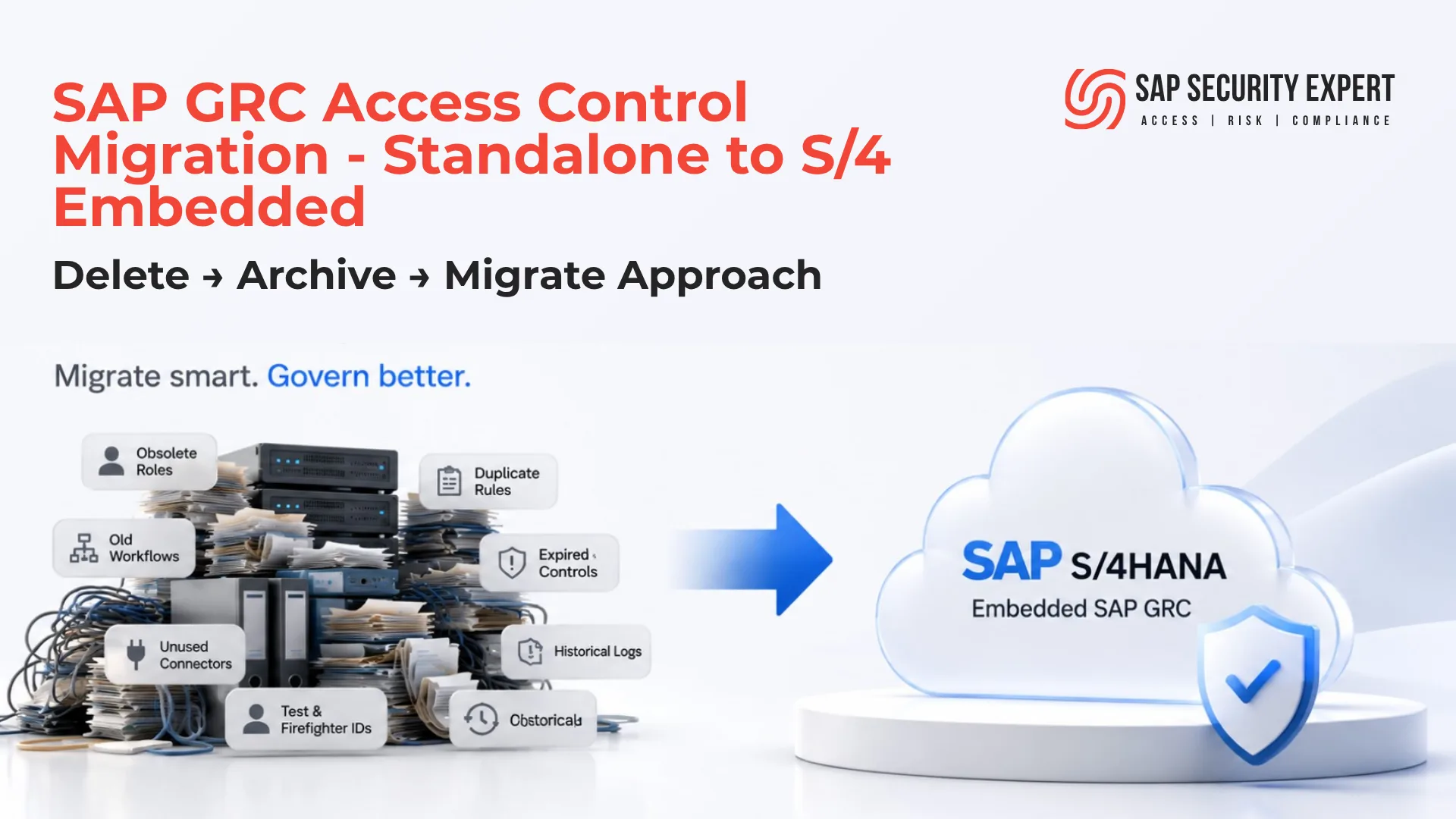
Migrating to SAP GRC Embedded on SAP S/4HANA is more than a technical upgrade. It is an opportunity to modernize access governance. While many organizations focus on moving configuration from a standalone SAP GRC system into the embedded environment, the most successful migrations follow a simple principle: Delete → Archive → Migrate . By removing obsolete configuration, archiving historical information, and migrating only active governance components, organizations can reduce technical debt, simplify administration, improve long-term maintainability, and build a cleaner SAP GRC Embedded landscape.
Executive Summary
Organizations migrating from a standalone SAP GRC deployment to an embedded installation often concentrate on the technical aspects of the project - system compatibility, migration activities, and cutover planning. However, one of the most important decisions is determining what should actually be migrated. Years of obsolete rules, inactive workflows, historical audit records, and unused configuration can unnecessarily increase project complexity. This article introduces a practical Delete → Archive → Migrate methodology that helps organizations reduce technical debt, improve migration efficiency, and build a cleaner SAP GRC Embedded landscape.
Table of Contents
- Why Organizations Are Migrating to SAP GRC Embedded
- Before You Start Your Migration
- The Biggest Mistake Organizations Make
- Cleanup Before vs. Cleanup After
- Delete → Archive → Migrate Methodology
- SAP's Recommended Approach
- Best Practices
- Common Migration Mistakes
- Migration Decision Matrix
- References
- Related Articles
At a glance
Who Should Read This?
Whether you are planning the migration, validating the target environment, or reviewing the migration scope, this guide provides practical recommendations to help build a cleaner and more maintainable SAP GRC Embedded landscape.
This article is intended for:
- SAP Security Consultants
- SAP GRC Access Control Administrators
- SAP Solution Architects
- SAP Basis Administrators
- SAP S/4HANA Migration Teams
- Internal Audit and Compliance Teams
- Organizations planning a transition from standalone SAP GRC to an embedded deployment
Why Organizations Are Migrating to SAP GRC Embedded
With the introduction of SAP GRC for SAP HANA 1.0, organizations planning their SAP S/4HANA transformation now have the option to deploy SAP GRC Access Control as an embedded solution instead of maintaining a separate standalone landscape.
For many enterprises, this is more than a deployment choice - it is an opportunity to simplify their SAP security architecture and align access governance more closely with their SAP S/4HANA environment.
Compared to a standalone deployment, an embedded architecture can provide several operational advantages:
- Reduced infrastructure and system administration
- Simplified landscape with fewer systems to manage
- Tighter integration with SAP S/4HANA
- Lower operational overhead
- Streamlined lifecycle management
- Reduced integration complexity
However, selecting an embedded deployment is only the first step. The success of the migration depends on the quality of the existing SAP GRC landscape and the decisions made before any data or configuration is transferred.
This raises an important question:
Should everything from the existing SAP GRC system be migrated into the new embedded environment?
The answer, in most cases, is no.
Before You Start Your Migration
Before discussing migration activities, it is worth understanding the current state of your SAP GRC landscape.
Ask yourself the following questions:
- Which SAP GRC version are you currently running?
- What is your target SAP S/4HANA release?
- How many connected systems are managed by SAP GRC?
- How large is your repository?
- How extensively have your SoD rules been customized?
- Are MSMP workflows heavily customized?
- How many Firefighter IDs are currently active?
- What historical data must be retained for regulatory or audit purposes?
- Which configuration is actively used today?
The answers to these questions will determine the size and complexity of your migration effort.
The Biggest Mistake Organizations Make
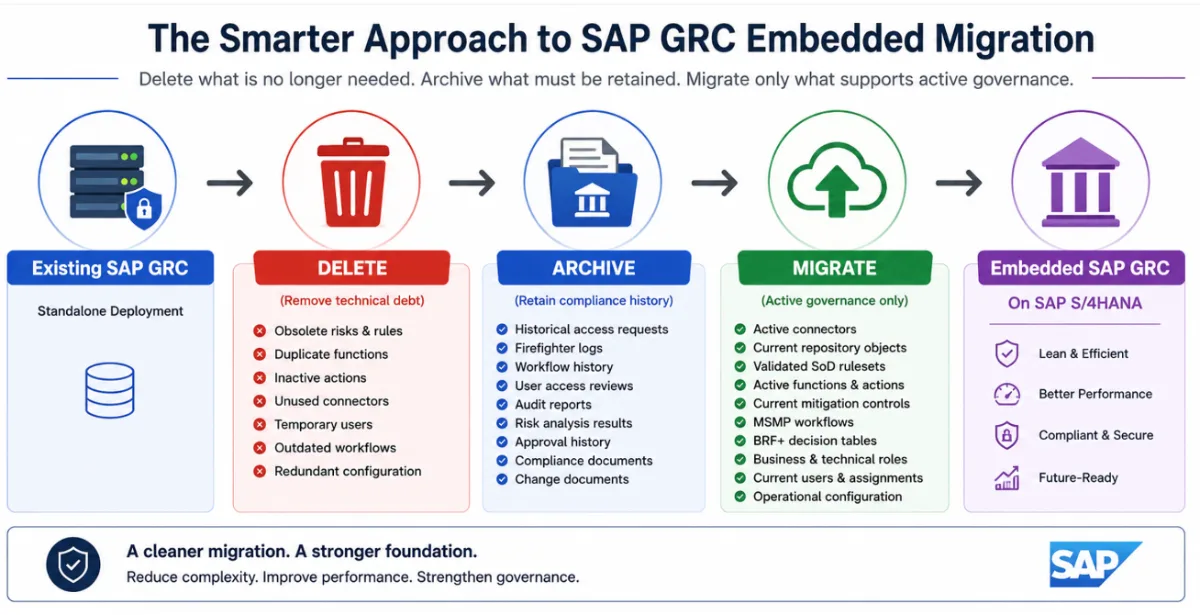
During SAP GRC migration projects, one recommendation consistently proves its value: do not migrate technical debt. Organizations often assume that migrating everything and cleaning up later is the safest option. In practice, this approach usually increases project complexity, extends testing cycles, and transfers years of obsolete configuration into the embedded landscape.
Typical examples include:
- Obsolete SoD risks
- Duplicate Functions
- Inactive Actions (Transaction codes)
- Legacy Mitigation Controls
- Unused Firefighter IDs
- Test users
- Old workflow definitions
- Unused connectors
- Historical Access Requests
- Outdated BRF+ rules
Every unnecessary object migrated today becomes another object that must be maintained tomorrow.
Migration should therefore be viewed as a landscape optimization project, not simply a data movement exercise.
Cleanup First or Cleanup Later? Which Approach Works Better?
One of the first decisions during an SAP GRC migration project is when to clean up the existing landscape.
Some organizations choose to migrate everything into the embedded environment and perform the cleanup later. Others invest time in optimizing the landscape before migration.
While both approaches are technically possible, they produce very different outcomes.
Cleanup Before Migration vs. Cleanup After Migration
While both approaches are technically possible, the long-term operational outcomes are significantly different.
| Evaluation Criteria | ✅ Cleanup Before Migration | ⚠️ Cleanup After Migration |
|---|---|---|
| Migration Scope | Smaller and easier to manage | Larger and more complex |
| Data Validation | Less data to validate | More data to validate |
| Migration Duration | Shorter migration timeline | Longer migration windows |
| Technical Debt | Eliminated before migration | Carried into production |
| Repository Synchronization | Cleaner and more efficient | Higher probability of synchronization issues |
| Ruleset Quality | Validated and optimized before go-live | Duplicate and obsolete rules remain |
| Testing Effort | Reduced testing scope | More complex regression testing |
| System Performance | Better performance after go-live | Performance improvements delayed |
| Long-Term Maintenance | Lower operational effort | Additional cleanup project required |
Why Cleanup Before Migration Is Usually the Better Choice
Migrating a SAP GRC landscape is an opportunity to improve - not simply reproduce - your existing environment.
Every obsolete rule, inactive connector, expired mitigation control, and historical workflow that is migrated increases the amount of data that must be validated, tested, maintained, and supported in the new system.
By cleaning the landscape first, organizations can:
- Reduce the overall migration effort
- Simplify repository synchronization
- Improve risk analysis accuracy
- Shorten testing cycles
- Reduce database growth
- Improve long-term maintainability
The result is not only a smoother migration but also a cleaner and more efficient SAP GRC Embedded deployment.
Think of it this way.
You wouldn't move an entire warehouse to a new location without first discarding obsolete inventory. The same principle applies to an SAP GRC migration. Carrying unnecessary configuration into the embedded environment only transfers technical debt and increases future maintenance effort.
When Might "Migrate First, Cleanup Later" Be Appropriate?
There are situations where migrating first may be justified, such as:
- Regulatory or contractual deadlines
- Limited project timelines
- Pending business transformation activities
- Ongoing role redesign initiatives that will occur after go-live
- Need of complete audit trails
Even in these scenarios, organizations should recognize that they are effectively deferring technical debt rather than eliminating it.
Planning a dedicated post-migration cleanup project can help reduce long-term operational overhead.
A Simpler Approach: Delete → Archive → Migrate
Rather than migrating everything, many experienced SAP Security teams adopt a much simpler methodology:
- Delete what is no longer needed.
- Archive what must be retained.
- Migrate only what continues to support active governance.
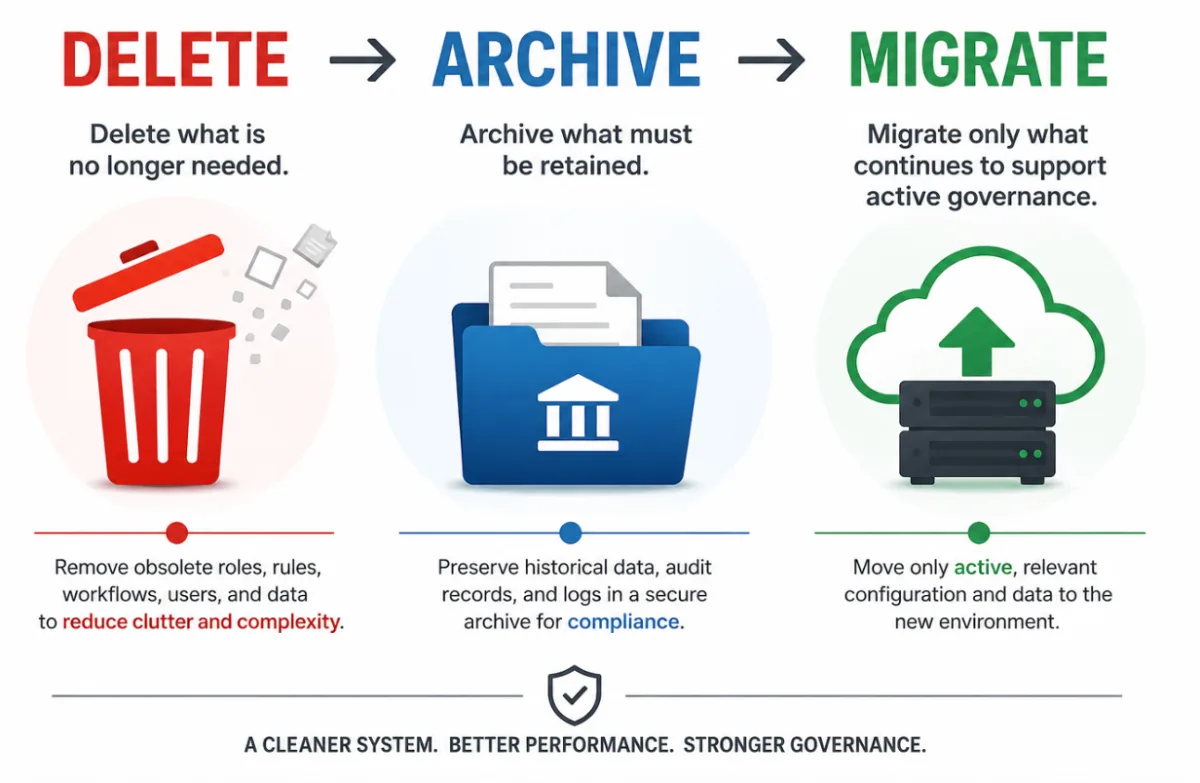
Although deceptively simple, this approach significantly reduces project complexity while improving the quality of the embedded environment.
Let's examine each phase.
Step 1 – Delete What No Longer Adds Business Value
Over time, every SAP GRC implementation accumulates configuration that no longer supports the organization's current business or security requirements. Business processes evolve, applications are decommissioned, projects introduce temporary configuration, and authorization models change. Yet obsolete rules, inactive workflows, duplicate functions, unused connectors, expired mitigation controls, test users, and redundant BRF+ rules often remain in the system long after they have served their purpose. Migrating these objects into an embedded SAP GRC landscape only transfers technical debt and increases the effort required for validation, testing, and ongoing administration.
Before migration, perform a thorough cleanup of the existing SAP GRC environment and remove configuration that no longer provides operational or compliance value. This reduces the migration scope, improves repository synchronization and risk analysis performance, simplifies troubleshooting, and lowers long-term maintenance effort. A simple question can help guide every decision: "If we were implementing SAP GRC today, would we create this object again?" If the answer is no, it should be carefully evaluated before being included in the migration scope.
Step 2 – Archive What Must Be Retained
Not every object in your SAP GRC system should be deleted. While obsolete configuration can be removed, many historical records must be retained to satisfy internal and external audit requirements, regulatory obligations, SOX compliance, and corporate governance policies. However, retaining data does not necessarily mean migrating it into the new embedded SAP GRC environment. Historical information such as completed access requests, Firefighter session logs, workflow history, user access reviews, risk analysis results, audit reports, and compliance documentation often provides little operational value but remains important for audit and legal purposes. Archiving this information preserves its integrity while preventing unnecessary growth of the production system.
A well-planned archiving strategy delivers benefits beyond compliance. By reducing the volume of historical data in the operational environment, organizations can improve database performance, accelerate backup and recovery, simplify reporting, reduce storage requirements, and lower long-term administration costs. More importantly, administrators and auditors can focus on current access governance activities instead of navigating years of legacy operational data.
The objective is simple: retain historical evidence for compliance, but keep the production SAP GRC landscape focused on active governance.
Step 3 – Migrate Only What Supports Active Governance
Once obsolete configuration has been removed and historical information has been archived, the final step is to migrate only the components that actively support your organization's access governance processes. The goal is not to replicate the existing SAP GRC landscape, but to build a cleaner and more maintainable SAP GRC Embedded environment. This typically includes active connectors, validated SoD rulesets, current repository objects, business and technical roles, mitigation controls, MSMP workflows, BRF+ decision tables, and other configuration required for ongoing operations. Every object included in the migration should have a clearly defined business purpose and continue to support the organization's governance, risk, and compliance objectives.
Migration should not be considered complete until the embedded environment has been thoroughly validated. Before production cutover, perform end-to-end testing of all critical SAP GRC processes, including repository synchronization, access risk analysis, access request management, emergency access management, provisioning, workflow routing, notifications, connector health, and authorization validation. Many post-go-live issues are not caused by the migration itself but by insufficient testing and validation. Investing time in comprehensive validation before go-live helps ensure a stable, secure, and operationally ready SAP GRC Embedded deployment.
SAP's Recommended Approach for Embedded Migrations
One important point often misunderstood during migration planning is the availability of migration utilities.
Unlike an in-place SAP GRC upgrade, migrating from a standalone deployment to an embedded installation is considered a merge scenario. Because of this, SAP does not provide a standard automated migration utility for every customer landscape. For complex migrations, SAP generally recommends using Data Management and Landscape Transformation (DMLT) services.
SAP's published guidance outlines the overall migration approach but should not be interpreted as a complete implementation guide. Every customer landscape is unique, with different repository sizes, workflow customizations, rulesets, connected systems, and compliance requirements.
Ultimately:
- Migration planning remains the customer's responsibility.
- Testing and validation remain the customer's responsibility.
- Data quality remains the customer's responsibility.
- Post-migration verification remains the customer's responsibility.
This reinforces the importance of performing a thorough assessment before beginning the migration.
Best Practices for SAP GRC Embedded Migrations
Organizations that complete successful SAP GRC migrations typically share a few common practices.
- Review your ruleset before migration
- Migration is the ideal opportunity to simplify and modernize your SoD rules.
- Avoid migrating duplicate or obsolete risks.
Clean up connectors
- Remove connections to systems that are no longer operational.
- Unused connectors increase administrative overhead and complicate repository synchronization.
Archive instead of migrate
- Historical access requests, workflow logs, and audit evidence rarely need to exist in the operational system.
- Archive them instead.
Validate repository synchronization early
- Repository synchronization should be completed and validated before testing risk analysis or provisioning.
Test complete business processes
- Do not test individual transactions.
- Test complete scenarios such as: Request → Approval → Provisioning → Risk Analysis → Review
Review technical users
- Migration provides an excellent opportunity to review RFC users, service users, communication users, and batch users.
- Remove unnecessary privileges wherever possible.
Benchmark performance
Measure ( before and after migration):
- Repository synchronization
- Risk analysis
- Provisioning
- Workflow execution
- Performance improvements
Common Migration Mistakes
After reviewing numerous SAP GRC implementations, several migration mistakes appear repeatedly.
Migrating technical debt
The most common mistake is treating migration as a lift-and-shift exercise. Migration should improve the environment - not duplicate its problems.
Ignoring repository cleanup
- Repository synchronization becomes increasingly difficult when obsolete objects remain.
- Clean repositories produce better compliance results.
Carrying historical operational data
- Years of completed workflows and access requests rarely improve current governance.
- Archive them.
Assuming every custom rule is still required
- Business processes change.
- Rulesets should evolve accordingly.
Skipping workflow testing
- A technically successful migration does not guarantee that approvals, notifications, provisioning, and escalations continue to function correctly.
Delaying performance testing
- Performance should be validated before production - not after business users begin submitting requests.
| Migration Activity | Recommended Action |
| Obsolete SoD Risks | Delete |
| Duplicate Functions | Delete |
| Inactive Connectors | Delete |
| Test Users | Delete |
| Temporary Firefighter IDs | Delete |
| Historical Access Requests | Archive |
| Completed User Access Reviews | Archive |
| Firefighter Session Logs | Archive |
| Audit Reports | Archive |
| Historical Workflow Logs | Archive |
| Active Rulesets | Migrate |
| Repository Objects | Migrate |
| MSMP Workflows | Migrate |
| BRF+ Rules | Migrate |
| Current Mitigation Controls | Migrate |
| Active Connectors | Migrate |
This simple matrix can serve as a practical reference during migration planning workshops.
References
The following references provide additional guidance for organizations planning an SAP GRC Embedded migration.
Upgrade Guide for SAP GRC Access Control for SAP HANA 1.0
This guide is the central starting point for the Upgrade from SAP Access Control 12.0 to SAP GRC Access Control as part of SAP GRC for SAP HANA 1.0. This Upgrade Guide explains the upgrade process.
Leveraging SAP GRC for SAP HANA 2026: A Migration Path to SAP GRC for SAP S/4HANA
This blog outlines why preparing now on SAP GRC for SAP S/4HANA matters, what benefits customers can expect from SAP GRC for SAP HANA 2026, and how SAP consulting services can support this journey.
What’s Next for SAP Access Control 12.0?
This blog outlines what SAP is adding/releasing in the newer version of SAP GRC including SAP GRC for HANA 2026:
SAP Help Portal – Extending Log Transfer to a Central Log or External System (Applicable to projects involving historical log migration.)
Documentation describing the supported architecture for transferring logs to a central log system or external repository using SAP HANA Smart Data Access (SDA) and ABAP Managed Database Procedures (AMDP).
- SAP Help Portal – SAP GRC for SAP HANA
- SAP Product Availability Matrix (PAM)
- SAP Data Management and Landscape Transformation (DMLT) services documentation
Final Thoughts
An embedded SAP GRC deployment is more than a technical migration - it is an opportunity to build a cleaner, more efficient, and easier-to-manage governance platform.
Organizations that simply migrate everything often carry years of technical debt into their new environment. Those that take the time to delete obsolete configuration, archive historical information, and migrate only active governance components create a stronger foundation for long-term security, compliance, and operational efficiency.
Migration is a rare opportunity to simplify - not just modernize - your SAP GRC landscape. Organizations that invest time in cleaning the environment before migration typically benefit from lower operational costs, improved performance, and easier long-term administration.
The most successful SAP GRC migrations are not those that move the most data - they are those that migrate only the data and configuration that continue to support the business.
Disclaimer
The guidance provided in this article is based on practical SAP GRC implementation experience and publicly available SAP documentation available at the time of writing. Every SAP landscape is unique, and organizations should validate all migration activities against the latest SAP documentation, SAP Notes, product releases, and their own business, security, compliance, and regulatory requirements before implementation.
The information is provided for general guidance only and should not be considered legal, audit, tax, or professional consulting advice. SAP product names mentioned in this article are trademarks or registered trademarks of SAP SE or its affiliated companies.