In many real-world SAP GRC implementations, it is common to see BRF+ rule changes made directly in the GRC production system to quickly address workflow requirements. However, this approach bypasses the formal change management process and introduces unnecessary risk.
Direct changes to BRF+ rules can potentially impact active GRC access requests and workflow routing logic, leading to unintended disruptions in the approval process.
Before diving deeper into the topic, let’s briefly understand the basics of MSMP and BRF+ for readers who may be new to these concepts.
What is MSMP in SAP GRC?
Multi-Step Multi-Process (MSMP) is the workflow framework used in SAP GRC Access Control to manage approval processes for activities such as:
- Access Requests
- Role Provisioning
- Firefighter ID assignment
MSMP determines how an access request flows through different approval stages, including initiators, approvers, and reviewers.
The workflow logic can be controlled using rules that determine approvers, routing paths, and stage conditions.
What is BRF+ in SAP GRC?
BRF+ (Business Rule Framework Plus) is the rule engine used by SAP to evaluate decision logic within applications. In SAP GRC BRF+ rules are commonly used when the standard MSMP rules are not enough to determine:
- Initiators
- Approvers
- Routing conditions, and
- Workflow stages
- or complex conditions which needs AND, OR, NOT conditions or SELECT in SELECT statements.
These rules are typically implemented using Decision Tables, Decision Trees, Table Operations, BRF Rulesets etc., which evaluate request attributes such as Request Type, Role, or Business Unit or custom requirements and return a corresponding workflow outcome.
The Challenge with Non-Transportable BRF+ Rules
Many SAP GRC administrators face challenges when creating transportable BRF+ initiator rules, especially when applications are created in the $TMP (local) package, which prevents transport across systems.
This guide explains how to create a transportable BRF+ flat initiator rule for the SAP GRC MSMP workflow framework and how to convert existing non-transportable rules into transportable ones.
By following these steps, you can ensure your GRC workflow rules are properly transported across Development, QA, and Production systems.
Who Should Read This Guide?
This guide will be useful for:
- SAP GRC Security Consultants
- SAP Security Administrators
- GRC Workflow Administrators
- SAP Basis or GRC Technical Teams
If you are responsible for configuring MSMP workflows, BRF+ rules, or access request processes in SAP GRC, this guide will help you implement transportable BRF+ rules following proper change management practices.
Quick Summary
To create a transportable BRF+ initiator rule in SAP GRC MSMP, I’ve summarized the steps below:
- Create a transportable development package (SE21)
- Create the BRF+ application
- Activate the application
- Configure the MSMP rule
- Create the decision table
- Assign the rule function
- Transport the objects across systems
Step 1: Create a Development Package for BRF+ Objects
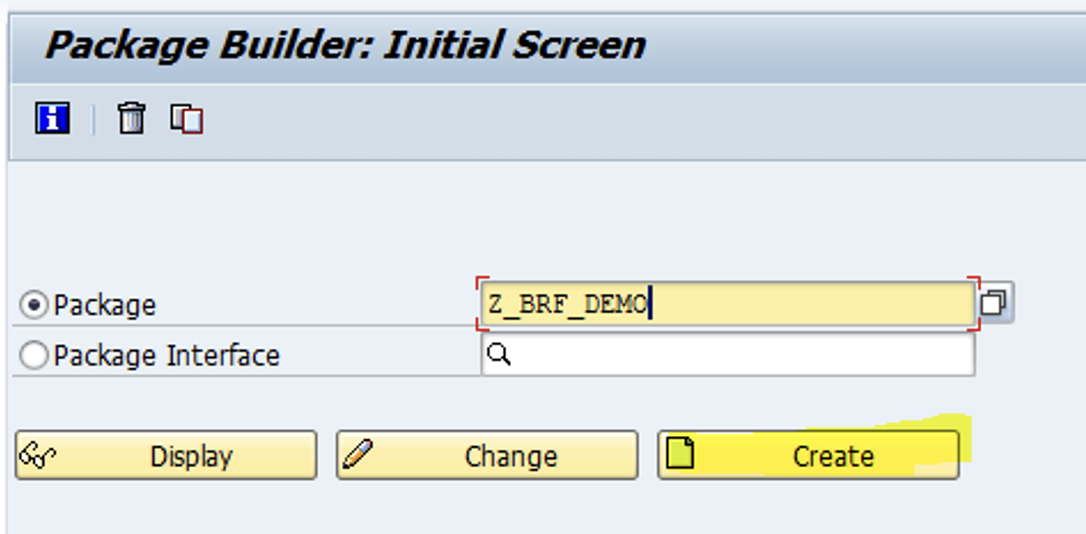
- Log in to the SAP GRC system, and execute transaction SE21.
- Enter a new package name, and click Create.
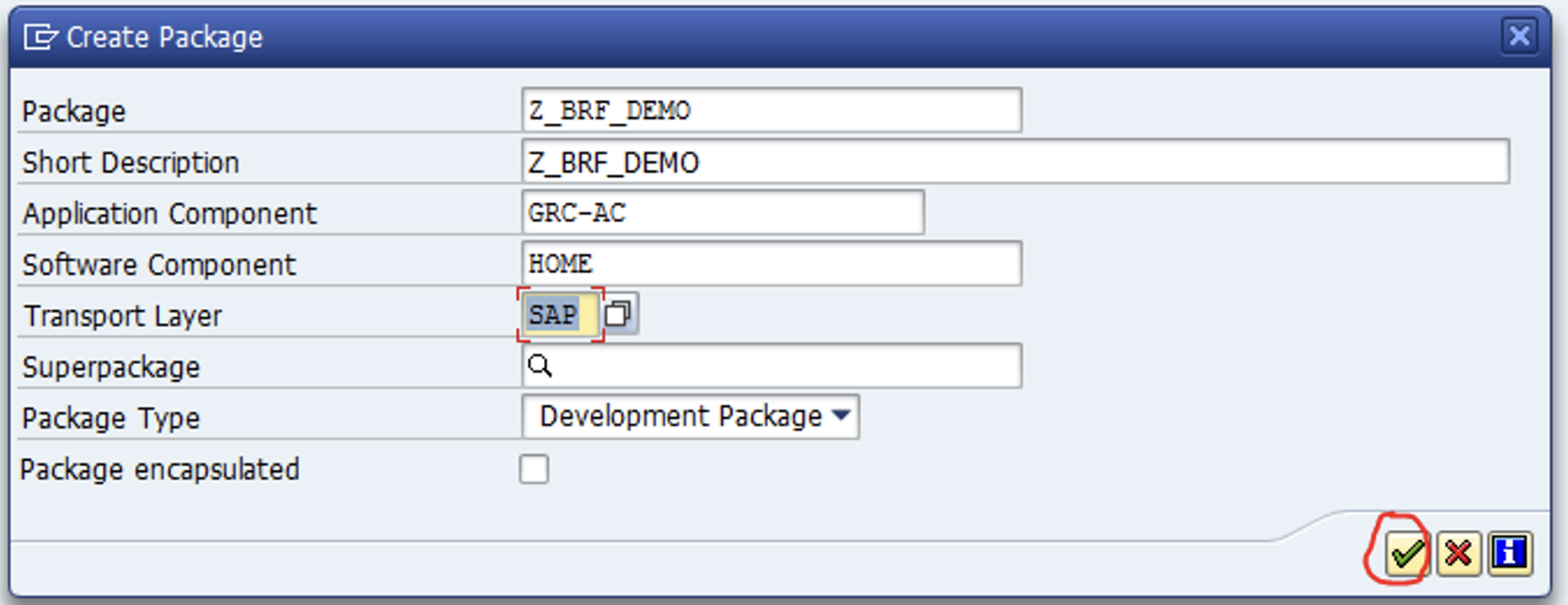
 3. Enter the details. Remember that:
- The development package is to be associated with a transport layer.
- The creation results in a workbench request.
- The software component is GRCFND_A.
Step 2: Create a BRF+ Application
Go to SPRO → Governance, Risk and Compliance → Access Control → Workflow for Access Control → Define Workflow Related MSMP Rules to validate the Workflows for which you wish to create the BRF+ rule.
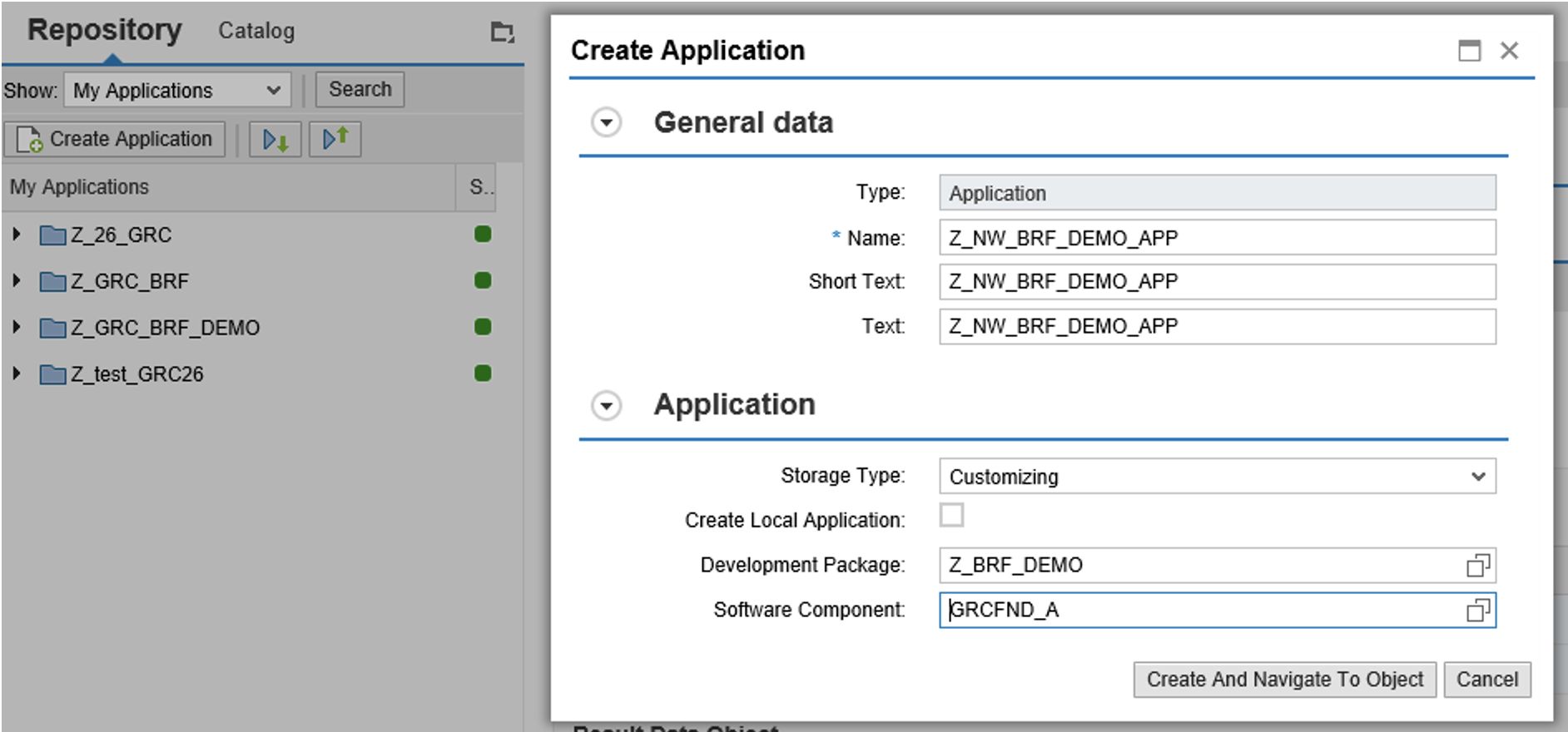
- Execute transaction BRF+ to create the application.
- In the right side, under Repository, click Create Application button.
- Enter Name, Short Text, and Text
NOTE: You can enter a name and description as per your naming practices. This is required to link the application with the respective development package.
 After creating the BRF+ application, it will initially remain inactive.
Step 3: Activate the BRF+ Application
To use the application in MSMP rules, you must activate the application by following the steps outlined below:
- Open the application
- Click Activate
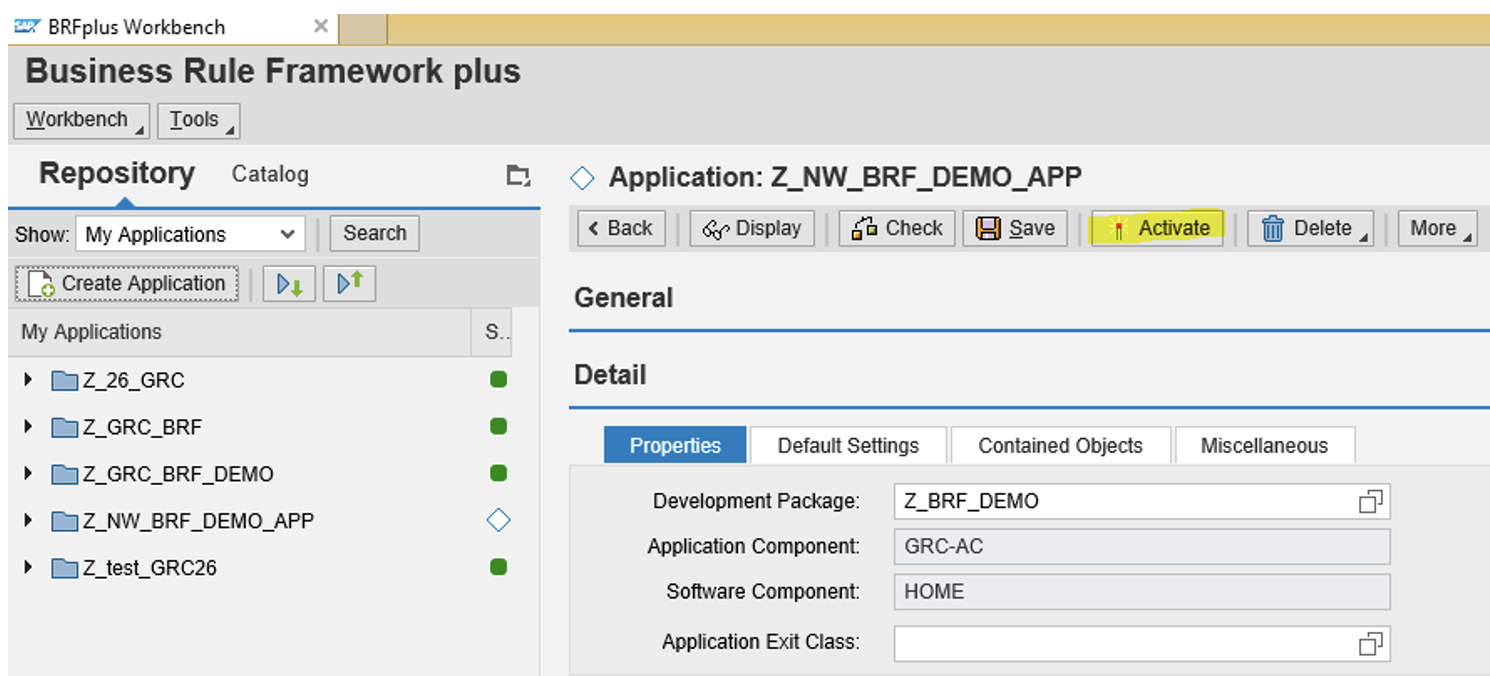 Note: Once the application is active, you can see the icon before the application in Green color. If the application shows any errors, review the error details, resolve the issues, and then activate the application again.
Step 4: Generate the MSMP Rule for the Process
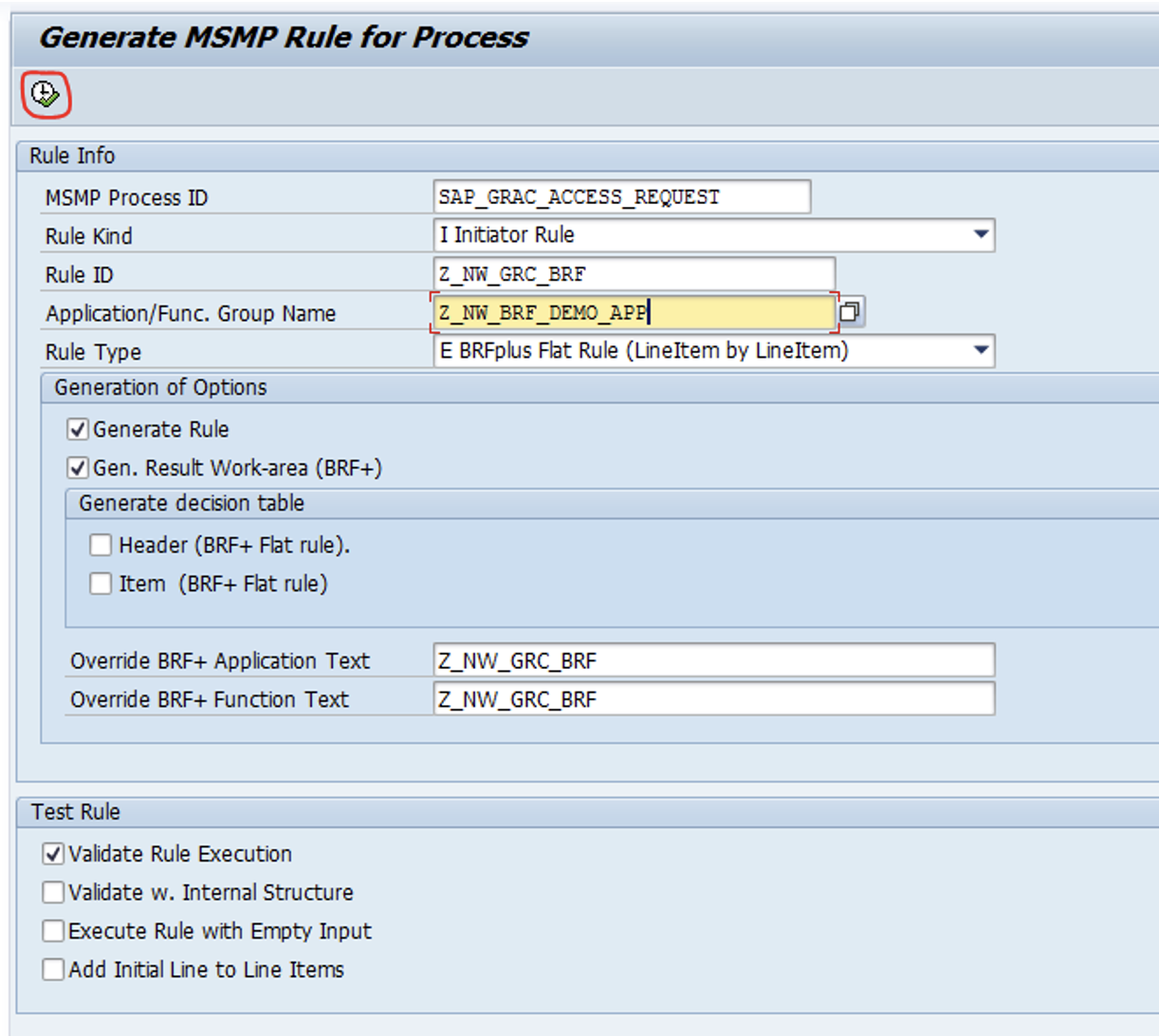
Path: SPRO -> IMG -> GRC -> AC -> Workflow for AC -> Define Workflow Related MSMP Rule -> execute and enter all below fields as per requirement
(OR)
In transaction GRFNMW_DEV_RULES the relevant MSMP process ID - (here SAP_GRAC_ACCESS_REQUEST) can be selected.
Select the following configuration:
- Rule Type: BRFplus Flat Rule (Line Item by Line Item)
- Rule Kind: Initiator Rule
NOTE: The Rule ID should be self-explanatory and aligned with your organization’s naming convention, and the name of the application that was previously created needs to be added.
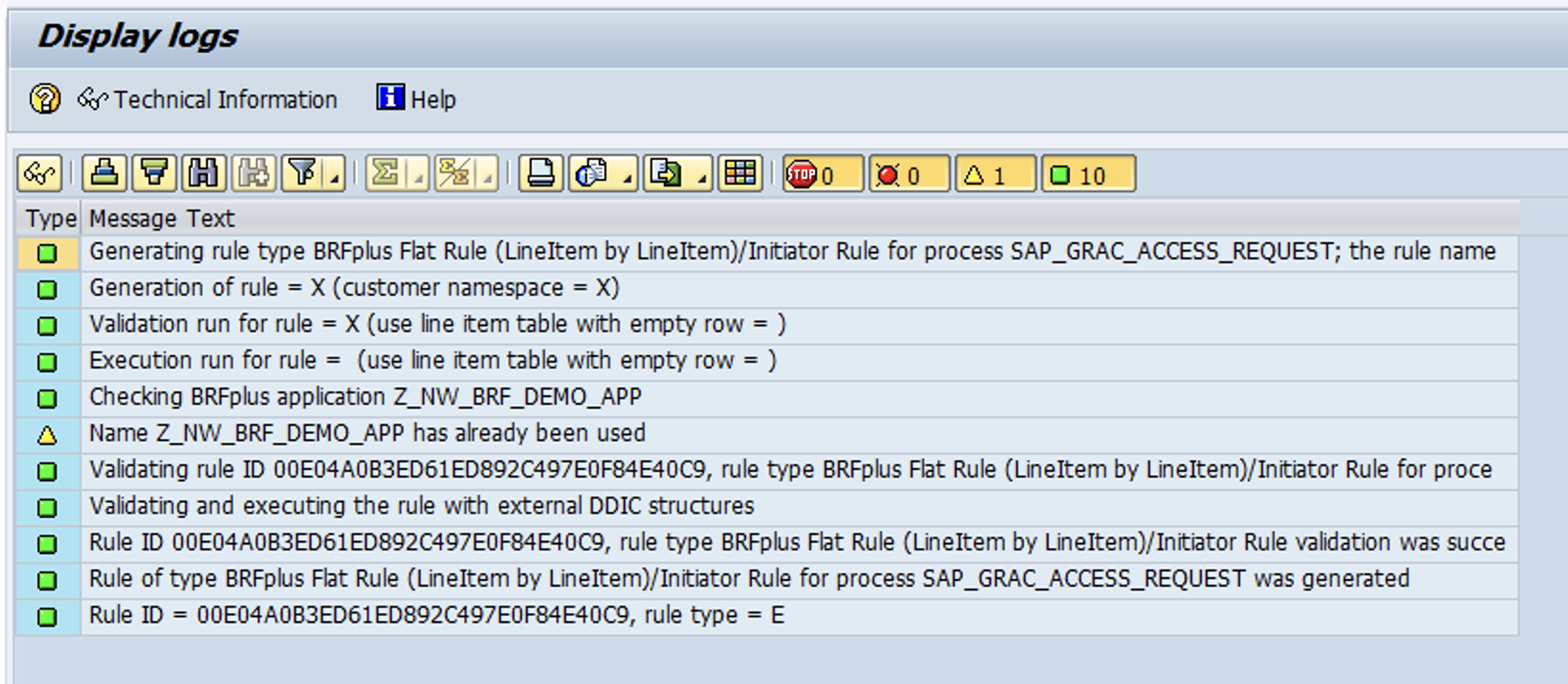
Step 5 - If the decision table has not yet been generated, click Top Expression → Create.
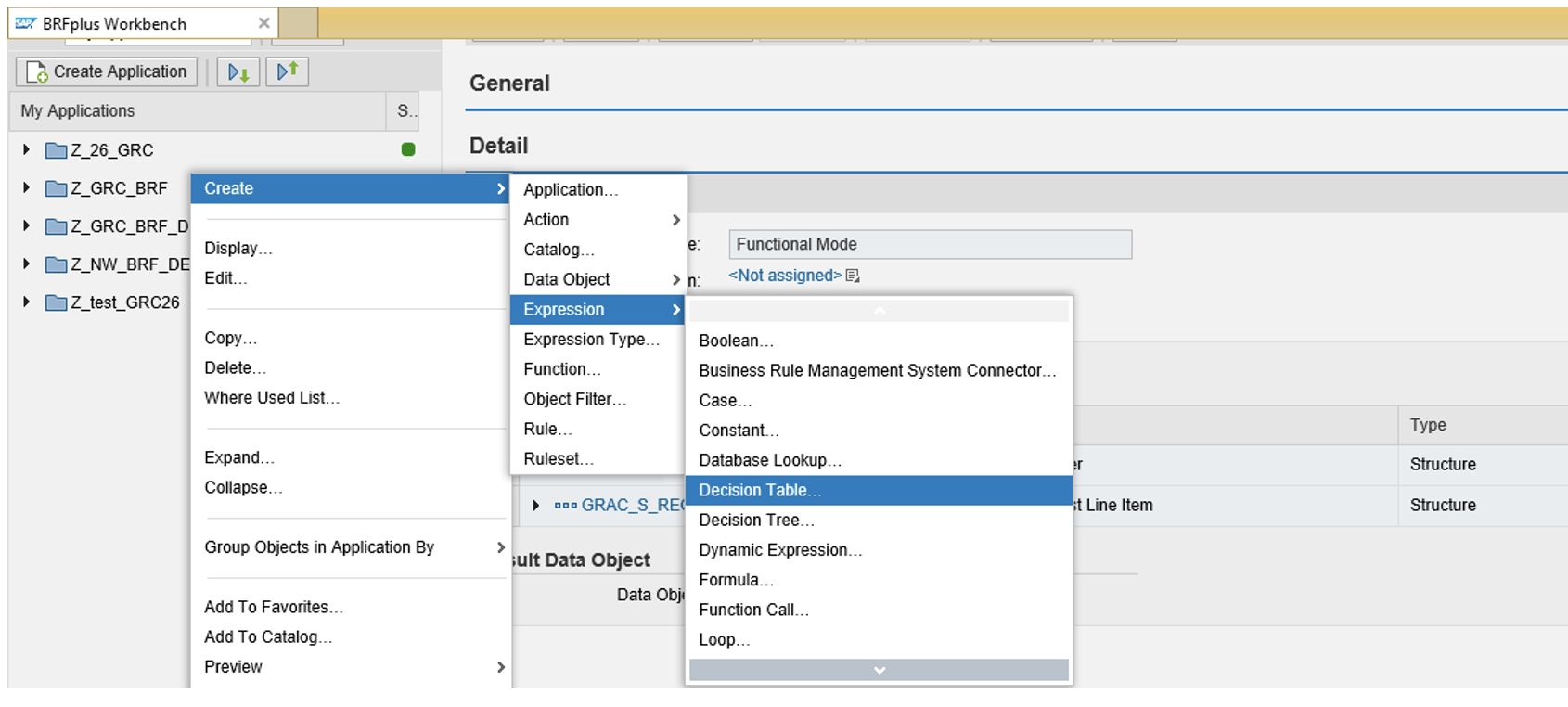
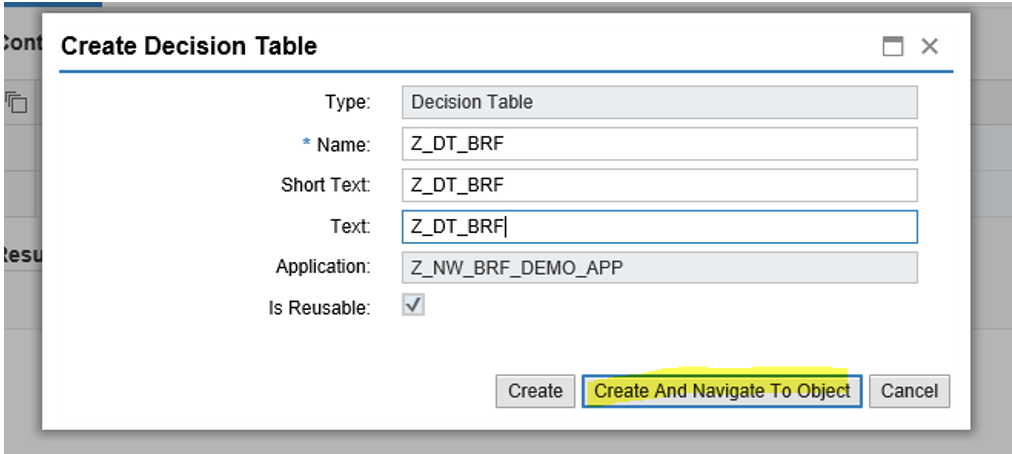
Create Decision Table: Right-click Z_NW_BRF_DEMO_APP -> Create -> Expression -> Decision Table.
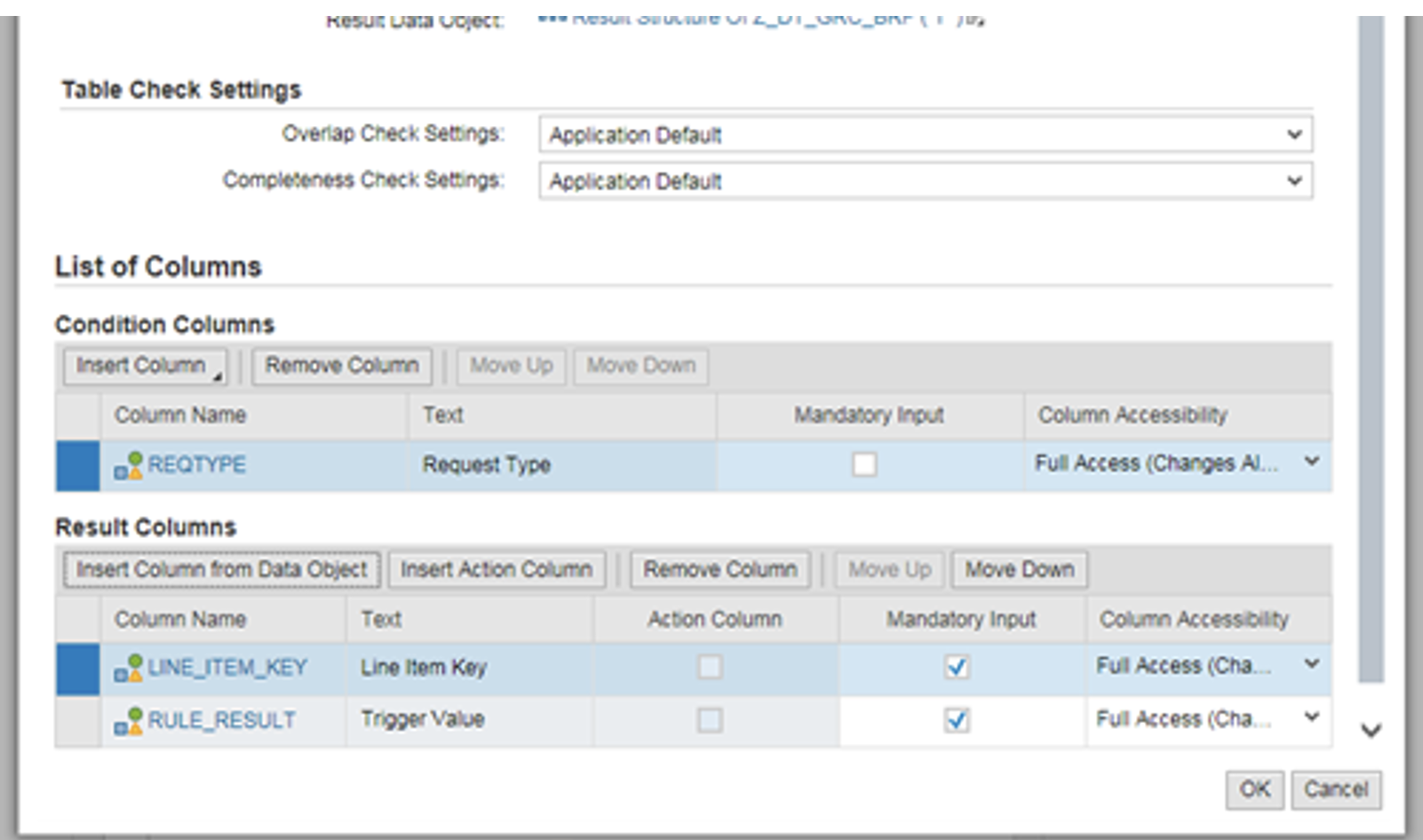
 Condition Columns:
Insert columns from Context Data Objects → Request Header → Request Type
Result Columns:
Insert columns from Data Objects → Search → Select the required Result objects. → go to Result object and select all the objects which are in Result – hit OK
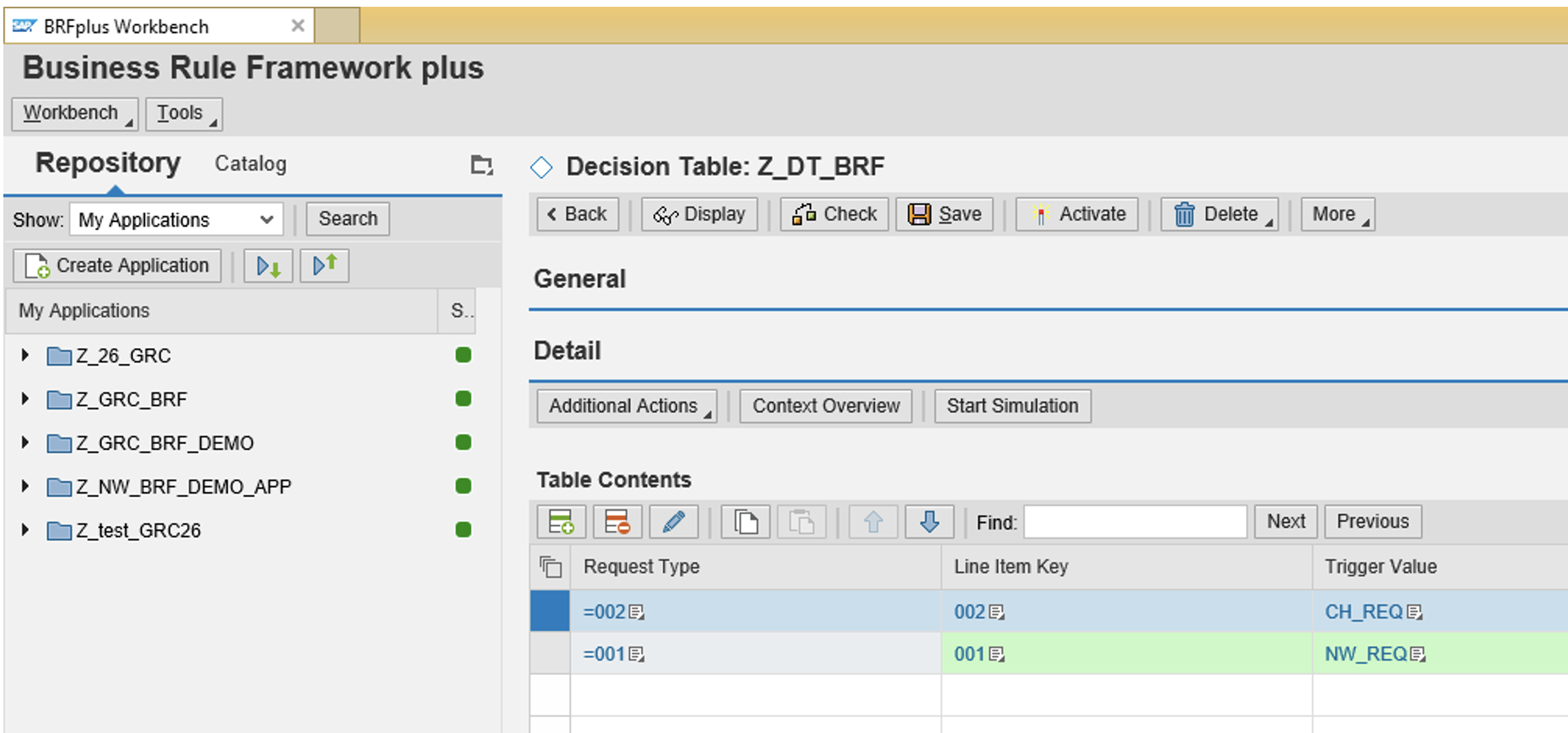
Important: Understanding the MSMP Trigger Value
The Trigger Value is critical in MSMP workflows because it determines how the workflow routing logic is executed. The value defined in the decision table result column is used later in:
- MSMP routing rules
- Stage determination
- Approval path logic
Important: Ensure the trigger value is consistent with the workflow configuration.
Step 6: Assign the Decision Table to the Rule Function
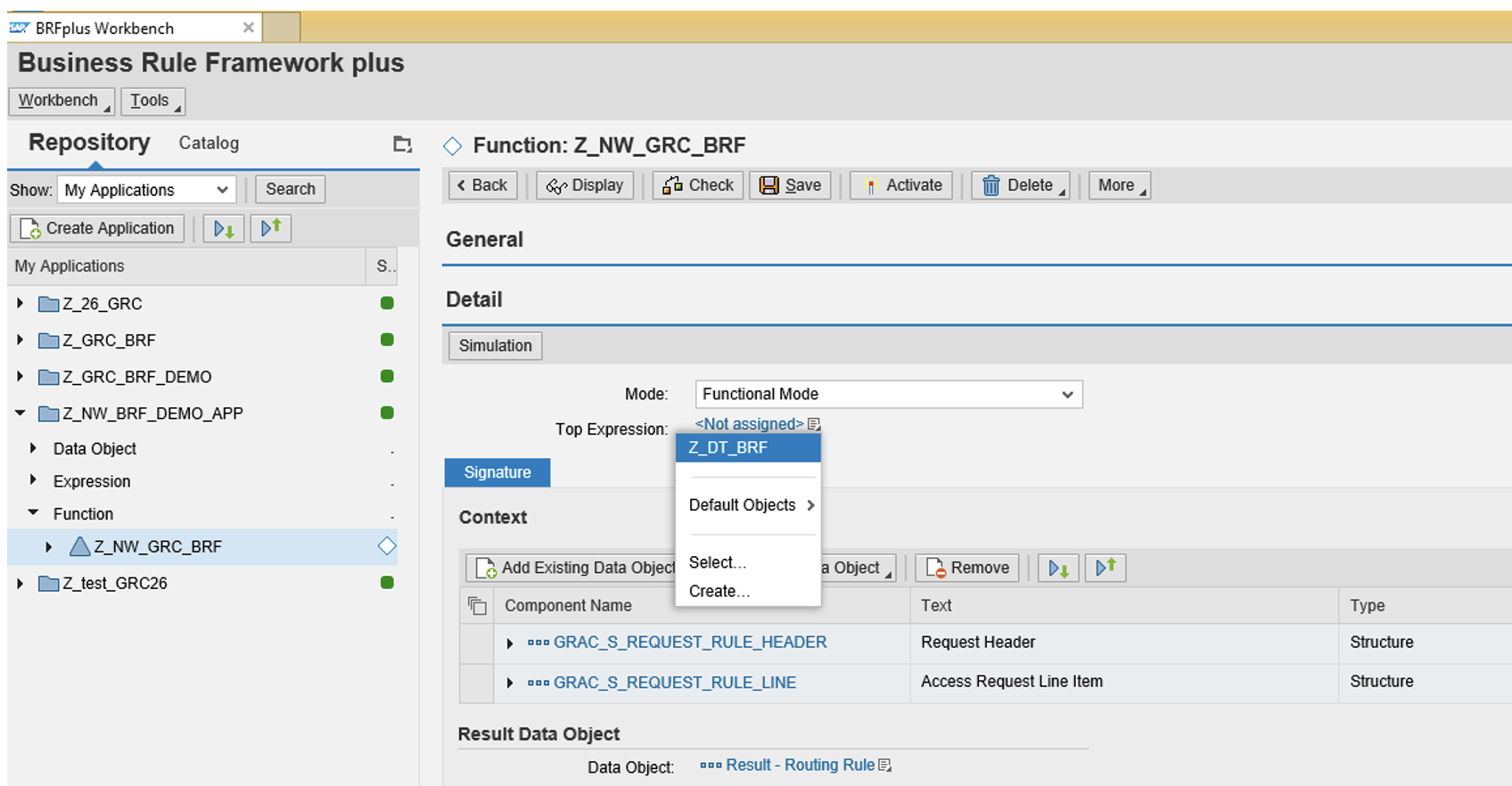
- Select Function -> Z_NW_GRC_BRF -> Right-click and EDIT
- Mode: Functional Mode
- Select Top Expression -> Pick Z_DT_BRF ( this the name we mentioned for Decision Table)
- Save and Activate and copy the rule ID -- we will use it in MSMP
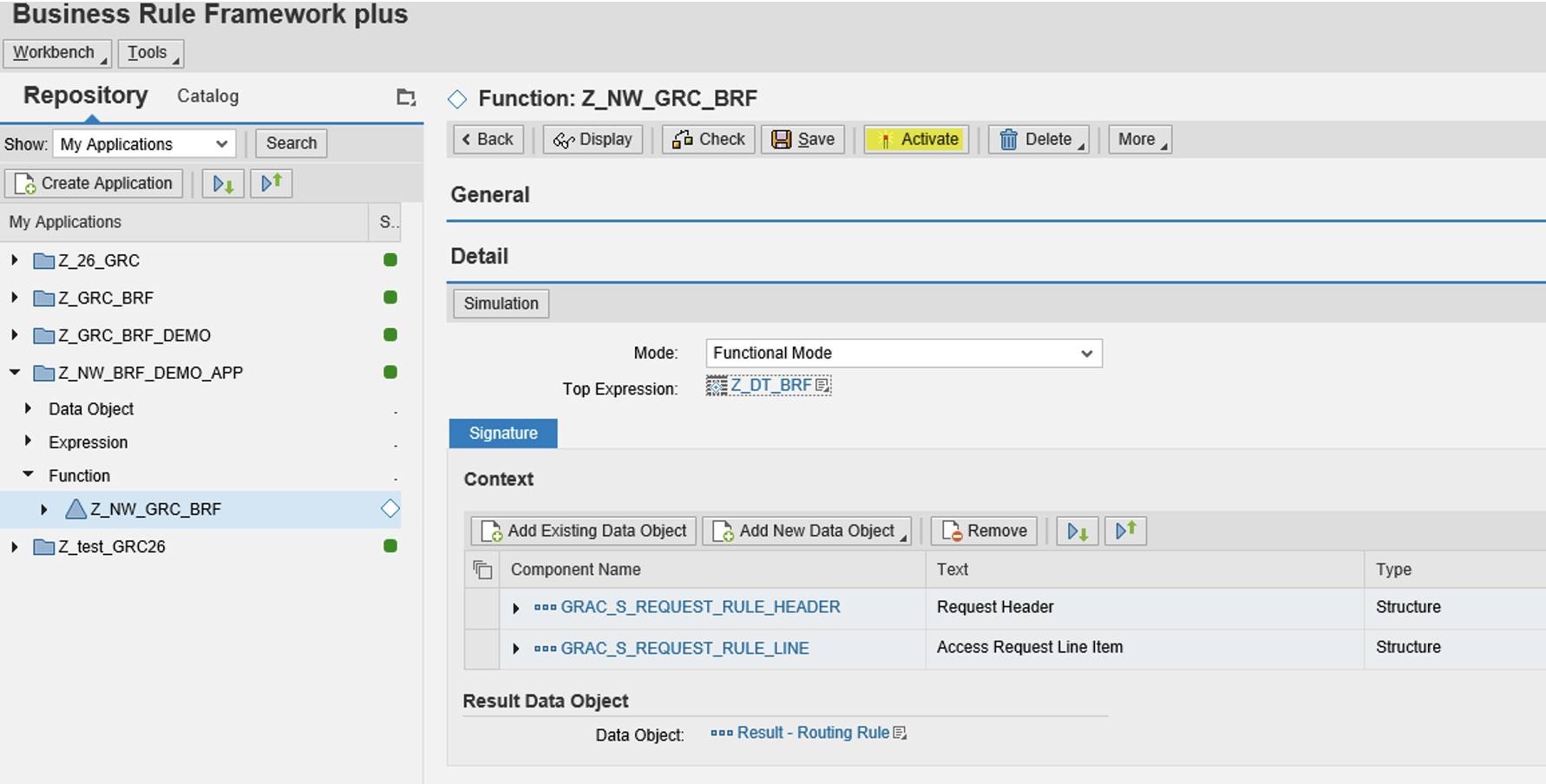
How to Make an Existing BRF+ Initiator Rule Transportable in SAP GRC
To make an existing BRF+ application transportable, follow the steps below:
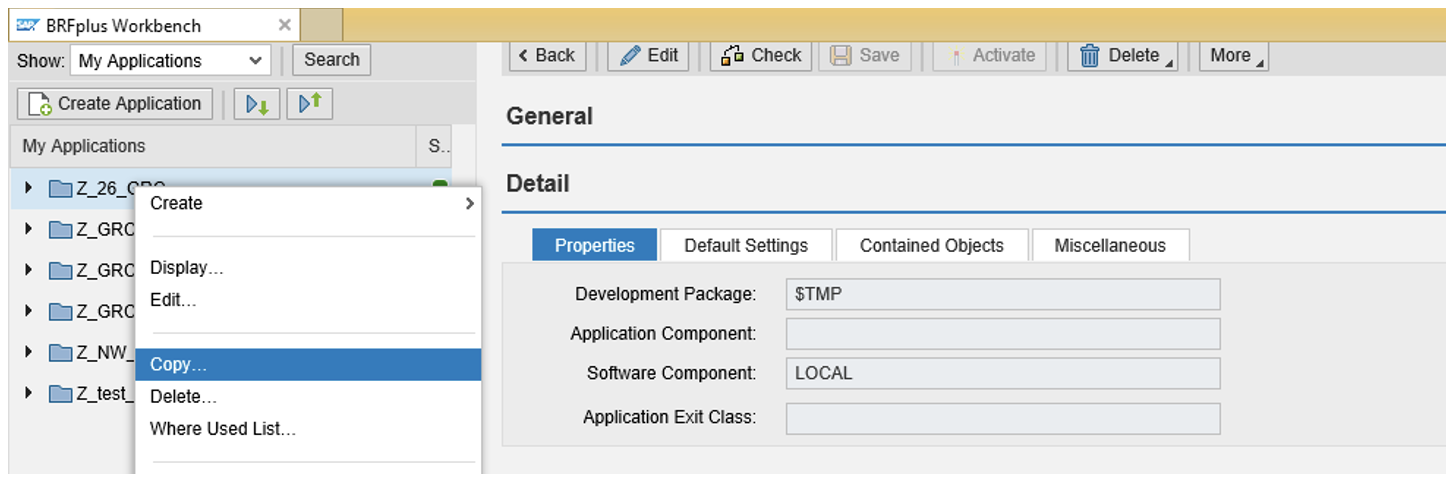
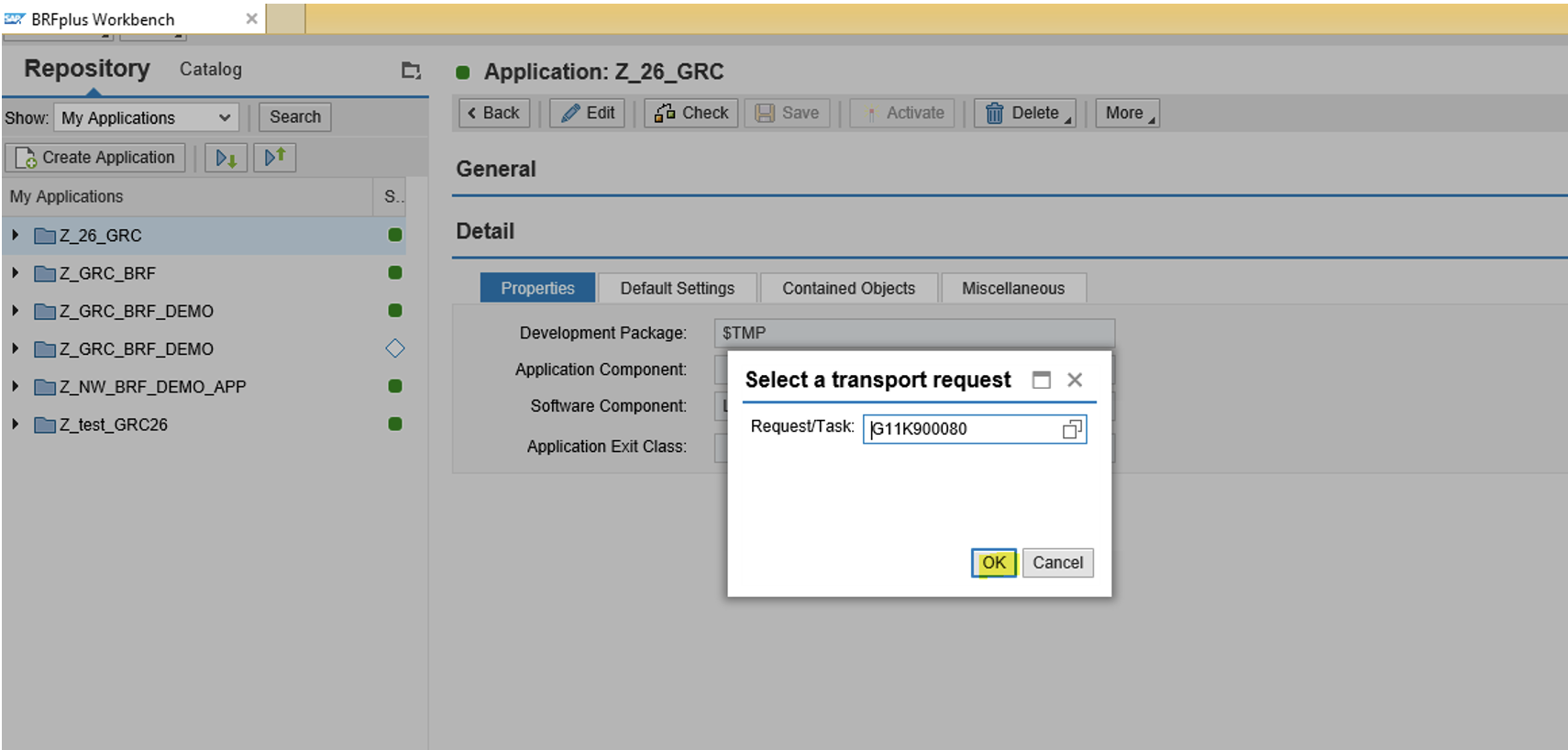
- Copy the application from $Temp package to SAP Development package.
- Execute BRF+ transaction code –> Navigate to the application which is saved into $Temp package.
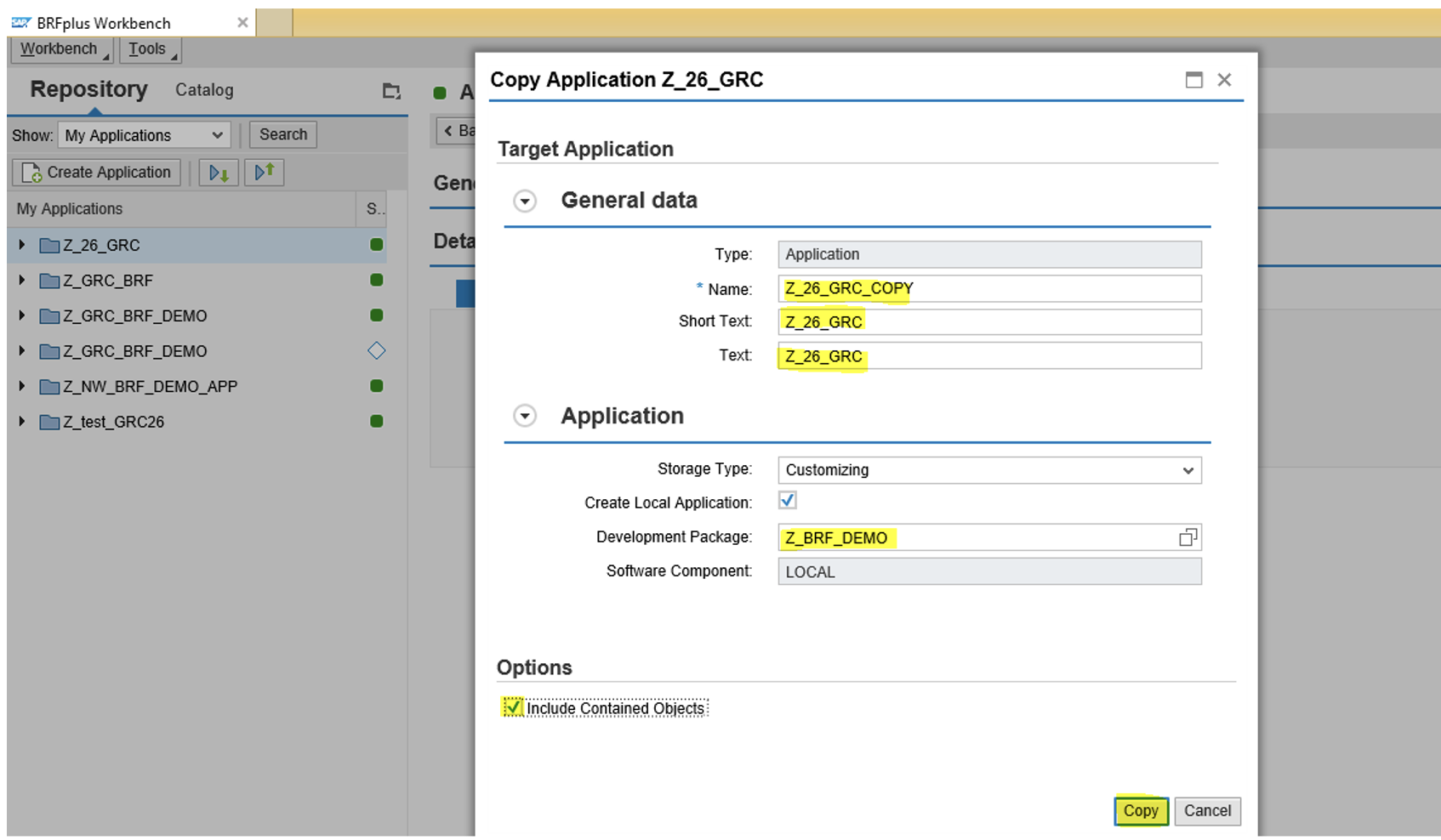
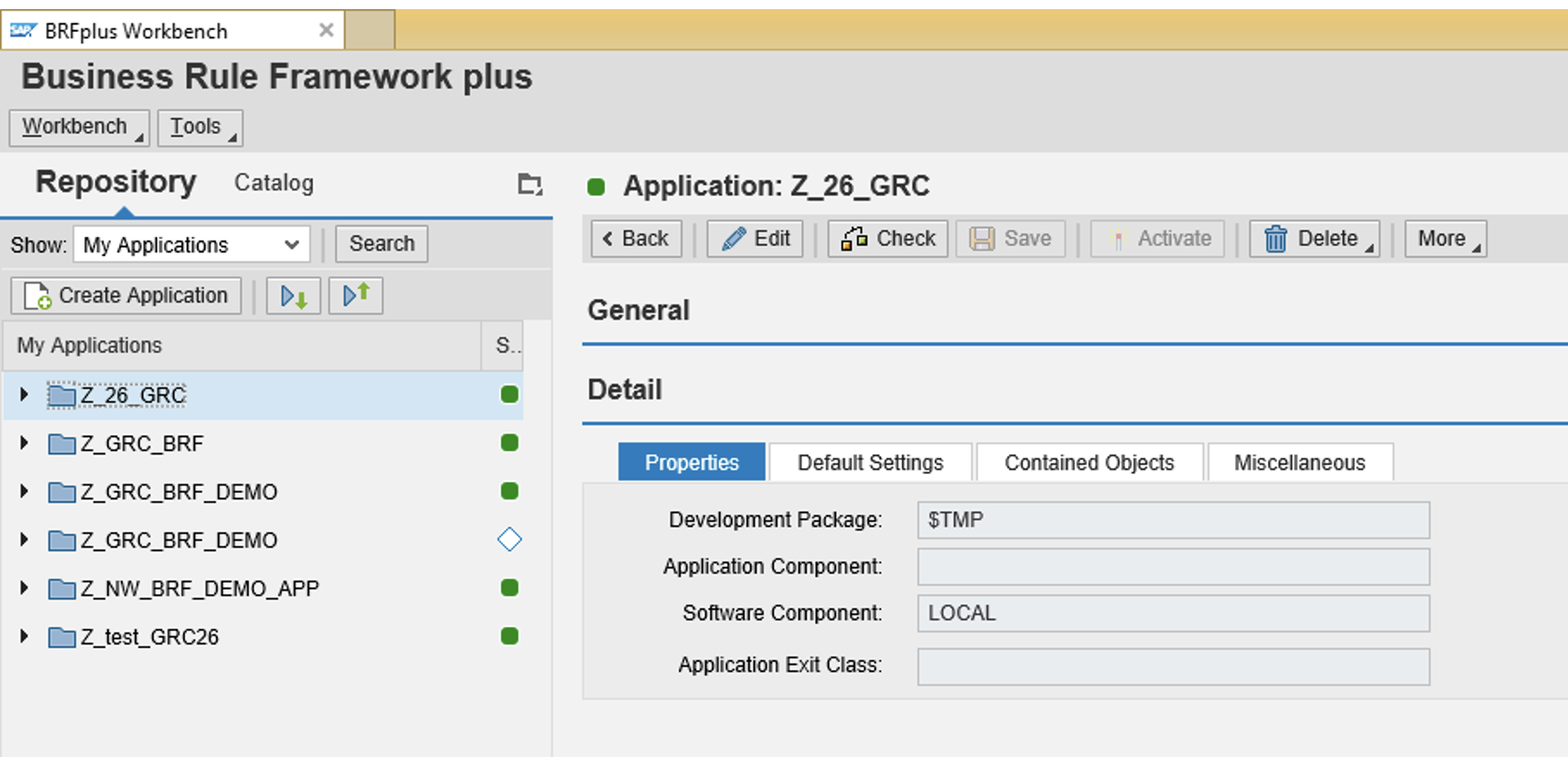 3) On the new screen, enter the New-Application name (target application name), description and short text.
You need to make sure to uncheck the box for “Create Local Application”. If you miss this step, you would again end up copying the target application into $Temp package.
If you have created a package specifically for BRF+ then you can mention the package name under “Development package”.
Note: If Development package in not created, then you can create with transaction code: SE21.
Understanding how BRF+ integrates with SAP GRC workflow configuration is essential for designing scalable access governance processes.
Related Articles (will be added soon)
- SAP GRC MSMP Workflow Explained
- SAP GRC Access Request Workflow Architecture
- How BRF+ Decision Tables Work in SAP
Conclusion
Creating a transportable BRF+ flat initiator rule ensures that MSMP workflow rules can move seamlessly across SAP landscapes.
By placing the BRF+ application inside a transportable development package, organizations can maintain consistent workflow logic across Development, QA, and Production systems.
Following this structured approach also simplifies workflow maintenance and governance in SAP GRC Access Control.
Properly designing transportable BRF+ rules for SAP GRC MSMP workflows helps organizations maintain secure, scalable, and auditable access governance processes.
This approach also ensures that workflow logic changes remain auditable, maintainable, and aligned with enterprise change management policies.
Best Practice
Always create BRF+ applications in a transportable development package rather than the $TMP local package to ensure workflow rules can be safely transported across systems.