- By Raghu Boddu - SAP Security & GRC Leader | Author | Co-Founder at ToggleNow | SAP Cybersecurity Advisor
- Published: May 10, 2026
SAP Security programs have evolved significantly over the last decade. Many enterprises today have implemented some form of access governance such as periodic user reviews, SoD monitoring, privileged access management, or audit logging. Yet during security assessments and remediation programs, one recurring issue continues to surface across SAP landscapes of all sizes is -
Critical security-related profile parameters are often either misconfigured, inconsistently maintained, or never reviewed after the initial implementation phase.
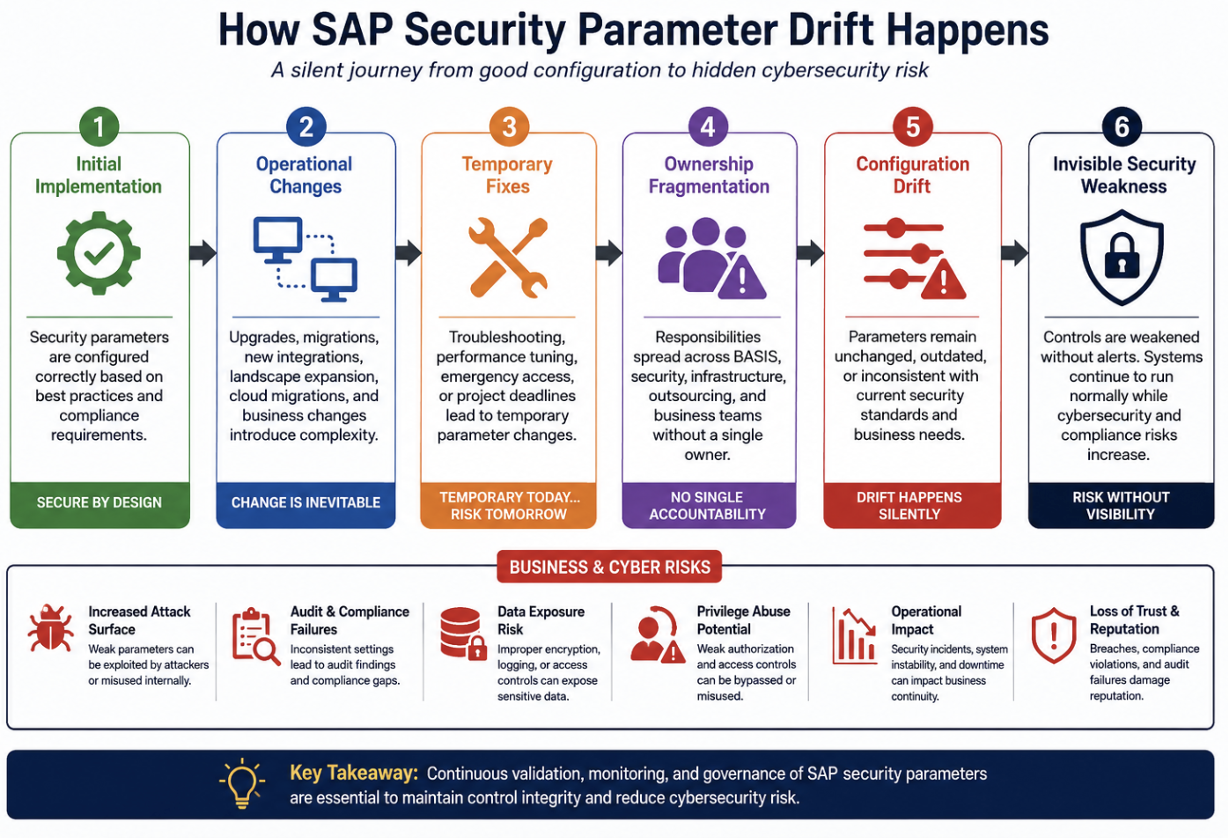
This is not necessarily due to lack of awareness. In many cases, these parameters were originally configured correctly. However, over time, landscapes evolve through upgrades, migrations, troubleshooting activities, system refreshes, outsourcing transitions, and emergency operational fixes.
Parameter governance slowly becomes fragmented between BASIS, infrastructure, hosting, and security teams.
The result is a silent configuration drift that weakens the overall SAP security posture without creating immediate visible failures.
Unlike missing role approvals or failed audit controls, parameter-level weaknesses rarely generate operational alerts. Systems continue functioning normally while underlying security assumptions gradually become unreliable.
This is particularly important because SAP profile parameters directly influence:
- authorization enforcement,
- RFC behavior,
- encryption controls,
- audit logging,
- privileged access behavior,
- and runtime security validation.
From an audit and cybersecurity perspective, these are foundational controls rather than optional hardening recommendations.
The following parameters are among the most commonly overlooked or inconsistently governed settings observed in enterprise SAP environments.
Parameter # 1 - auth/object_disabling_active
Authorization Controls Can Be Quietly Weakened Without Changing Roles
The auth/object_disabling_active parameter is a prerequisite for globally deactivating checks on individual authorisation objects.
When this option is set to Yes (By default, its Y), administrators with access to Transaction code - AUTH_SWITCH_OBJECTS can go ahead and disable authorization objects globally.
NOTE: Objects in object class Basis (BC) and Human Resources (HR) - (S* or P*) are exception to this rule for obvious reasons. These cannot be disabled.
Refer to the below screen from transaction code
AUTH_SWITCH_OBJECTS:
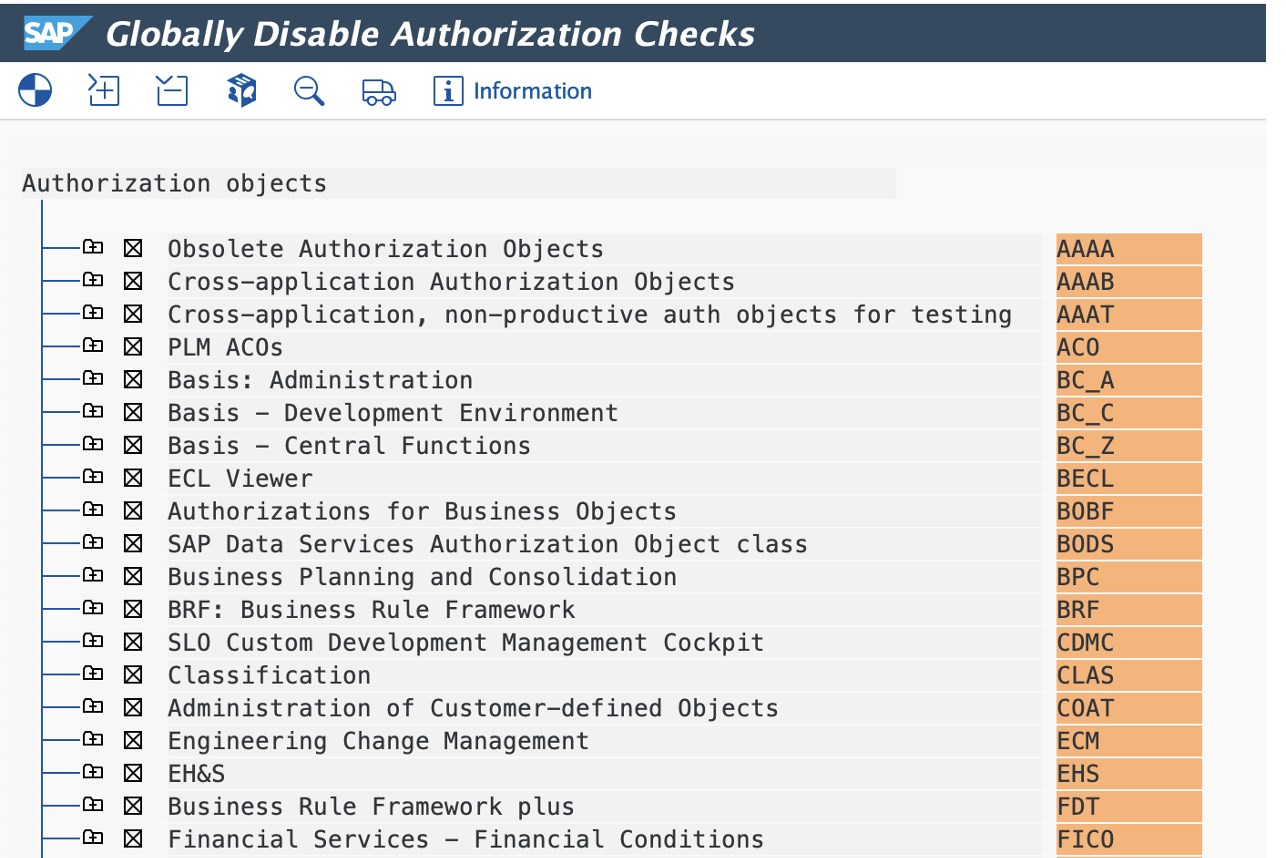
This parameter & transaction code is applicable to All ABAP Stack NetWeaver versions. Thus, it must be carefully managed.
Additional References
SAP Help:
Authorization object checks documentation
SAP Note 3591708:
Understanding the Functionality of Profile Parameter auth/object_disabling_active
Expert View:
From a technical perspective, this functionality was designed to support exceptional operational scenarios. In practice, however, it introduces significant governance risk if not tightly controlled.
During troubleshooting or custom development testing, organizations sometimes disable authorization checks temporarily to resolve operational issues or accelerate testing cycles. The challenge is that these temporary adjustments are not always revisited after go-live or project completion.
Over time, enterprises may continue reviewing roles, SoD conflicts, and access risks while certain runtime authorization validations are no longer behaving as originally intended.
This creates a dangerous disconnect between perceived governance and actual enforcement.
The risk becomes even more significant in environments where compliance frameworks such as SOX, FDA validation requirements, or internal ITGC standards depend on preventive access controls operating consistently across production systems.
From a governance standpoint, enterprises should periodically validate:
- whether the parameter is enabled,
- whether any authorization objects were disabled historically,
- and whether runtime authorization behavior still aligns with approved security design.
Parameter # 2 - rfc/reject_expired_passwd
Technical Users Often Operate Outside Standard Password Governance
Technical users continue to remain one of the least governed areas in many SAP environments.
Most organizations enforce password policies rigorously for dialog users. Password expiration, complexity rules, lockout thresholds, and MFA initiatives are commonly implemented for business users. However, RFC and interface accounts often remain operational for years with limited governance oversight.
Setting up the parameter rfc/reject_expired_passwd to 1 initiates a system check for productive passwords in Remote Function Calls (RFCs). This means that passwords must not be expired or initial for users attempting to log in.
While it is not mandatory to set this parameter; it creates a broader risk exposure than many enterprises realize. RFC users frequently possess:
- elevated authorizations,
- background execution capability,
- cross-system communication privileges, and
- broad process-level access.
Because these accounts are heavily integrated into system-to-system communication, they also tend to receive fewer operational reviews compared to dialog users.
NOTE : This parameter affects both Dialog and Communication user types. If a user attempts to log in with an expired or initial password, the system will reject the connection.
Additional Reference
SAP Note 2579165:
Parameter rfc/reject_expired_passwd
Expert View:
In several SAP cyber incidents publicly discussed by SAP security researchers and threat intelligence firms, insecure technical user governance has been identified as a contributing factor in lateral movement and unauthorized access scenarios.
SAP security frameworks increasingly emphasize stronger RFC governance through:
- trusted RFC reviews,
- RFC authorization checks,
- UCON implementation, and
- tighter monitoring of technical accounts.
Microsoft Sentinel’s SAP monitoring guidance also references RFC and authorization-related parameters as security-sensitive configuration areas requiring monitoring.
https://docs.azure.cn/en-us/sentinel/sap/sap-suspicious-configuration-security-parameters
Enterprises should therefore evaluate RFC password governance with the same rigor applied to business users rather than treating technical accounts as operational exceptions.
Parameter # 3 - rsau/enable
Audit Logging Is Frequently Assumed to Be Active Rather Than Continuously Verified
One of the most common assumptions during SAP audits is that Security Audit Logging (SAL) is already enabled and functioning correctly because transaction SM19 was configured at some point in time.
In reality, logging continuity is often far more inconsistent than organizations expect.
The parameter rsau/enable is directly associated with activation of the SAP Security Audit Log (SAL).
SAP documentation and multiple SAP technical references describe this parameter as part of the Security Audit Log framework used to capture security-related activities such as unsuccessful logons, RFC activity, and changes to sensitive system objects.
The Security Audit Log itself plays an important role in:
- Forensic investigations,
- Insider threat analysis,
- Audit evidence generation,
- Privileged activity monitoring, and
- Compliance reporting.
However, many organizations still manage SAP audit logging operationally rather than strategically.
Common issues observed across landscapes include:
- logging activated only during audits,
- insufficient filter coverage,
- log retention inconsistencies,
- lack of monitoring for logging disablement, or
- assumptions that logging remained active continuously after initial setup.
SAP’s own guidance around the Security Audit Log has evolved significantly over the years, especially in newer NetWeaver and S/4HANA releases where dynamic configuration and database logging options became more mature.
Expert View:
From a compliance perspective, this becomes highly relevant under frameworks such as:
- SOX,
- MCA Rule 11(g),
- GDPR/DPDPA, and
- broader cybersecurity monitoring expectations.
A logging mechanism that can be disabled silently without immediate visibility creates a governance weakness regardless of whether the feature exists technically within SAP.
This is precisely why many mature SAP security programs are now moving toward continuous audit monitoring and tamper-evident logging models instead of relying solely on periodic manual reviews.
Organizations evaluating stronger audit trail enforcement mechanisms can explore ThreatSense AI Audit Trail Enforcer as an additional control layer to help automatically enforce audit logging integrity and identify potential deficiencies proactively.
Additional References
SAP Note 3416951:
What are SAL (Security Audit Log) kernel parameters and how do they work?
Parameter # 4 - wdisp/ssl_encrypt
Internal SAP Traffic Is Frequently Trusted More Than It Should Be
Historically, many SAP environments were designed around the assumption that internal corporate networks were inherently trustworthy. That assumption is no longer realistic.
Modern cyberattacks increasingly originate from:
- Compromised internal endpoints,
- Unmanaged third-party devices,
- VPN compromise,
- Insider activity, or
- Lateral movement after initial breach access.
The parameter wdisp/ssl_encrypt is used within SAP Web Dispatcher configurations to enforce encrypted communication over HTTP channels. From a security perspective, this is critical because SAP systems routinely process highly sensitive operational and financial information.
Without strong encryption enforcement, enterprises increase exposure to:
- Credential interception,
- Session hijacking,
- Unauthorized traffic inspection
- Data tampering risks.
This becomes particularly important in hybrid and internet-facing SAP architectures where SAP Web Dispatcher often acts as a key communication layer between users, applications, and backend systems.
The issue is not limited to external exposure alone.
Expert View:
Organizations frequently underestimate risks associated with internal network traffic visibility. Once an attacker gains a foothold within the network, weak internal encryption controls can significantly simplify reconnaissance and lateral movement activities.
Cybersecurity standards and enterprise security frameworks increasingly expect encryption-by-default behavior across critical enterprise applications rather than selective encryption based on perceived network trust levels.
In SAP environments, this expectation should extend consistently across Web Dispatcher communication layers as well.
NOTE : This parameter along with few of wdisp parameters don't take effect when wdisp/server_info_location is set and when no system parameter or message server parameters are defined. For detailed information, refer to SAP Note – 2090179
Parameter # 5 - login/no_automatic_user_sapstar
Forgotten Emergency Access Paths Continue to Create Risk
The SAP* user remains one of the most widely recognized privileged accounts in SAP systems. In the older versions, there is no option to disable the SAP* and the only control is to lock the ID and reset the password. Administrators used to validate the availability and status of these IDs using RSUSR003 report.
SAP introduced the parameter login/no_automatic_user_sapstar (default is 0 – permitted) which can be used to control this.
SAP security guidance and multiple SAP security references strongly recommend restricting this behavior in productive environments. Check:
Many organizations assume this risk no longer applies because:
- SAP* is not actively used,
- Passwords were changed years ago, or
- The account appears locked during standard operations.
However, emergency access mechanisms become especially relevant during:
- Client refreshes,
- Recovery activities,
- System copies, or
- Unexpected operational scenarios.
In such situations, dormant privileged access paths can become active unexpectedly if governance controls are inconsistent.
Additional References
SAP Note 68048:
Deactivating the automatic SAP* user
SAP Note 3303172:
Activating a Super-User SAP*
SAP Note 3250501:
Information on mandatory Security Parameters & Hardening requirements for ABAP systems in SAP Enterprise Cloud Services (ECS)
Expert View:
This is less about day-to-day administration and more about defensive security posture.
Attackers, auditors, and security assessors all recognize the significance of privileged fallback accounts. Any uncertainty around emergency access behavior weakens confidence in the broader privileged access governance model.
For mature SAP security programs, privileged access governance should not focus only on active Firefighter IDs or named administrators. It should also include continuous validation of emergency and fallback access mechanisms embedded within the SAP platform itself.
In most enterprises, these risks do not emerge overnight. They evolve gradually through operational changes, fragmented ownership, and silent configuration drift across the SAP landscape.
Why These Parameters Continue to Be Overlooked
While the underlying issue is rarely lack of technical capability within SAP, the more common problem is operational ownership. Over time, enterprises typically experience:
- Landscape expansion,
- Cloud migrations,
- Managed service transitions,
- Multiple implementation partners, and
- Fragmented operational responsibilities.
During this evolution, profile parameter governance often becomes reactive rather than continuous.
Security teams assume BASIS teams are monitoring the settings. BASIS teams assume the parameters were already approved during implementation. Audit teams validate screenshots periodically without verifying runtime continuity.
As a result, configuration drift slowly accumulates across the landscape.
This is one of the reasons why mature SAP security operations are increasingly focusing not only on user governance, but also on continuous platform-level control validation.
Final Thoughts
SAP security maturity is not achieved solely through:
- SoD remediation,
- Access reviews,
- Workflow approvals, or
- Privileged access monitoring.
Those are important components, but they represent only part of the overall security posture. The technical control layer underneath the application is equally important.
Profile parameters directly influence how SAP systems:
- Enforce authorizations,
- Validate communication,
- Protect privileged access, and
- Generate security visibility.
Yet these controls often receive far less continuous governance attention than user access itself.
In practice, some of the most significant SAP security weaknesses are not caused by missing tools or missing controls. They are caused by assumptions that critical parameters were configured correctly years ago and never drifted afterward.
Enterprises rarely get breached because security controls were completely absent.
More often, controls existed - but were weakened over time through misconfiguration, operational drift, inconsistent monitoring, and false assumptions around control continuity.