A Practical Guide to India's Electronic Books-of-Account Compliance in SAP S/4HANA Cloud Public Edition
India's Companies (Accounts) Rules, 2014 require every company to maintain its books of account and supporting records in electronic form on a server physically located in India, with daily back-ups. For SAP organisation running SAP S/4HANA Cloud Public Edition, SAP Document and Reporting Compliance (DRC) offers a purpose-built way to generate the readable audit files this rule calls for.
This article walks through exactly how that sample compliance report is built, configured, extended, so that finance, IT, and audit teams can reproduce it in their own landscape.
The Regulatory Backdrop
Rule 3 of the Companies (Accounts) Rules, 2014, as amended in August 2022, requires that books of account and other statutory records be kept in electronic mode on a server physically located in India, with a daily back-up including where the server is maintained by a third-party service provider outside India. For enterprises running their core finance processes on SAP S/4HANA Cloud, this creates a very specific technical question: how do you produce a readable, India-resident audit file from cloud-hosted transactional data on a repeatable, controlled basis?
SAP addresses this in an addendum to SAP Note 3443920, which explains that SAP Document and Reporting Compliance can be used purely as a file-generation engine to produce such audit files, it is explicitly not a data-backup or archiving tool, and it does not offer delta (incremental) extraction.
Understanding that distinction matters: DRC's job in this scenario is to generate a complete, well-structured extract on demand; the customer's own data management and back-up processes take it from there.
The tools at the center of this approach are three standard SAP S/4HANA Cloud Public Edition apps, Define Statutory Reports, Run Statutory Reports, and Custom CDS Views used together with a sample report configuration, YY1_IN_AUDIT, published as an attachment to SAP Note 3443920.
Why SAP Document and Reporting Compliance
SAP Document and Reporting Compliance is SAP's standard framework for country - and region-specific statutory and legal reporting. Rather than building a bespoke ABAP report or relying on ad-hoc downloads, DRC gives administrators a configuration-driven way to define what data a report pulls, how it is filtered, what output format it takes, and who is authorized to run it, all governed by the same role and authorization framework as the rest of SAP S/4HANA Cloud. That makes it a natural fit for a compliance requirement like India's electronic books-of-account rule, where the output must be defensible, repeatable, and auditable.
Prerequisites
Before building the report, the following license, business catalogs, and roles need to be in place:
Creating the Report Definition
The Define Statutory Reports app is where a statutory report's structure, its parameters, query logic, and output documents is designed. It is opened with the Fiori launchpad, where it also shows a live count of existing report definitions in the system.
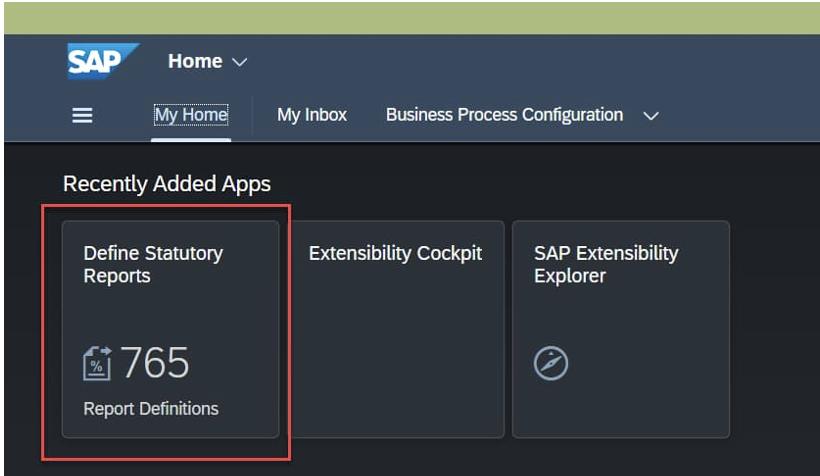
Figure 1 - The Define Statutory Reports tile on the Fiori Home page, showing existing report definitions.
Inside the app, selecting the Report Definition tab and choosing Upload allows the YY1_IN_AUDIT_Definition.ZIP file to be loaded directly. The upload dialog confirms the target Report Definition ID and lets the administrator select any accompanying schemas or configuration parameters bundled with the package.
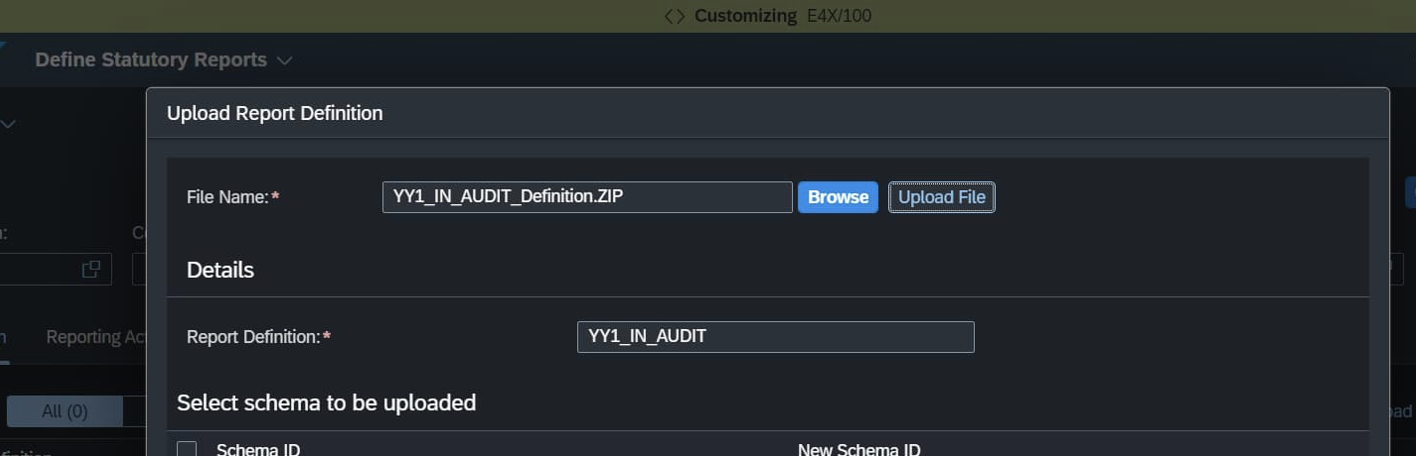
Figure 2 - Uploading the YY1_IN_AUDIT_Definition.ZIP package into the Report Definition tab.
Once uploaded, the definition opens in display mode, showing its general properties and critically its Parameter Definition: the five input fields (Company Code, Business Place, Ledger, Date From, Date To) that will later drive the selection screen every time the report is run.
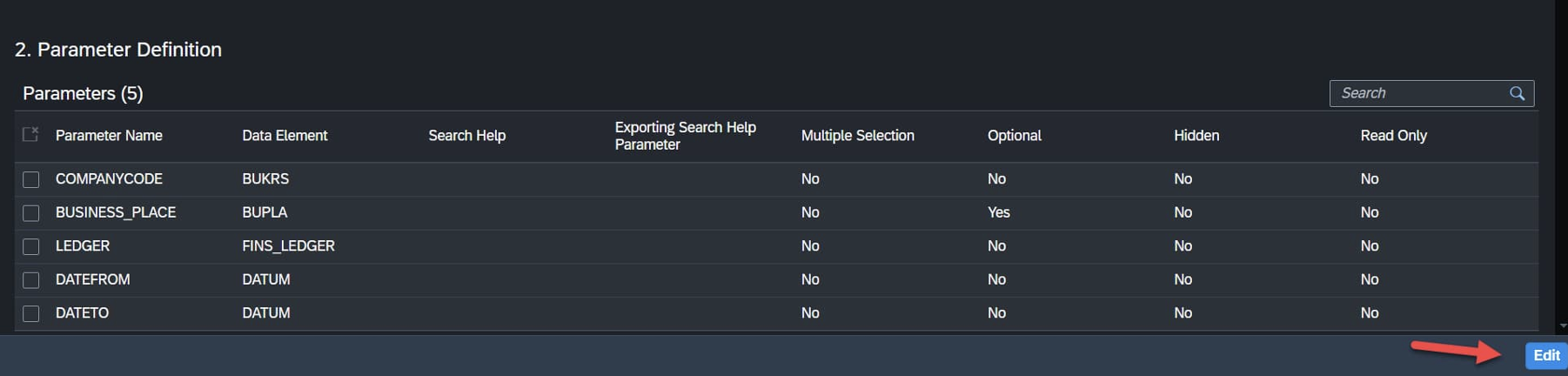
Figure 3 – Run-time parameters
Selecting Edit and then Activate compiles and validates the report definition. SAP typically flags informational warnings at this stage, these can be reviewed in the log, and the report can still be activated with an optional comment recorded against the activation.
Creating the Report Category
A Report Category is how SAP Document and Reporting Compliance groups report versions by functionality, country or region, organizational unit, and reporting phase. It is the object that ties a report definition to the organizational context it serves in this case, India (country/region IN) and a Declaration phase with a Run Level submission.
The category is created the same way as the definition by uploading YY1_IN_AUDIT_Category.ZIP from the Report Category tab and then activated. The resulting category record shows its phase, organizational unit, and reporting-activity assignments in one place.
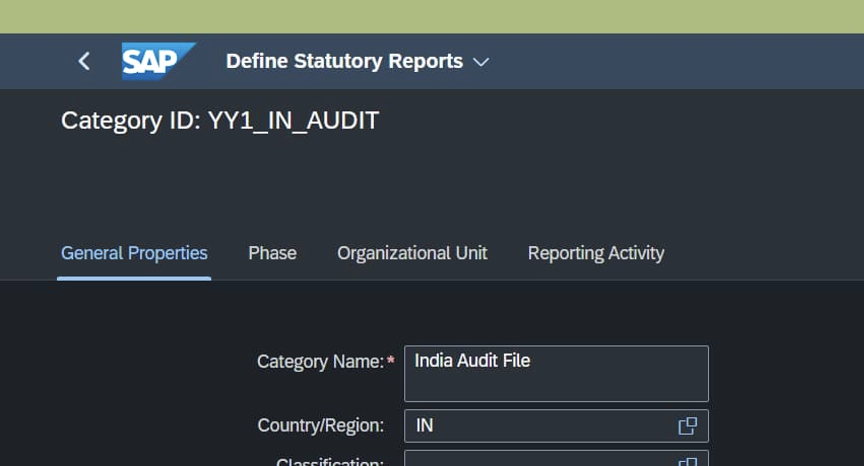
Figure 4 - The activated YY1_IN_AUDIT Report Category, “India Audit File,” scoped to country/region IN
Linking Everything in Customizing
With the report definition and category both active, the final design-time step happens in the Setting Up Your Statutory Reporting configuration activity (SSCUI ID 101071). This is where a Reporting Entity is created and explicitly connected to the report category, its periodicity (in this example, Ad hoc meaning the file is generated on demand rather than to a fixed calendar), its reporting activity, and the organizational unit (company code) it applies.
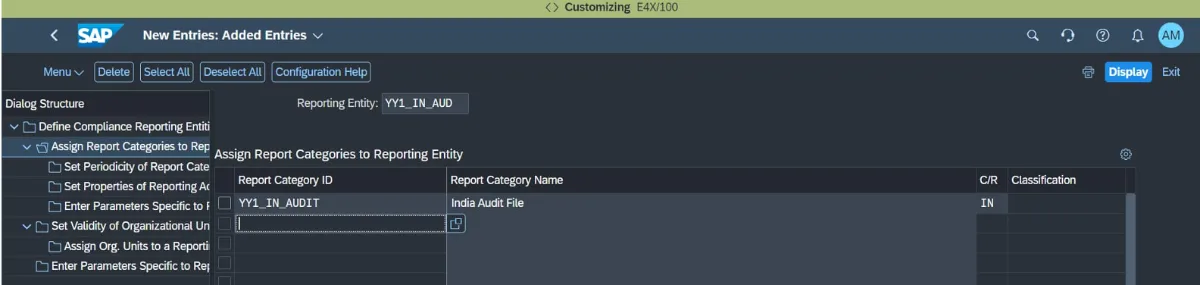
Figure 5 - Assigning the YY1_IN_AUDIT report category to the new India Audit reporting entity in customizing
Ad hoc reports of this kind are non-periodic: they may be requested by tax or regulatory authorities on a non-regular basis, or generated on demand to support an audit request, rather than following a fixed monthly or quarterly filing calendar which fits India's back-up-on-demand style requirement well.
Running the Report
Once configuration is complete, day-to-day execution happens in the separate Run Statutory Reports app deliberately kept apart from the design-time app so that finance or audit staff running the report do not need administrator-level access. Typing the report name in the filter bar brings up the India Audit File report, ready to be created as a new ad hoc run.

Figure 6 - Filtering for the YY1_IN_AUDIT report in the Run Statutory Reports app
Selecting New Run opens the selection criteria: the specific documents to generate, the company code, the ledger, and the date range the extract should cover. In the reference example, all available audit files are generated for company code IN01.
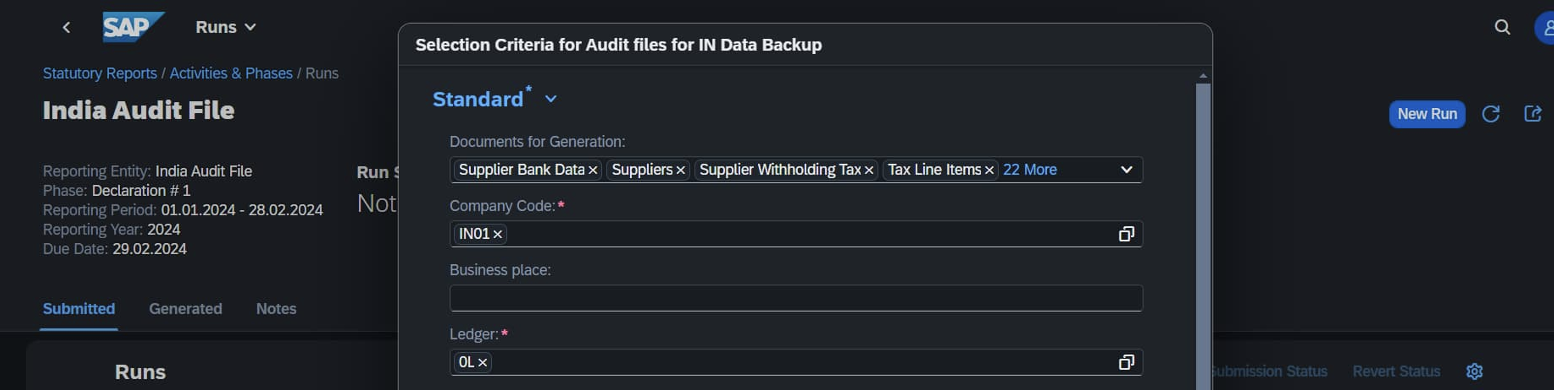
Figure 7 - Selection criteria for a short run of the India audit files: company code, ledger, and date range
A short run typically completes in under three minutes; longer runs or scheduled runs are also supported for larger data volumes. Once complete, the run produces one text file per document type - sales documents, supplier bank data, suppliers, supplier withholding tax, tax line items, and more - each with its own size and a clear Generated Successfully status, ready for download or hand-off into the customer's own India-resident storage and back-up process.
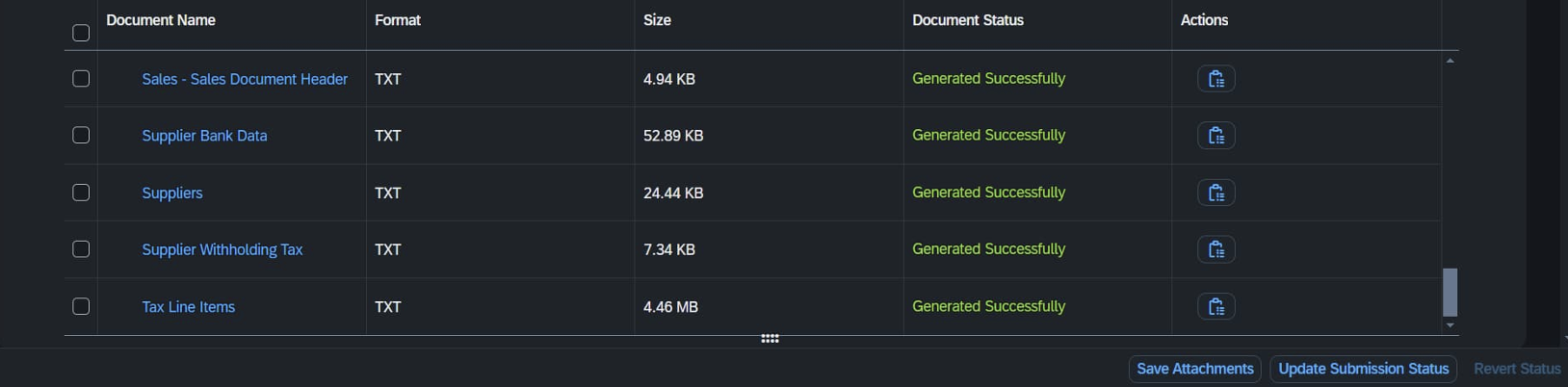
Figure 8 - Completed run output: individual audit files generated successfully, each downloadable in TXT format
Extending the Sample Report for Business-Specific Needs
SAP explicitly positions YY1_IN_AUDIT as a sample and reference implementation, not a fixed template organisation is expected to enhance, modify, or rebuild it to fit their own chart of data and audit scope. The Define Statutory Reports app supports this through new or changed parameters, new query definitions built on custom data sources, new document definitions, and full control over which columns appear in the generated files. Two worked extension scenarios illustrate the pattern.
Scenario A- Adding Sales Document Detail
The first extension scenario augments the audit file with combined sales document header and item detail. This starts in the Custom CDS Views app, where a new view YY1_SalesDocInfo is created with the standard CDS view I_SalesDocument as its primary data source.
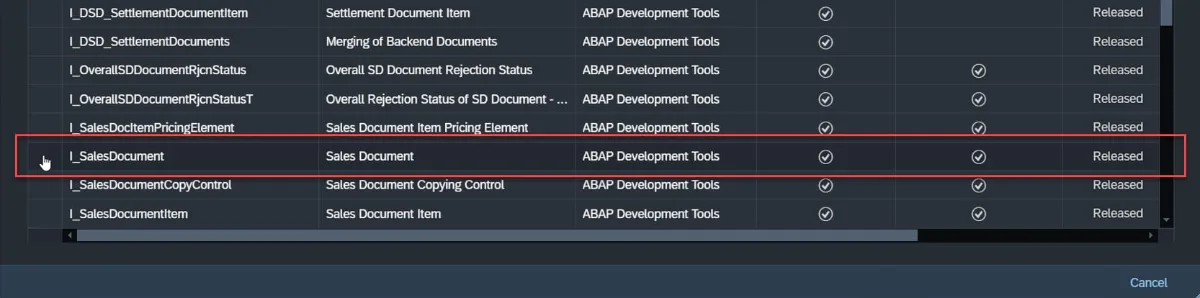 Figure 9 - Selecting I_SalesDocument as the primary data source for the new custom CDS view
The standard view I_SalesDocumentItem is then added as an associated data source, joined on the SalesDocument key field with a zero-or-more cardinality, and the required columns from both views, spanning company code, sales organization, pricing, tax classifications, quantities, and amounts are selected in the Elements step before the view is published.
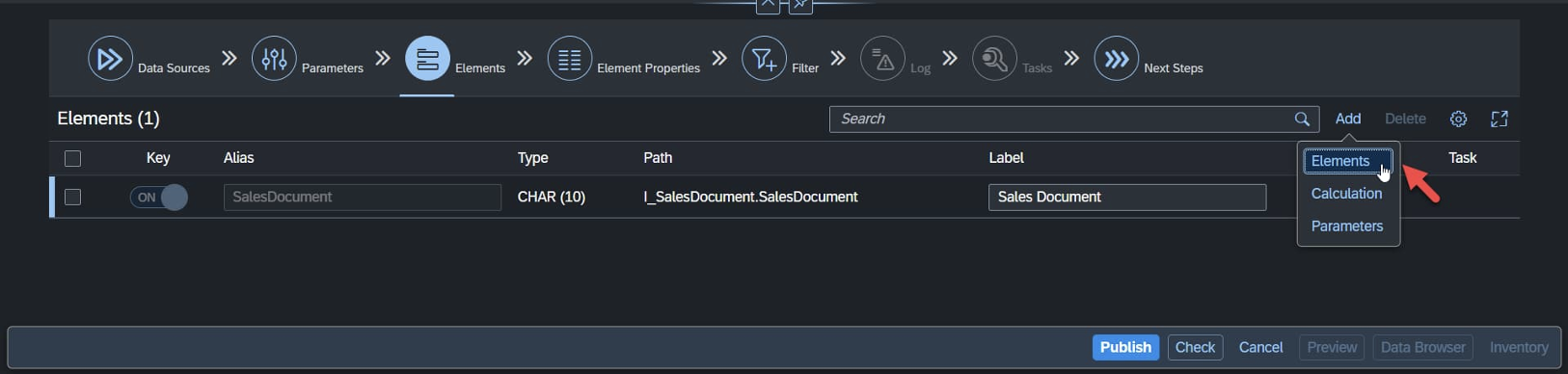 Figure 10 - Adding elements/columns to the custom CDS view before publishing it for use
Back in the Define Statutory Reports app, a new query is added to the YY1_IN_AUDIT report definition, pointing at the newly published YY1_SALESDOCINFO CDS view, with filters on billing company code (mapped to the COMPANYCODE parameter) and sales document date (mapped to DATEFROM/DATETO). A new TXT document definition is then created from that query, its columns mapped automatically, and the whole chain CDS view, query, and document is activated.
Scenario B - Adding Company Master Data (PAN)
The second scenario demonstrates a country-specific enrichment: attaching each company code's Permanent Account Number (PAN) a mandatory Indian tax identifier to the audit output. A second custom CDS view, YY1_CompanyCodeInfo, joins the standard views I_CompanyCode and I_AddlCompanyCodeInformation, using CompanyCode as the join key and an additional condition restricting the join to records where CompanyCodeParameterType equals J_1I02, the code that identifies the PAN field specifically.
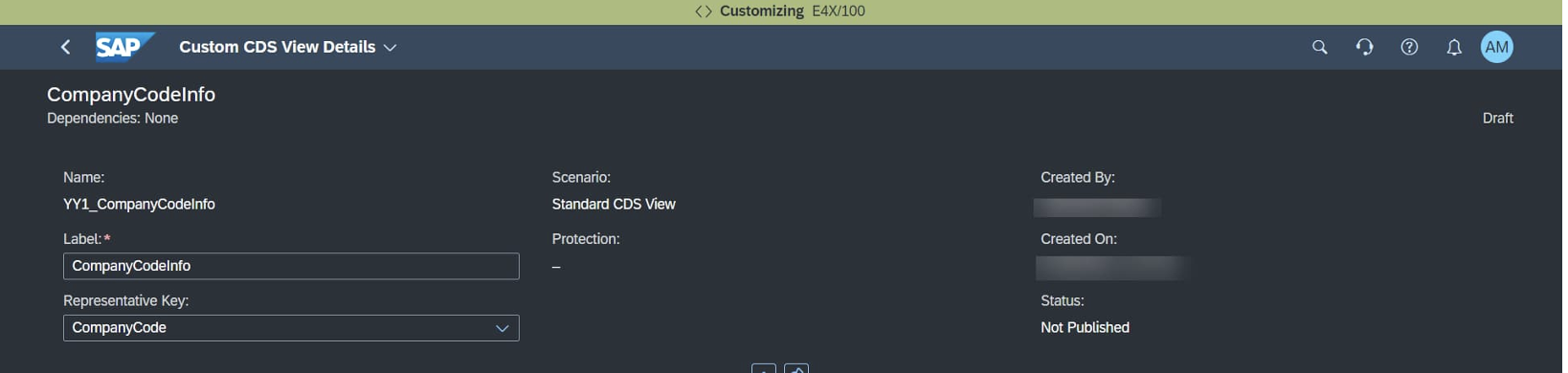
Figure 11 - The custom CompanyCodeInfo CDS view, built to surface each company code's PAN for the audit extract
As with the sales document scenario, the published view is then wired into the report definition as a new query and a new document, filtered by the COMPANYCODE parameter, with column mapping inherited automatically from the underlying query. The result is an audit file enriched with statutory company identifiers that go beyond what the out-of-the-box view exposes exactly the kind of country-specific adaptation the framework is designed to support.
Technical Reference: Standard Data Sources Behind the Sample Report
The out-of-the-box YY1_IN_AUDIT report already spans a wide range of financial and master-data domains, each backed by a released CDS view over a specific underlying database table. This gives implementation teams a starting map of what is already covered before they consider building further extensions.
India-Specific Master Data Fields
Beyond the core financial extracts, the framework also exposes a set of CDS views carrying India-specific statutory attributes that implementation teams commonly need to fold into an audit or compliance extract:
Performance and Governance Considerations
Because a full audit extract can involve significant data volume, SAP recommends generating documents in parallel where the framework supports it, and reviewing the query design itself adding targeted filters, introducing additional report parameters, and choosing appropriately performant data sources rather than relying on default settings alone. Database-level tuning, such as CDS view join design and SAP HANA query optimization, becomes relevant at scale.
From a governance standpoint, three points are worth building into any implementation plan. First, role separation is deliberate: report design (SAP_BR_ADMINISTRATOR) and report execution (SAP_BR_GL_ACCOUNTANT) sit behind different business catalogs, which supports segregation of duties in the audit trail. Second, every activation of a report definition, a report category, or a custom CDS view passes through a verification and activation log, giving a documented change history for the compliance artifact itself. Third, because DRC generates files rather than storing or backing them up, the customer remains responsible for moving the generated output into India-resident storage with the required daily back-up cadence SAP's role here is deliberately scoped to reliable, repeatable file generation.
Conclusion
SAP Document and Reporting Compliance turns a specific, high-stakes Indian regulatory requirement electronic books of account, resident in India, backed up daily into a configurable, auditable, role-controlled reporting process inside SAP S/4HANA Cloud Public Edition. The sample YY1_IN_AUDIT report gives implementation teams a working starting point covering the core financial and master-data domains most audits need, while the Custom CDS Views app and the Define Statutory Reports app together provide a clear, repeatable pattern for extending that coverage whether that means joining in additional transactional detail, as in the sales document scenario, or enriching the output with statutory identifiers like PAN, as in the company code scenario. For organizations building out their India compliance on SAP S/4HANA Cloud, that combination of a solid starting template and a documented extension pattern is exactly what turns a regulatory requirement into a repeatable operational process.