When troubleshooting SAP S/4HANA Cloud Public Edition access issues, consultants often focus on permissions when the real problem lies in scope activation, configuration dependencies, or catalog mapping. This guide explains how SAP Central Business Configuration (CBC), business roles, and the SSCUI List work together to identify the precise authorization required while maintaining least privilege and audit readiness.
It is the afternoon before go-live. A functional consultant messages you on Teams: “I can't open the posting periods configuration, it just returns No authorization to start the UI. Can you give me access?” With the timeline at risk and attention turning to you, you assign a broad business catalog. The activity opens, the issue is resolved, and the go-live proceeds without further disruption.
Four months later, that same catalog is raised in an audit as a segregation-of-duties (SoD) conflict, and you find yourself explaining to the auditor why a finance configurator is also able to maintain roles.
The fix that protected the go-live created the finding.
That greyed-out activity was rarely a simple access problem to begin with, and there is almost always a precise, low-risk way to clear it. In most cases the error traces back to a single missing business catalog, an inactive scope item, or a gap in CBC authorization. There is no need to guess: SAP publishes a structured reference that identifies exactly which security object is missing, without over-provisioning.
This reference is the SSCUI List. Once you know how to read it, you can stop reacting to access errors and begin resolving them in minutes, and in a manner that withstands later audit scrutiny.
This guide explains how SAP CBC works, the distinction that accounts for the most wasted troubleshooting effort, a structured triage that separates genuine authorization problems from the issues that merely resemble them, and the step-by-step use of the SSCUI List to resolve the genuine cases without widening your access footprint.
What SAP CBC Actually Does in an S/4HANA Cloud Project
SAP Central Business Configuration (CBC) is the central control point for S/4HANA Cloud Public Edition implementations. Rather than distributing configuration across separate tools, it gives organizations a single place to manage business process configuration, organizational structures, and implementation activities, all through the Project Experience portal.
In practice, project teams use CBC to initiate configuration changes, expand scope, adjust organizational structures, and modify existing settings at any stage of the implementation lifecycle.
As business requirements evolve, the configuration can be kept aligned with them. Several capabilities are relevant to day-to-day work:
- Centralized management of organizational structures, including company codes, plants, purchasing organizations, and other enterprise entities.
- Scope management, which defines the business processes, modules, and functionalities included in the implementation. This has direct consequences for security, as discussed below.
- Dependency management, which maintains consistency between configuration activities and scope items so that one change does not inadvertently affect another.
- A cloud-based user experience, delivered through the CBC Project Experience portal, that simplifies configuration for functional and implementation teams.
Because finance, procurement, sales, and supply chain teams work within CBC concurrently, authorization management is not a peripheral task; it is central to keeping the implementation moving. It is also the point at which many consultants take a wrong turn.
The Trap Nobody Warns You About: CBC Authorizations Are Not S/4HANA Business Roles
This single point of confusion accounts for more wasted hours than any other in Public Cloud security. Two separate authorization domains are involved, and an SSCUI error almost always belongs to the second of them.
| Layer | What it actually controls | Where you fix it |
|---|---|---|
|
CBC authorizations the SAP_CBC_CONSUMPTION_* user groups |
Who can do what inside the CBC Project Experience portal: scoping, organizational structures, requesting systems, and project tasks. | In the CBC tenant, via the CBC user groups. |
| S/4HANA business roles and business catalogs | Whether a user can launch a given SSCUI / Fiori app, and what data they can read or change in the S/4HANA system itself. | In the S/4HANA system, via Maintain Business Roles. |
When a consultant encounters No authorization to start the UI, the instinct is often to elevate the user's CBC user group. This has no effect. The SSCUI is governed by an S/4HANA business catalog, not by a CBC user group. Until you have identified the correct layer, troubleshooting proceeds without direction, which is what the next two sections address.
The Five SSCUI Security Issues You'll Almost Certainly Hit
Across enough projects, the same small set of issues recurs. The five below are the most common, presented with the symptom typically observed, the SSCUI involved, and the underlying cause.
| S.no | Issue | What the user sees | Related SSCUI | Root cause |
|---|---|---|---|---|
| 1 | SSCUI missing from the system | Consultant can't even find SSCUI 101098 for Workflow Configuration in Manage Your Solution. | 101098 – Workflow Management | Scope item or localization not activated in CBC / project scope. |
| 2 | Workflow approval not triggering | A Purchase Order or Supplier Invoice workflow never reaches the approver. | 101098 – Workflow Management | Workflow conditions or responsibility rules not maintained correctly. |
| 3 | Posting failure due to SSCUI config | "Posting Period Closed" appears while posting journal entries. | 101522 – Define Document Types | General Ledger –configuration blocking the business transaction. |
| 4 | Business Partner creation failure | Can't create a customer/vendor BP because of a missing BP role or number range. | 105599 – Define BP Types; 102241 – Define Groupings and Number Ranges | BP Type or number range configuration incomplete or incorrect. |
Note that only one of these five is, strictly, an access problem. The remainder are matters of scope, configuration, or rule maintenance that present as authorization errors. Assigning further permissions in these cases does not resolve the issue and can introduce audit findings. The cause should therefore be established before any role is changed.
Is It Authorization or Is It Scope? A 30-Second Field Triage
This is the practice that distinguishes an experienced consultant from someone following a checklist. Before assuming that "greyed out" means "missing access," assess the error against four questions. Only one outcome leads to an authorization change.
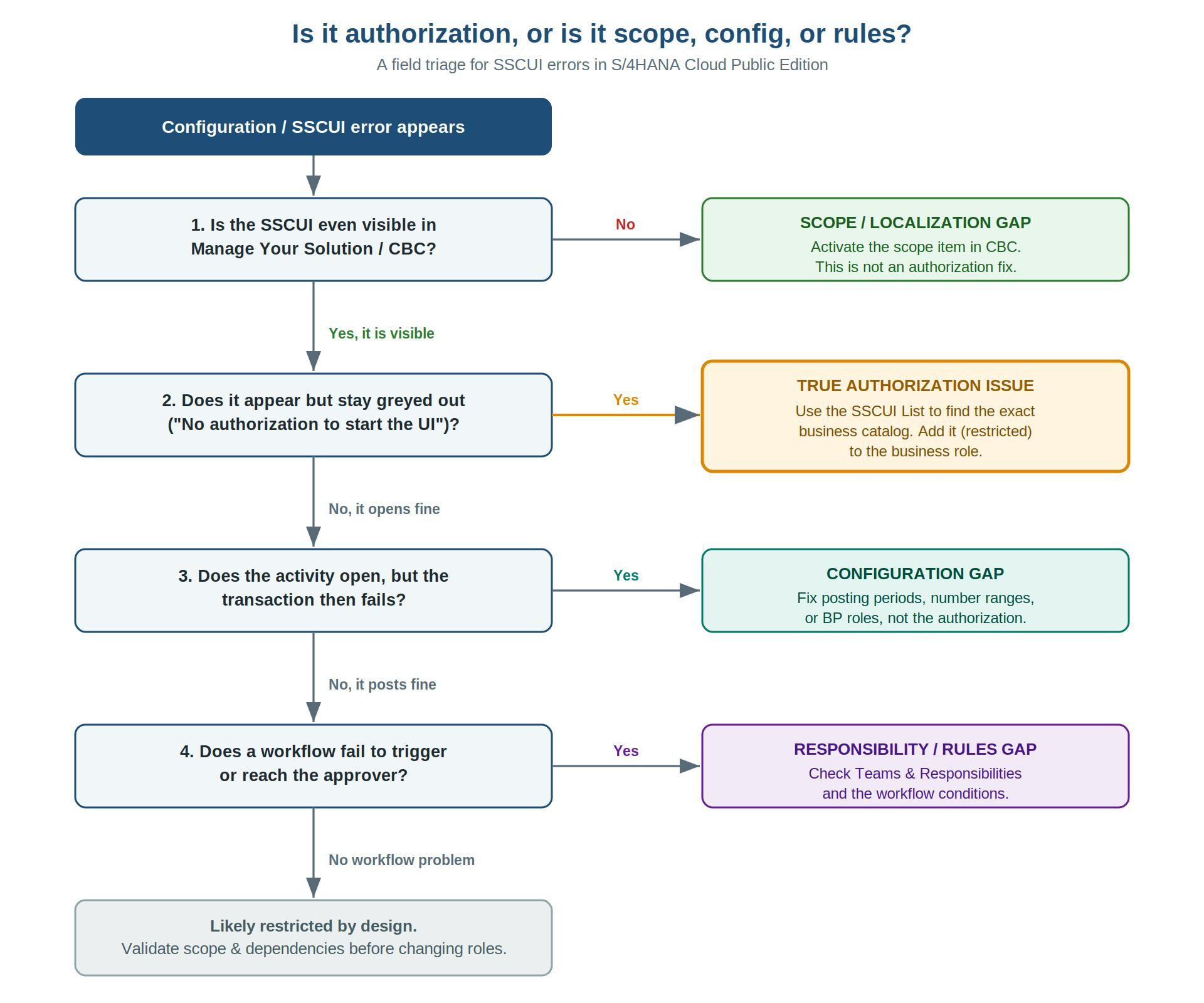
The value of the tree lies as much in what it prevents as in what it prescribes. Three of the four outcomes direct you away from the business role entirely, which is the discipline that keeps role design clean and reduces audit exposure.
Resolving the Real Auth Cases: The SSCUI List Method
When the triage points to the highlighted branch, you have a genuine authorization gap, and the goal is precision: grant the exact catalog the activity requires, and nothing more. The SSCUI List, published on SAP for Me, makes that precision possible. It connects a failed configuration activity to the exact security objects required to enable it.
The lookup proceeds as follows. You take the Configuration Step ID from the error message or the CBC screen, locate it under the S/4HANA Cloud tab of the SSCUI List, and note the associated Main Scope Item ID. You then cross-reference that Scope Item ID against the IMG_Act BusinessCatalog Match sheet, which identifies the precise technical catalog and business catalog associated with the SSCUI. In effect, you are tracing a single row across two sheets:
| Configuration Step ID | Main Scope Item ID | Technical Catalog | Business Catalog |
|---|---|---|---|
| 101522 — Define Document Types | <scope item> * | <technical catalog> * | <business catalog> * |
Identifying the catalog is only part of the task. In S/4HANA Cloud, a business catalog within a business role carries restriction types and restriction values; it is not a simple on/off assignment. The same catalog can be granted as read-only, as write, or restricted to specific values such as company code or plant. The appropriate fix is the narrowest assignment that enables the activity, frequently a read or value-restricted grant rather than unrestricted write access.
Assigning the catalog without restriction clears the error but grants the user considerably more than the configuration step requires, which is precisely the condition an auditor will later identify.
Applied this way, the SSCUI List also shows when the problem is not an authorization issue at all. Where an activity is restricted by an inactive scope item or by a CBC limitation by design, no catalog assignment will help, and the list allows you to confirm this quickly rather than pursuing a fix that was never required.
Step-by-Step: The SSCUI List Lookup
| Step | Activity | What you do |
|---|---|---|
| 1 | Identify the Configuration Step ID | Every config activity has a unique SSCUI / Configuration Step ID, for example 101098 – Workflow Management, 101522 – Define Document Types, or 105599 – Define BP Type. Find it in the error message, the CBC activity screen, or Manage Your Solution. |
| 2 | Open the SSCUI List on SAP for Me | Search the SSCUI number under the S/4HANA Cloud tab to find the associated Main Scope Item ID. |
| 3 | Cross-reference the business catalog mapping | Use the IMG_Act BusinessCatalog Match sheet (a lookup/mapping file, usually Excel) to identify the exact technical and business catalog for the activity, and therefore the precise authorization required. |
| 4 | Update the relevant business role, restricted | Add the missing business catalog to the corresponding business role, granting the narrowest restriction type and values that unblock the activity, not unrestricted write. |
| 5 | Validate scope and configuration dependencies | Confirm the issue is truly authorization-related, not controlled by inactive scope items, localization dependencies, or an intentional CBC restriction. |
Each of the shortcuts below clears the error in the moment, and each of them returns.
| The tempting shortcut | Why it bites you later |
|---|---|
| Assign a broad business catalog just to clear the error | Over-provisions access and creates segregation-of-duties conflicts that surface as audit findings. |
| Fix it by changing the user's CBC role or group | Wrong layer. The SSCUI is gated by S/4HANA business catalogs, not CBC groups, so the error stays. |
| Edit the role directly in the running system and skip the source / template | The change is lost on the next tenant refresh or transport, and the issue reappears, usually mid-test. |
| Grant full (write) access where read or value-restricted access was enough | Breaks least privilege and widens your audit surface for zero functional benefit. |
Why This Is Really an Audit Story
For most consultants, the concern is not the error but the finding that may follow it. The value of the SSCUI List is therefore not only speed; it is that it makes access changes defensible.
Applied consistently, it supports the three things an auditor typically examines. You grant the minimum necessary catalog, which provides evidence of least privilege. You can explain why each catalog is present on a role, which provides traceability. And you avoid the broad assignments that create segregation-of-duties conflicts in the first instance. Combined with the CBC Auditor role (SAP_CBC_CONSUMPTION_AUDITOR), which provides read-only access together with change logs and CSV exports, this allows a reviewer to confirm not only that access is appropriate today, but how it came to be configured. That distinction often separates a clean audit from a protracted one.
The Roles and Authorizations SAP CBC Gives You
SAP CBC provides predefined user groups and authorization roles mapped to common project responsibilities. Assigning the appropriate one gives users exactly the access they require, no more and no less, while preserving governance and segregation of duties. As noted earlier, these govern access within CBC, not the S/4HANA catalogs that control SSCUIs.
| Target team | User group | Authorizations and tasks |
|---|---|---|
| Super User | SAP_CBC_CONSUMPTION_PROGRAM_LEAD | Super-user role with complete access to all CBC activities and configurations. |
| Project Manager | SAP_CBC_CONSUMPTION_PROJECT_LEAD | Performs Project Experience tasks and manages implementation activities. |
| Key User / Business Process Team | SAP_CBC_CONSUMPTION_KEY_USER | Performs Project Experience tasks except critical ones such as requesting systems. |
| Display User | SAP_CBC_CONSUMPTION_DISPLAY_USER | Read-only access to Project Experience tasks. |
| Auditor | SAP_CBC_CONSUMPTION_AUDITOR | Read-only access to Project Experience tasks, plus change logs and CSV downloads for audit purposes. |
Key Takeaways
S/4HANA Cloud Public Edition projects depend on accurate configuration and well-controlled authorization within SAP Central Business Configuration. The security consultant's role has broadened accordingly: it now extends beyond provisioning roles to enabling functional teams to work efficiently while keeping the environment audit-ready.
The principal lesson from these SSCUI-related issues is that most authorization errors are neither random nor, in many cases, authorization errors at all. They can usually be traced to the wrong layer (CBC rather than the S/4HANA system), a missing business catalog, an inactive scope item, a workflow gap, or an unrestricted role assignment. Establish the cause first, then use the SSCUI List to grant the single catalog that is genuinely missing, at the narrowest restriction that works.
Applied consistently, this reduces what was previously a half-day investigation to a lookup of a few minutes, and does so in a way that reinforces least privilege rather than eroding it. It represents a shift from reactive troubleshooting to a structured, audit-ready security practice, and it is a discipline that experienced S/4HANA consultants establish early.
The views and information shared in this article are based on practical project experience and are intended for general guidance only. SAP, SAP S/4HANA, SAP Fiori, SAP GRC, and related product names are trademarks or registered trademarks of SAP SE (or an SAP affiliate company). This content is not affiliated with, endorsed by, or sponsored by SAP SE. Always validate configuration, security, and authorization changes within your own system landscape and follow your organization's change management, security, and compliance policies. Screen names, SSCUI IDs, scope items, business catalogs, and application references may vary by release, localization, and feature pack. Always verify the latest information using official SAP documentation and SAP for Me before implementing changes.