A practical guide to application users, database users, roles, spaces, row-level security, and effective data access.
Ask most people what “security” means in an analytics platform and they’ll start with the login screen: username, password, maybe a two-factor prompt. That matters, but it is only the beginning. The harder question comes after the user is inside: what can they actually access, and what data can they see? In SAP Datasphere, that answer is built through a chain of controls. You do not understand the security model by memorizing settings; you understand it by following that chain from identity to effective data access.
Why "Can They Log In" Is the Wrong First Question
Here is a simple example. Imagine a large retailer running regional sales analytics in Datasphere. A finance analyst in the Northeast and another in the Southwest may both be allowed to open the same sales dashboard. They may even have the same role and work in the same space. But the Northeast analyst should not automatically see Southwest sales. If security stopped at “can this user open the view?”, both users could end up seeing far more than their jobs require.
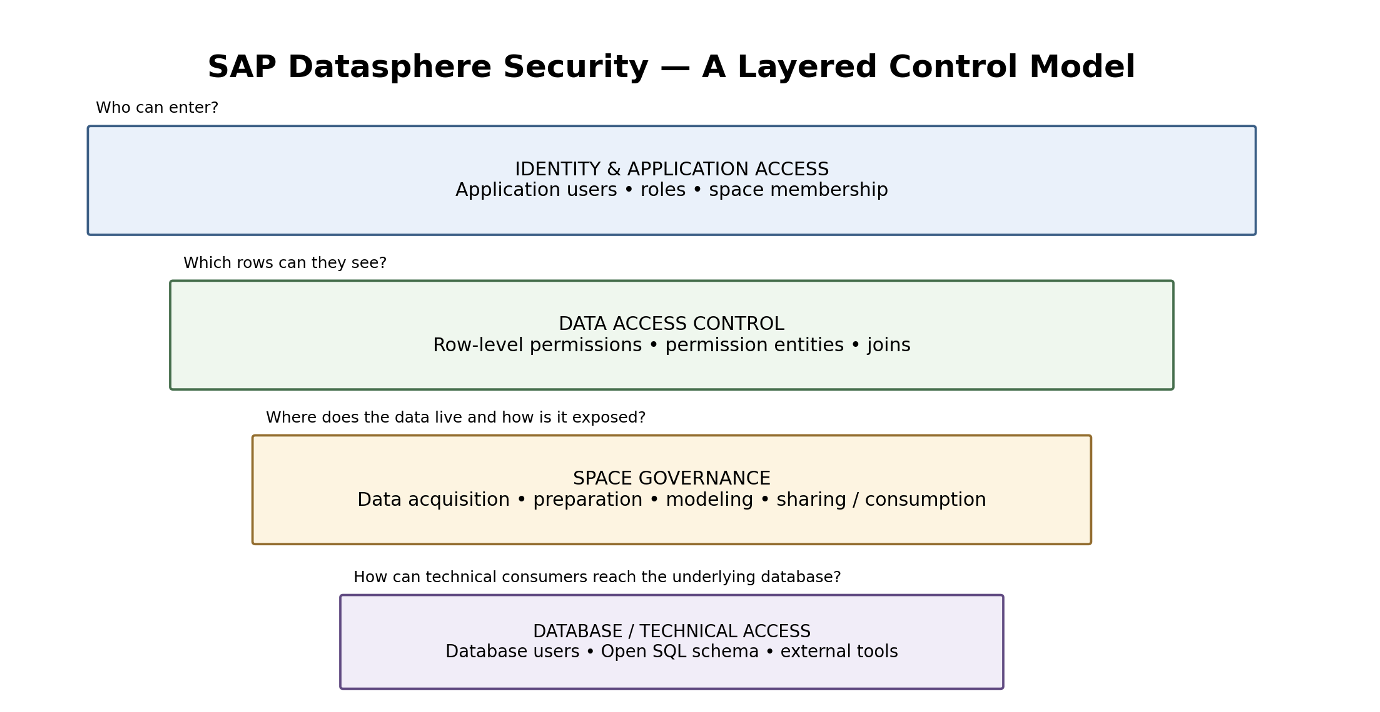
In Datasphere, security is a set of controls that work together rather than one gate at the front door. At a practical level, I look at four questions: who is the user, what can the user do, where can the user work, and which data can the user actually see? Roles, space membership, database access, and row-level controls each answer a different part of that story.
Two Very Different Kinds of "User"
Every access model starts with identity, but Datasphere gives us two very different identities to think about. Mixing them up is an easy way to create access that nobody can explain later.
The application user - a person with a job to do
An application user is the everyday human being who logs into Datasphere to build, consume, or manage content. This identity is defined by role, scope, space membership, and the data-access permissions layered on top. If you're picturing a business analyst, a data modeler, or a space administrator clicking around the interface, that's an application user.
The database user - a technical door, not a person
A database user is something else entirely a technical account that reaches directly into the underlying SAP HANA database. It shows up in conversations about open SQL schemas, third-party BI tools, SAP Analytics Cloud connections, database views, scoped roles, and the Database Explorer. It exists to let a system, not a person, pull data in a controlled, auditable way.
My rule of thumb is simple: application-user controls are for people and the work they perform in Datasphere; database-user controls are for technical access to the underlying database layer. A technical service account should have a documented reason to exist, and a business user should not be given a database path simply because it is convenient.
Roles: The Scaffolding, Not the Whole Building
Datasphere provides standard roles, and organizations can create custom roles as well. Roles can be global or scoped. From a least-privilege perspective, that is useful because it lets you give someone the capabilities their job needs without automatically giving them tenant-wide reach.
Here is where I would challenge a common review approach: assigning the right role is not the finish line. A role tells you what a person is allowed to do - build a model, consume a view, administer a space, and so on. It does not, by itself, tell you which rows of business data that person will see. A meaningful review therefore connects the role, the user, the space assignment, the Data Access Control, and the resulting data visibility. If the reviewer cannot answer “who has access, why, to what, and to which rows?”, the review is incomplete.
Configured Access vs Effective Access
This is one distinction I would make explicit in any security review. Configured access is what the administration screens say has been assigned: roles, scoped roles, space membership, Data Access Controls, and database privileges. Effective access is what the user can actually retrieve or consume after those controls are applied. The two should agree, but you should never assume they do without testing.
For example, a user may have a role that allows access to a sales view and be correctly assigned to the relevant space. That still does not answer whether the user can see every sales region. The effective answer depends on the data-access rules applied to the object.
Row-Level Security: Where Access Gets Personal
This is where access gets much more interesting. A Data Access Control can take a broad permission to use an object and narrow the result to the data that a particular user is entitled to see. The control uses a Permissions Entity and applies the defined criteria to the protected object, so the same view can return different rows for different users.
That is the part I find most useful to explain to business and audit teams: the report does not have to be redesigned for every region or user. The underlying object can remain the same; the effective result changes because the authorization rule changes which rows survive. Two people can open the same object and get two different - and still correct - answers.
Data Access Control (DAC) – Permission Structures
How a Data Access Control narrows a shared object down to a personalized result set. A Simple End-to-End Example -
Consider three users working with the same sales model:
All three users may open the same analytical object. The difference is not necessarily a different report or a different copy of the data. The difference is the authorization context applied to the data. That is why a security review should follow the complete path from user and role to space and Data Access Control, and finally to the rows returned.
Four Ways to Define “Who Sees What”
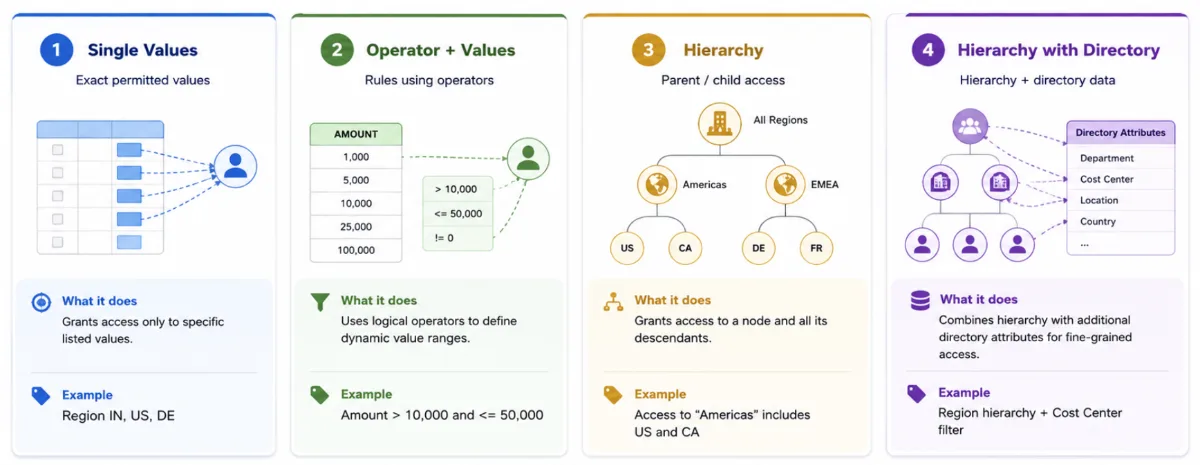
Not every business rule has the same shape, and Datasphere provides different Data Access Control structures to match those patterns. Choosing the structure is a design decision. I would start with the business rule and then select the structure, rather than forcing the business rule into whatever structure happens to be easiest to configure.
Single Values - the explicit list
This is the simplest structure: a defined list of permitted values, such as the specific sales organizations or customer groups a user is cleared to see. It's transparent and easy to audit, but it doesn't scale gracefully, if the list of permitted values starts running into the thousands, performance and maintainability both suffer.
Operator and Values - the conditional rule
Some rules aren't a list at all; they're a condition. Operator-and-Values structures support exactly that, combining an operator, a restriction, criteria, and one or two values to express something like "amount less than X" or "region not equal to Y." This is the structure to reach for when access depends on a range or a rule rather than an enumerated set.
Hierarchy - the organizational shape
Hierarchy-based permissions make sense when the business itself is organized in layers: global, region, country, site, for example. Access can follow the hierarchy instead of maintaining a long flat list of individual values. That can make the model easier to maintain when organizational relationships change.
Hierarchy with Directory - the hierarchy plus lookup model
Hierarchy with Directory is useful when authorization needs to follow a hierarchy while also using directory information associated with that hierarchy. It is particularly relevant for models where access needs to follow organizational or geographic relationships without maintaining every permitted value as a flat list. SAP also supports using identity-provider attributes as identifiers with this structure, which can reduce the need for individual user-to-value assignments.
The practical lesson is simple: let the business rule choose the structure. A flat list is fine when the rule is genuinely a list. A condition is better expressed as a condition. A hierarchy is useful when the business is actually hierarchical. The wrong structure may work on day one and become painful six months later.
Beyond User IDs: Identity-Provider Attributes
There is another capability worth knowing if you are designing Datasphere for a large enterprise. Data Access Controls can use custom application attributes supplied by the identity provider as identifiers. In practical terms, that means a rule can be applied to users who share an attribute value - for example, a country or organizational attribute instead of maintaining a separate permission entry for every individual user.
This is where identity governance and data authorization start to meet. The security question changes from “Which users did we add to this permission table?” to “Which trusted identity attributes drive this access rule, and are those attributes still correct?” That is a much more scalable model, but it also means the identity-provider data becomes part of the security control and needs to be governed accordingly.
Spaces: Drawing the Walls Around the Data
If roles and Data Access Controls help answer who can do what and which rows they can see, spaces define an important boundary around where data is stored, prepared, modeled, and shared. SAP describes spaces as areas of responsibility and authority, and data in one space is not simply available everywhere else unless it is shared or exposed. That makes space design a governance decision, not just an organizational convenience.
One practical architecture pattern is to use a dedicated permissions space for the tables that drive row-level rules, an IT or modeling space where Data Access Controls are built and maintained, and one or more consumption spaces for protected business content. This is an architecture pattern, not a mandatory SAP design. The important principle is that movement and exposure of data between spaces should be intentional and understood.
Turning This Into an Operating Model
If I were reviewing a Datasphere environment, I would not start by asking whether every role looks tidy. I would start by tracing a few real users from identity to effective data access. The following questions are a practical way to do that:
- Define the business boundary first. What should this user be able to do, and separately, what data should this user be able to see? Treat those as two different questions.
- Separate human and technical identities. For every database user, document the business or integration reason it exists, what it can reach, and who owns it.
- Design roles around real responsibilities. Use the narrowest global or scoped role that gets the job done instead of starting with broad access and trying to remove it later.
- Choose the row-level structure deliberately. Match Single Values, Operator and Values, Hierarchy, or Hierarchy with Directory to the actual business rule.
- Review sharing and exposure as access decisions. Ask what leaves a space, where it goes, and whether the destination changes the security assumptions.
- Test effective access, not just configuration. Use representative users and confirm both the rows they should see and the rows they must not see.
- Revisit the design as the business grows. A permission list that works for 50 values may become difficult to maintain at 5,000.
Review identity attributes used by Data Access Controls. Know which IdP attributes drive authorization and who owns their accuracy.
Review exposed objects and technical paths. Confirm that database users, OAuth/ technical users, and exposed views have a documented purpose.
Retest after change. A security model that was correct six months ago may no longer be correct after role, space, hierarchy, or identity changes.
Mistakes Worth Naming Out Loud
These are the failure patterns I would actively look for during a security review. None of them are particularly exotic; they are usually the result of one layer being reviewed while another is ignored:
- Assuming the role alone determines visibility. A user can have permission to use an object while a Data Access Control still narrows the rows returned.
- Using a database user where an application user would be more appropriate, without documenting why the technical access exists and who owns it.
- Treating a space like a folder instead of an authorization and data-governance boundary.
- Using Single Values for a rule that is naturally conditional or hierarchical, creating unnecessary maintenance later.
- Designing the permission model without considering scale until a simple list has become hundreds or thousands of entries.
- Testing only the positive case - “can this user see the data?” - without testing the negative case: “can this user see data they should not see?”
The Bigger Picture: A Chain, Not a Checkpoint
If you step back from the individual settings, the model is easier to understand as a chain. Identity establishes who the user is. Roles establish what the user can do. Space assignment establishes where the user can work. Data Access Controls narrow the data that user can see. Sharing and exposure determine how protected content can move toward consumption.
SAP Security professionals will recognize the principle immediately: effective access is rarely determined by one authorization object. What changes in Datasphere is the environment. Modeling, integration, data preparation, and consumption sit close together, so a shortcut in one layer can undermine controls elsewhere.
The Security Review Question I Would Ask
Do not stop at “Does the configuration look right?” Ask instead: “If I give this user a realistic business task, what can they actually retrieve, consume, change, or expose?” That question forces the review across the layers instead of validating each setting in isolation.
Conclusion: Make Access Intentional, Not Just Correct
SAP Datasphere brings analytics, data integration, modeling, and consumption together, which is powerful but also makes access governance easier to underestimate. The controls are there: separate application and database identities, use roles with appropriate scope, design spaces deliberately, protect sensitive data with Data Access Controls, and test the resulting access rather than assuming the configuration is correct.
The goal is not to make access complicated for its own sake. It is to make access explainable. For any important user, you should be able to answer four questions with confidence: Who are they? What can they do? Where can they work? And, most importantly, what data can they actually see? That is the difference between configured access and effective access.
Technical references: SAP Help Portal documentation on User Management, Authorizations and Roles, Data Access Controls, Hierarchy with Directory, and Identity Provider Attributes.