SAP SuccessFactors (SAP SF) is not just another enterprise application. It sits on information about people: employee master, organizational relationships, job information, performance, compensation and other HR data. SAP SuccessFactors holds information is classified as confidential, and some of the data is highly sensitive. Thus, the way you handle SAP SuccessFactors Security is different from traditional ERP systems such as SAP ECC, or SAP S/4HANA.
The question is not only whether a user can open a particular application or perform a particular action. A proper security review also asks what information the user can see, whose information they can access, whether the access matches their responsibilities, and whether that access remains appropriate as people and organizations change.
Role-Based Permissions (RBP) is the principal authorization model used across most of SAP SuccessFactors. SAP describes RBP as a security model for restricting and granting access to SuccessFactors applications, and its current documentation centers the model around permission roles, access populations, target populations and role assignments.
This is why RBP deserves to be treated as a security architecture rather than as an implementation checklist. A permission can be technically correct while the population behind that permission is too broad. A role can be necessary while its assignment creates an unnecessary privilege combination. And a carefully designed human-user model can still be undermined by an integration account with excessive access.
This guide takes a security-first view of RBP. It explains the model, the design decisions that matter, the mistakes that create exposure, and a practical approach for building an authorization model that can be understood, tested and governed.
What Is Role-Based Permissions (RBP) in SAP SuccessFactors?
Role-Based Permissions (RBP) is the core authorization framework used to control access to applications, functions and data in SAP SuccessFactors. SAP describes it as a suite-wide authorization model that applies to the majority of SuccessFactors products.
The simplest way to understand RBP is to separate four questions:
- Who receives access?
- What can they do?
- Whose data can they access?
- What additional scope or restrictions apply to that access?
SAP's administrator documentation/guide describes a permission role as a set of permissions, an access population as the users granted those permissions, a target population as the users whose data the access population can access or manage, and a role assignment as the relationship between the role and those populations.
That distinction is central to security. If an HR Business Partner needs permission to edit employee information, the security design still needs to determine which employees that HR Business Partner is allowed to manage.
The RBP Security Model
A useful conceptual representation is:
Access Population → Permission Role → Permissions → Target Population
Permission groups are used to define groups of employees who share attributes, such as department, country/region or job code. Those groups can be used both to assign roles and to define target populations. SAP also supports relationship-based access, such as manager-to-employee relationships.
This makes RBP more expressive than a simple role-to-user model. The effective authorization depends on the combination of the role, its assignment and the population rules associated with it.
Permission Roles
A permission role contains a set of permissions. Good role design starts with a business purpose: what responsibility does this role support, and what is the minimum access needed to perform it?
SAP's guide recommends defining user groups before defining permission roles. When creating a role, administrators define the permissions and then assign the role to employees or groups, with target population specified where required.
From a security perspective, the role description should be meaningful enough that another administrator or auditor can understand why the role exists without opening every permission checkbox.
Permission Groups
Permission groups define populations of users who share relevant attributes. SAP documents both dynamic and static groups. Dynamic groups can automatically adjust membership as employee attributes change, which can reduce administrative effort in large environments.
That automation is useful, but it also means group criteria become part of the authorization boundary. If the underlying criteria are wrong, the membership can change automatically - and so can the effective access.
For that reason, security teams should treat group criteria, not just role permissions, as reviewable security configuration.
Access or Granted Population
The access population is the set of users who receive a role assignment. In practical terms, it answers: who gets this capability?
For example, an HR Business Partner role might be granted to a defined group of HR Business Partners. SAP also supports relationship-based assignments, including manager relationships.
Target Population
The target population answers a different question: whose data can those granted users access or manage?
This is where many RBP discussions become security discussions. A role may be perfectly appropriate for an HR Business Partner, but the target population can determine whether that person can work only with an assigned region or with the entire workforce.
Not every permission requires a target population. SAP explicitly notes that some permissions are application-level and do not require one, while other permissions require a target population. The current platform also provides checks for roles where a target population is required but has not been defined.
Granted Population vs Target Population
Consider an HR Business Partner responsible for US. If the role is granted to US HR Business Partners and the target population is US employees, the design has an understandable business boundary. If the same role is granted to the same users but the target population becomes everyone, the permission itself has not changed - the effective access has.That is why an RBP review that looks only at role names or permission checkboxes is incomplete. The population behind the role is part of the authorization decision.
Design RBP Around Business Personas
A common implementation mistake is to begin with the permission catalog and work backward toward users. A security-first approach starts with business personas and responsibilities.
The exact design will differ by enterprise. What matters is that the role can be explained in business language before it is translated into technical permissions.Least Privilege in SuccessFactors
Least privilege is often described as giving a user only the access they need. In SuccessFactors, that principle has several dimensions.
- Functional privilege - what actions can the user perform?
- Data privilege - what information can the user see or change?
- Population privilege - whose information can the user access?
- Administrative privilege - can the user change security or configuration?
- Integration privilege - can a non-human identity access employee information?
The distinction matters because excessive access is frequently caused by scope rather than by a single obviously dangerous permission. A user may legitimately need to edit job information; the risk appears when that capability can be exercised against employees outside the user's responsibility.
A useful design test is therefore: if the business responsibility became narrower tomorrow, would the RBP model automatically narrow with it - or would an administrator have to discover and manually correct a broad assignment?
The Privileged Administrator Problem
Broad administrative access deserves special attention. In many SuccessFactors environments, a small number of administrators become the people who can 'fix anything.' Over time, troubleshooting access, configuration access, user administration and sensitive HR-data access can become concentrated in the same roles.
That concentration increases the blast radius of a compromised or misused account.
Where the operating model allows it, separate security administration from business-data access. Define privileged roles explicitly, restrict their assignment, and make their ownership and purpose clear.
A useful question for every privileged role is not simply “Does this person need administrator access?” but “Which administrator capabilities do they need, and which capabilities can remain outside their role?”
RBP and APIs / Integrations
SuccessFactors commonly exchanges data with other systems. That means security teams need to examine not only interactive users but also system-to-system identities and the interfaces through which employee information moves.
SAP provides APIs for managing RBP itself, including capabilities around roles, role assignments and permission groups. This is useful for administration and automation, but it also means that the ability to manage RBP through APIs is itself a privileged capability that should be controlled.
- Which integration identities exist?
- Which APIs do they use?
- What employee data can they read or change?
- Is write access genuinely required?
- Who owns each integration?
- Are inactive integrations and accounts removed or disabled?
- Are credentials, certificates or secrets governed appropriately?
- Does the integration have a broader population scope than its business purpose requires?
A human-user access review that excludes integration identities is therefore not a complete SuccessFactors security review.
Common RBP Security Mistakes
Here are the few common mistakes in SuccessFactors with RBP:
A Practical Methodology for Building Secure RBP
For those who are implementing RBP in SuccessFactors, I recommend the most successful methodology which will be carried out in 10 steps as outlined below:
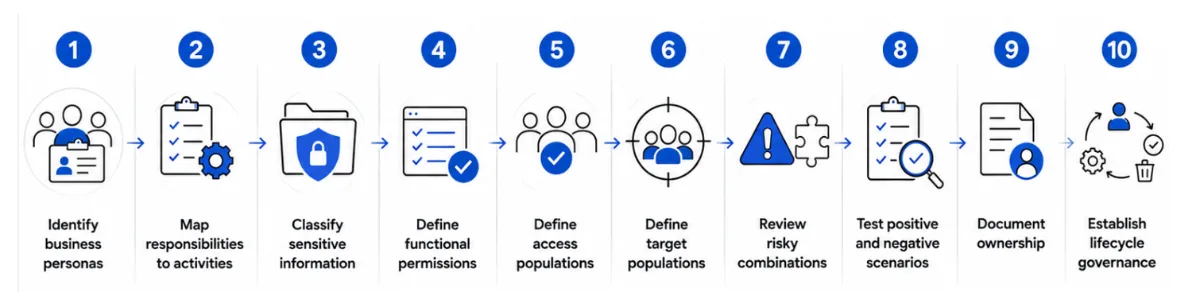
Step 1 - Identify business personas
Document the populations that use SuccessFactors and the responsibilities associated with each.
Step 2 - Map responsibilities to activities
Describe what each persona actually needs to do. Avoid starting by selecting every permission that appears useful.
Step 3 - Classify sensitive information
Identify compensation, personal information and other data requiring heightened controls.
Step 4 - Define functional permissions
Select the minimum permissions necessary to support the business activities.
Step 5 - Define access populations
Determine who should receive each role and keep privileged assignments narrowly scoped.
Step 6 - Define target populations
Determine whose information each role can access. Validate organizational, regional and relationship boundaries.
Step 7 - Review risky combinations
Look for SoD and privilege-concentration issues across roles.
Step 8 - Test positive and negative scenarios
Prove both that required access works and that unauthorized population access fails.
Step 9 - Document ownership
Record the purpose, owner, population, sensitive permissions and approval expectations for important roles.
Step 10 - Establish lifecycle governance
Define how access is requested, approved, changed, reviewed and retired.
Testing RBP Properly
Security testing should deliberately challenge the boundaries defined by the authorization model.
Negative testing is particularly valuable in RBP because authorization weaknesses can remain invisible when testers only follow the intended happy path.What Mature RBP Looks Like
A mature RBP environment is not necessarily one with the fewest roles. It is one where the organization can explain the roles it has and the access those roles create.
- Roles have clear business purposes and owners.
- Access populations are understandable and appropriately scoped.
- Target populations reflect real organizational responsibility.
- Sensitive permissions receive additional scrutiny.
- Privileged access is identified and controlled.
- Relationship-based access is tested and understood.
- Integration identities are included in the security model.
- Changes are traceable and governed.
- Security testing includes negative scenarios.
- Access can be explained to an auditor without relying on tribal knowledge.
That last point is often underestimated. If only one administrator understands why a role exists, the organization has a governance problem even if the role is technically working.
RBP Is Not the Entire SuccessFactors Security Model
It is tempting to summarize SuccessFactors security as “RBP.” That is too narrow for an enterprise environment.
RBP is a critical authorization layer, but the wider security model also includes identity and authentication, data protection and privacy, APIs and integrations, audit, monitoring and access governance.
SAP's current documentation, for example, covers RBP alongside data protection capabilities such as data blocking and read audit. SAP also documents audit-data retention and purge behavior.
The practical model is therefore:
Identity & Authentication → Authorization → Population Scope → Data Protection → Integration Security → Audit & Monitoring → Governance
A weakness in one layer can undermine another. Strong authentication does not compensate for an overly broad target population. A well-designed RBP role does not compensate for an uncontrolled integration identity.
Conclusion
SAP SuccessFactors RBP should not be treated as a permissions spreadsheet that is completed during implementation and forgotten after go-live.
The strongest designs begin with business responsibility. They translate that responsibility into clearly defined roles, carefully scoped access populations and target populations. They distinguish functional access from data scope, apply least privilege, consider risky combinations, and pay attention to privileged administrators and non-human identities.
Just as importantly, they are designed to be understood. When a security reviewer asks why an HR Business Partner can access a particular population, the answer should not be 'because that is how the role was configured.' The answer should connect the access to a documented business responsibility.
The real security question is therefore not simply:
“Does this user have access?”
It is:
“What can this user do, what information can they access, whose data can they access, and why?”
That is the difference between configuring SuccessFactors security and governing it.