Lesson 3: Introduction: From authorization configuration to authorization behavior
Understand the SAP authorization model, authorization objects, generated profiles, runtime checks, and how multiple roles influence effective user access.
In the previous lessons, I’ve explained two key topics. If you have landed directly to this lesson, I suggest you go through the previous two lessons:
Lesson 1: What SAP is and how it's organized
Lesson 2: Security Concepts in ERP: Users, Roles, Authorizations, and Profiles
This lesson takes the next step: understanding how authorization data is structured and how SAP uses it to determine whether a user can perform a particular activity. This sets a foundation for you to start working in SAP Security.
Prefer listening? Listen to this lesson as a podcast.
Before we start, you must understand the important distinction between “configuring access” and “evaluating access." As a security administrator, you would:
- Define authorization data, maintain roles, generate relevant profiles
- Assign roles to users
- Troubleshoot authorization issues
Understanding the relationship between these activities is essential. It helps you to understand why a correctly assigned role does not automatically guarantee that every business operation will succeed, why access can be broader than intended, and why a configuration change may not immediately produce the expected runtime behavior.
For you to easily understand the topic, we will use one practical example throughout this lesson: a procurement buyer who must be able to create purchase orders for an approved purchasing organization without receiving unintended access to other organizations.
How SAP authorizations are constructed
Let’s start with knowing how the SAP authorizations are constructed and how authorization design starts with the requirements of the business activity that must be protected.
For example – User Priya from the procurement team is responsible for creating purchase orders for purchasing organization 1000. As a part of the security design, you must ensure that she must be able to perform the approved activity within that scope but should not get access to other purchasing organizations in the system.
A Security consultant must translate such a business requirement into authorization data and structure it.
From business requirements to authorization data
The first step in this exercise is to capture all the business requirements and map them to technical requirements. In this example, Priya would need access to transaction code ME21N - Create Purchase Order. However, adding the transaction code in the role itself doesn’t bring the access. Authorizations must be maintained to ensure users get the relevant access. The design is as follows:
Transaction Code → Authorization Objects → Authorization Fields
When transaction code ME21N is added to a role, SAP proposes authorization objects based on the relevant authorization defaults. For purchase order processing, these can include objects such as M_BEST_BSA (document type), M_BEST_EKG (purchasing group), M_BEST_EKO (purchasing organization), and M_BEST_WRK (plant).
For example, M_BEST_EKO contains the fields ACTVT and EKORG. The authorization values must be maintained according to the user's approved business responsibilities. The exact objects proposed and the checks performed should be verified in the target SAP system.
| Authorization Field | Illustrative Value | Purpose |
|---|---|---|
| ACTVT |
01
Activity code
|
Defines the create activity, where applicable to the authorization check. |
| EKORG |
1000
Purchasing organization
|
Restricts the authorization to the specified purchasing organization, subject to the applicable authorization check. |
The key principle is that authorization data must represent the intended access, not merely the name of the transaction the user needs to execute.
Note: The authorization objects and activity values shown are illustrative. Verify the actual proposals and authorization checks in the target SAP system.
In my experience, I’ve seen many SAP implementations where authorization values are either maintained incorrectly or kept broader than necessary. This often goes unnoticed, but the impact can be significant. Overly broad access can create Segregation of Duties (SoD) conflicts, increase the risk of unauthorized activities, and potentially contribute to fraud.
Follow the Principle of Least Authorization (POLA): give users only the access they need to perform their job responsibilities, and nothing beyond that.
Does this mean that I need to remember the relevant Authorization Objects and Authorization Fields?
Not really. SAP provides authorization proposals that help populate role authorization data during role maintenance. These proposals are associated with applications and their authorization-check configuration.
When you add an application or transaction to a role and navigate to authorization maintenance, SAP proposes relevant authorization objects and default values (USOBT_C and USOBX_C are key tables associated with transaction authorization defaults and authorization check indicators.) These fields will be displayed with the following authorization status:
- Standard
- Maintained
- Changed
- Manual
The default authorization proposals are initially displayed with the status “Standard.” When authorization data is maintained, the status may change to “Maintained.” If standard proposals are changed, the status is shown as “Changed.” When authorization fields are added manually, the status is shown as “Manual.” The subsequent lessons will explain these statuses in detail.
Remember that the final authorization data must therefore be validated against the intended use case.
How the authorization data becomes a generated profile?
Once the role's authorization data has been maintained, the profile generator creates the associated authorization profile.
- Business access requirement: create purchase orders within an approved scope.
- Role authorization data: authorization objects and maintained field values.
- Generated authorization profile: the generated authorization representation of the role's data.
Remember that the role and the generated profile are for different purposes.
The role is the administrative structure used to maintain and assign access, while the generated profile contains the authorization data used by the user's authorization setup.
A role can be correctly named and assigned yet still contain inappropriate authorization values. Similarly, changes to authorization data must be reflected in the generated profile before the profile can represent those changes.
From generated profile to effective user access
When a role is assigned to a user, the corresponding generated authorization profile is assigned through the user comparison process. Generated profiles should not be assigned directly to users; they are managed through role assignment.
When a user logs on, SAP uses the user's runtime authorization data to evaluate authorization checks. This data is available through the user buffer, which supports runtime authorization checks. Changes to roles or authorization profiles may not be reflected immediately in an already active user session, so the runtime context must also be considered when investigating access issues.
This is why the relationship between role data, generated profiles, user assignments, and the authorization buffer matters.
How SAP evaluates authorizations at runtime
What happens when Priya attempts to create a purchase order (PO)?
Let’s look at what happens at runtime. Behind a transaction is application logic that implements authorization checks for the operations and resources it protects. In ABAP applications, these checks can include the AUTHORITY-CHECK statement, which evaluates an authorization object against the requested field values.
Imagine that Priya starts the purchase-order creation process and keys in the information needed for a purchase order belonging to purchasing organization 1000. The application performs the authorization checks implemented for that operation. A particular check might request authorization for a specified activity and organizational value.
The authorization mechanism evaluates the requested values against the applicable authorizations available to the user in the user buffer. If Priya has the required access in the user buffer, she will be able to continue creating the purchase order. Otherwise, the application may return an authorization error.
A simplified technical illustration
The following ABAP example shows the concept:
Why starting a transaction is not the same as completing an operation?
This is an important aspect to understand. A transaction start authorization (S_TCODE) check and a business-operation authorization check (other functional authorization objects) are not necessarily the same check. Priya may be authorized to start ME21N but fail to create a purchase order for purchasing organization 2000, as her authorizations doesn’t include this organization level. The role is limited to purchasing organization 1000.
Similarly, a user may pass the relevant authorization checks but encounter a different business validation error. You must distinguish between authorization to start an application, authorization to perform a particular action, and the additional requirements imposed by the business process. This is critical for a SAP Security consultant.
How multiple roles affect effective access?
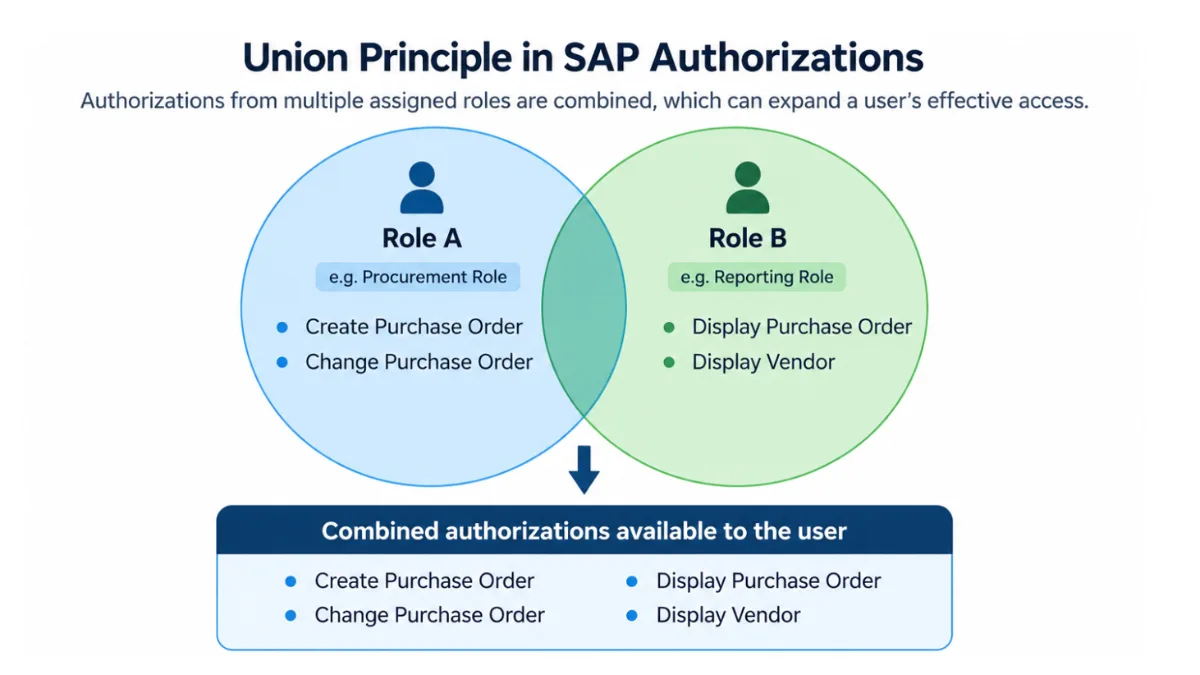
In practice, users often receive multiple roles because their responsibilities span several business activities. Priya might have a procurement role for creating purchase orders, a reporting role for viewing purchasing information, and another role for supporting a broader procurement function.
The authorizations contributed by applicable assigned profiles can expand her effective access. This concept is referred to as the “Union Principle." The below image outlines how the user gets combined access:
A Practical Perspective
In my experience, the Union Principle can sometimes give a false sense of how well user access is controlled. I’ve seen enterprises use an approach known as Bolt-on Roles (also called Enabler Roles), where the transaction-code check is separated from the business authorization checks. These additional roles are assigned to users to provide specific authorizations for organizational elements.
The problem is that each additional role may seem harmless on its own. However, when you combine all the roles assigned to a user, the overall access can become much broader than intended. This can also create Segregation of Duties (SoD) conflicts that may not be detected when roles are analyzed individually rather than as a whole.
Review the user's overall effective access, question the need for every bolt-on role, and follow the Principle of Least Authorization (POLA): give users only the access they need to perform their responsibilities.
SoD analysis also requires business context. A conflict flagged by an SAP GRC analysis does not always represent an actual risk in the user's organizational context. Organizational restrictions and the nature of the conflicting activities may need further examination.
Explore how organizational-level restrictions affect SoD analysis and why some flagged conflicts require further assessment.
Putting it all together: Priya's purchase-order scenario
We can now connect the complete authorization model to one business requirement. Priya must create purchase orders for purchasing organization 1000 but must not receive equivalent access to organization 2000.
The security consultant first translates this requirement into the authorization data required by the relevant application. The consultant maintains the appropriate authorization values in the role and generates the associated profile.
The role is assigned to Priya, and user comparison reconciles the profile assignment. The authorization information becomes available through the runtime authorization mechanism.
When Priya creates a purchase order, the application performs the relevant authorization checks. The requested values are evaluated against the authorizations available to her.
If the checks are successful, the application can continue, provided the remaining authorization checks and business validations also succeed. If Priya attempts an operation outside her approved scope, the relevant check should fail when no applicable authorization satisfies the request. But if another role grants broader authorization, the check may succeed despite the restriction in her primary role.
If an administrator changes the role, the consultant must ensure that the generated profile and user assignment are updated and that the effective runtime context reflects the intended change.
This scenario demonstrates the central idea of the authorization model: the access a user experiences at runtime depends on the relationship between authorization design, generated profiles, user assignments, effective authorizations, and the checks implemented by the application.
Conclusion
The SAP authorization model connects the way authorization data is constructed with the way that data is evaluated during application execution.
For an SAP security consultant, understanding this connection is more important than memorizing individual transaction codes. It provides the foundation for designing appropriate access, understanding unexpected behavior, and investigating authorization problems systematically.
The essential principles are:
- Authorization data must represent the intended business access.
- Generated profiles and user assignments are separate stages of the authorization lifecycle.
- Runtime authorization checks evaluate the requirements implemented by the application.
- Multiple applicable roles can broaden a user's effective access.
- Authorization changes must be reflected in the relevant profile, user assignment, and runtime context.
- A successful authorization check does not guarantee that the entire business operation will succeed.
With these concepts established, learners are prepared to progress to more detailed SAP Security topics, including role administration, authorization analysis, and structured troubleshooting.
Knowledge check:
- Why must authorization data be generated after relevant changes are made in role maintenance?
- What is the difference between generating an authorization profile and performing user comparison?
- Why might a user be able to start a transaction but fail a subsequent authorization check?
- How can a second role allow access that the user's primary role was designed to restrict?
- Why does a successful authorization check not necessarily mean that the business operation will succeed?
- What stages should a consultant consider when a role change does not produce the expected runtime behavior?
Additional References that I recommend:
- SAP Help Portal: Authorization Checks
- SAP Help Portal: Setting Up Authorization Checks
- SAP Authorization Objects vs. Roles: Understanding Access Control - Explore how roles, authorization objects, and field values work together to control SAP access.
- SU24 Check Proposals and Runtime Authorization Checks in SAP - Learn more about authorization proposals, check indicators, and their relationship with runtime authorization checks.
- SAP Role Design Best Practices: Secure Access Control - Explore practical approaches to role design, least privilege, organizational restrictions, and managing excessive access.