Why SAP Access Reviews Fail and How AI Can Fix Them
Most SAP user access reviews successfully pass audits but fail to achieve their intended purpose. In my 20+ years of experience, I’ve noticed three of the most common failures in review cycles:
- Reviews are rushed - Many reviewers spend less than a minute reviewing and certifying the access held by their team members.
- Reviews are mere audit requirements - The goal is to complete the review, focusing on what has been added since the last cycle and what can be removed.
- Excessive access remains - Access that is never required or inappropriate stays with users in production, exposing them to fraud, unauthorized activity, and sensitive data exposure, now backed by a signed attestation.
In my experience running and remediating access certification programs on SAP ECC, S/4HANA, and SAP GRC Access Control, this pattern has been remarkably consistent. In one pharma industry review cycle covering 12000+ users, reviewers approved ~95% of line items, yet a follow-up usage check showed the majority of that approved access had not been used in the last 90 days. Reviews rarely fail because organizations skip them. They fail because the review requires people to make hundreds of decisions without the necessary context.
Why Do SAP Access Reviews Fail?
SAP access reviews fail because reviewers are asked to certify technical roles they cannot interpret, at volumes they cannot manage, without usage or risk context. The result is rubber stamp approvals that satisfy auditors but have too much access still in place. These issues can be addressed by embedding AI into the review process, such as usage analysis, collecting evidence, and so on.
Key Takeaways:
- SAP access reviews fail on context, not on compliance. Reviewers approve technical role names they cannot interpret.
- Completion rate is an incorrect metric that many of the enterprises look at. Verified un-assignment of roles shows whether a review actually worked.
- SAP Business Data Cloud can supply unified access, usage, and risk data. SAP Joule can present that context to the reviewer at the moment of decision.
- AI should recommend, never decide. The reviewer's judgment and a clear audit trail remain the controls.
What is expected out of an SAP User Access Review?
An SAP user access review (UAR) is a periodic control in which business managers or role owners confirm that each user's roles are still required to perform their job duties. SAP GRC Access Control provides a workflow-based solution that triggers requests to reviewers, captures approve or remove decisions, and passes removals to provisioning. SAP Cloud Identity Access Governance (IAG) offers a comparable Access Review capability for cloud and hybrid landscapes called Access Certification campaigns. Refer to the SAP Community Portal that speaks about creating and managing campaigns in the IAG access certification service.
The intent is simple: detect access creep, catch movers and leavers that provisioning missed, and give auditors evidence that ITGC access controls operate effectively. Execution is where it breaks.
Six Reasons SAP Access Reviews Fail
1. Reviewers cannot read what they are approving.
Imagine a line in the review that says Z_FI_AP_PROC_1000, with around forty transaction codes with various access at the object level and organization elements; it means a zig-zag puzzle to a plant or finance manager. Role descriptions are often maintained the same as the role name, blank, or incorrectly maintained. When the reviewer cannot understand what risk the role carries, what the user can perform with it, or what authorizations the role gives to the users.
2. Volume turns review into rubber-stamping.
A single manager receives several hundred line items in one campaign, especially in landscapes built on single-role or task-level designs. The approval queue is huge with a deadline to it, and alongside a normal workload, reviews are not easy, and thus approvers mostly select all and approve. The completion metric looks healthy and completely aligned with the audit requirements. However, the control has not actually operated.
3. There is limited usage evidence on the screen.
The most useful question in any review is whether the user actually used the access. Standard review screens rarely answer it at the point of decision. Action usage data shown at a high-level and detailed report sits in a separate report. Reviewers often approve dormant roles/users that are not touched for a while.
4. The wrong person is reviewing.
Line managers know people but not roles. Role owners know roles but not people. Organizations pick one model, usually manager-based review, and accept the blind spot. Reorganizations worsen it: stale reporting lines in HR data route requests to managers who left months ago, and coordinators spend the campaign reassigning work items by hand.
5. Risk is reviewed in a separate silo.
Access review and segregation of duties review usually run as distinct campaigns, often owned by different teams. A reviewer approving a role has no view that the same assignment completes a critical SoD conflicts with another role the user holds. Every line is the same for the reviewer, so the handful of high-risk assignments get the same three seconds as display-only access.
6. Remediation never closes the loop.
Removal decisions are captured but not always provisioned, especially when Access Request Management (ARM) is not configured. Around 4 out of 10 enterprises that implemented SAP GRC mostly go with Access Risk Analysis (ARA) and Emergency Access Management (EAM) modules. Auditors increasingly sample removals and verify the target system. When the role is still assigned, the finding is no longer about the review. It is about whether the organization can trust its control evidence.
How can AI enhance the User Access Reviews?
AI does not fix a broken review design, but it addresses the specific issues related to each of the failure points mentioned above. Here is how it can help.
Role information in plain language : A language model working from role menus, authorization objects, and field values can generate a readable summary such as "Creates and posts vendor invoices for company code 1000; cannot release payments." That one sentence changes reviewer behavior more than any training session.
Usage-backed recommendations : Combining action usage history with the licensing category for each assignment allows the system to highlight recommendations for the reviewers. The reviewer still decides, but with proper evidence instead of a blank checkbox.
Risk-weighted queues : Instead of alphabetical lists, AI can order line items by risk: SoD conflicts, critical actions, sensitive organizational values, and privileged access. Focus is given to items that matter, and low-risk display roles can be grouped for bulk decisions with a documented rationale. Additionally, the grouping can be based on licensing category, usage analysis, etc.
Peer group comparison : Comparing a user's roles against peers with the same job, company code, plant, and cost center quickly highlights access nobody else in that group holds. This will ensure that access creep doesn’t happen as the reviewers know what the peer group has.
Reviewer behavior analytics : Decision timestamps help to understand whether a detailed review is carried out or whether the reviews are just rubber-stamping. A reviewer approving 100 items in 2-3 minutes is a signal that both the coordinator and the auditor want to see before sign-off, not after.
Evidence and reconciliation : AI agents can reconcile review decisions against the target system after provisioning and draft the exception list, which removes one of the most common audit findings.
What Guardrails Auditors Will Expect with AI?
AI inside an access control process is itself subject to scrutiny. Three guardrails keep it defensible:
- Human accountability : AI recommendations are advisory. The named reviewer makes and owns the decision. Leaving the decisions to AI is not recommended.
- Explainability : Every recommendation shows its basis: last used date, peer comparison, or rule triggered. An unexplained score will not survive an audit walkthrough.
- Data boundaries : Authorization and HR data are sensitive. Organizations should confirm where models run, what data leaves the landscape, and how prompts and outputs are logged.
Specific restrictions on the use of AI data are increasingly being incorporated into enterprise contracts. Customers are asking vendors to ensure that their data, prompts, inputs, outputs, logs, metadata and other customer information are not used to train, fine-tune, validate, improve or develop AI/ML models unless explicitly agreed. This becomes particularly important when AI services are integrated with sensitive enterprise environments such as SAP, cybersecurity and GRC platforms.
“The Supplier shall not use Customer Data (including prompts, inputs, outputs, logs, metadata or derived information) to train, fine-tune, validate, benchmark, improve or otherwise develop any AI or machine-learning model without the prior written consent of the Customer.”
“The Supplier shall ensure that all AI providers, subcontractors and third parties processing Customer Data undertake substantially similar obligations. The Supplier shall also comply with defined data retention and deletion periods, disclose relevant AI subprocessors, and adhere to restrictions on where Customer Data may be processed or stored.”
Can we use SAP Joule and SAP Business Data Cloud to enhance the review process?
Absolutely! The architecture is straightforward. While I haven’t implemented this solution yet personally, I am working with fewer enterprises to bring this integration and automation using SAP GRC, SAP BDC, and SAP Joule. SAP GRC data flows into SAP Business Data Cloud, SAP Joule consumes that information, and custom Joule agents extend it for access review use cases. Here is a high-level illustrative reference architecture for AI-assisted SAP user access review automation. I’ve carried out extensive research and utilized information available on the SAP Help portal to arrive at this architecture:
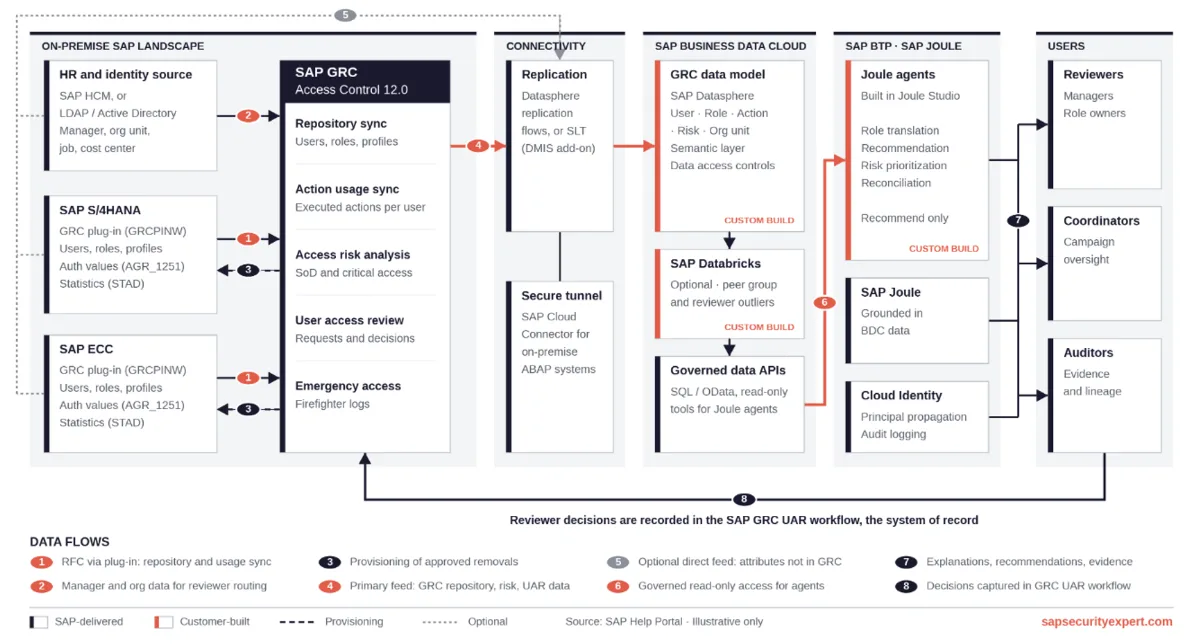
Each of the steps is outlined below:
Step #1: Bring SAP GRC data into SAP Business Data Cloud.
Data required to carry out a well-structured access review is scattered. While SAP GRC has the role assignments, action usage, and authorization information SoD results in risk analysis; many data sets are outside SAP GRC, such as job attributes in HR, licensing information in S/4HANA (STAR Analysis Ruleset), etc. Bringing this data into SAP Business Data Cloud creates one governed, semantically modelled layer that links user, role, action, risk, and organizational unit.
With that foundation, dormant access becomes a query instead of a separate report. Peer group comparisons across job, cost center, and plant run at scale. Removal decisions can be reconciled against actual assignments, so exceptions surface before the auditor finds them.
Step #2: Establishing a data pipe to SAP Joule
Once GRC data sits in the Business Data Cloud (BDC), Joule can ground its responses in it. A coordinator can ask which reviewers approved an entire queue in minutes, which removals failed provisioning, or which business units carry the most dormant access. A reviewer can ask what a role actually allows and when the user last used it. The answers come from governed data, not a spreadsheet export.
Step #3: Create additional Joule agents for reviews.
Joule Studio on SAP BTP allows organizations to build agents for the specific failure points in the review process:
- Role translation agent: Reads role menus, authorization objects, and field values and explains a role as "Creates and posts vendor invoices for company code 1000; cannot release payments."
- Recommendation agent: Pre-marks likely outcomes from usage history: access unused for 180 days suggested for removal; heavily used access marked as expected.
- Risk prioritization agent: Orders line items by SoD conflicts, critical actions, sensitive organizational values, and privileged access.
- Reconciliation agent: Matches review decisions against the target system after provisioning and drafts the exception list for the coordinator.
Each of these agents recommends and enables the reviewer to make better decisions. The named reviewer still decides.
Planning for SAP GRC 2026 and SAP Cloud IAG
This architecture should not be viewed as throwaway work for organizations migrating to SAP GRC 2026 or implementing SAP Cloud Identity Access Governance (IAG) for cloud and hybrid environments.
The pattern is consistent across all three platforms—governance data is consolidated, replicated into SAP Business Data Cloud, and used by Joule. The only variable is the source layer.
A data model based directly on SAP Access Control 12.0 table structures will require rework after migration. In contrast, a model based on stable business entities such as user, role, action, risk, organizational unit, and review decision will only require remapping.
For the SAP Cloud IAG there is a further aspect to consider, since the access certification data is not accessed via ABAP tables but via cloud APIs. That means that the path of ingestion is different, even if the downstream model is the same. Organizations preparing for migration should first focus on the data model and then the extraction process.
If you are still working out your deployment approach, you can start with Part 1 of the SAP GRC 2026 migration series, “Migrating from Standalone SAP GRC to an Embedded Deployment.” Read more here.
Closing Summary
The problem was that people were being asked to review access they couldn’t always understand or even clearly see, often across thousands of users and roles. At that scale, access reviews can quickly become a checkbox exercise rather than a meaningful security decision. AI can change that by providing context to the reviewer at the moment of decision, what the access is, how it is used, and what risk it poses. It can also provide auditors better visibility into whether a review was genuinely considered or simply approved. The final decision still belongs to the person. AI’s role is simply to provide them with better information to make that decision.